



Modern enterprises are investing heavily in AI, generative AI for businesses, automation, cloud, and custom software development. Yet, technology adoption challenges continue to grow more complex, and we could see businesses struggling to adapt to new technologies effectively. This is not because the technologies are harder to use, but due to organizational, human, and process factors behind the adoption that are still being underestimated.
The most common technology adoption challenges include resistance to change, lack of digital skills, unclear ownership, outdated processes, and poor measurement of success. These issues prevent businesses from fully realizing the value of their technology investments. Thus, making technology modernization services essential to align systems, processes, and teams.
This blog breaks down every major digital transformation barrier, gives you a solid fix for each one, and shows how to measure whether your technology adoption is actually working. No matter if you are running an enterprise-wide rollout or a departmental tool launch, this blog is your ultimate guide.
What is Technology Adoption?
Technology adoption is the process by which individuals, teams, and organizations start to use a new technology consistently, effectively, and to its fullest potential. It goes beyond deployment, as installing or licensing a tool doesn't guarantee that people will actually use it regularly. This is common in software development, where tools must fit into daily workflows for the teams to use them effectively.
True technology adoption happens when technology becomes a part of everyday workflows and delivers measurable business value.
A successful technology adoption can be measured in three key behavioural outcomes as follows:
1. Consistent Usage - Teams use the technology for the task it was intended to replace or improve without needing constant reminders.
2. Broad Feature Use - Users move beyond basic functions and engage with the features that drive real efficiency.
3. Reduced Dependency on Support - Technology adoption will have fewer tickets, minimal workarounds, and reduced use of shadow tools when confidence grows.
However, one of the biggest challenges businesses face is the partial adoption, where teams use only limited features or adoption is inconsistent across departments. This leads to underutilized investments, lower ROI, and unnecessary operational costs despite spending a lot on licenses, infrastructure, and training.
Technology adoption is often used interchangeably with digital adoption. However, both are different terms where digital adoption focuses specifically on software and digital platforms, while technology adoption is a broader thing that covers hardware, infrastructure, and other systems. In this guide, both terms refer to the same organizational challenge.
Quick Answer - Top Technology Challenges & Fixes at a Glance
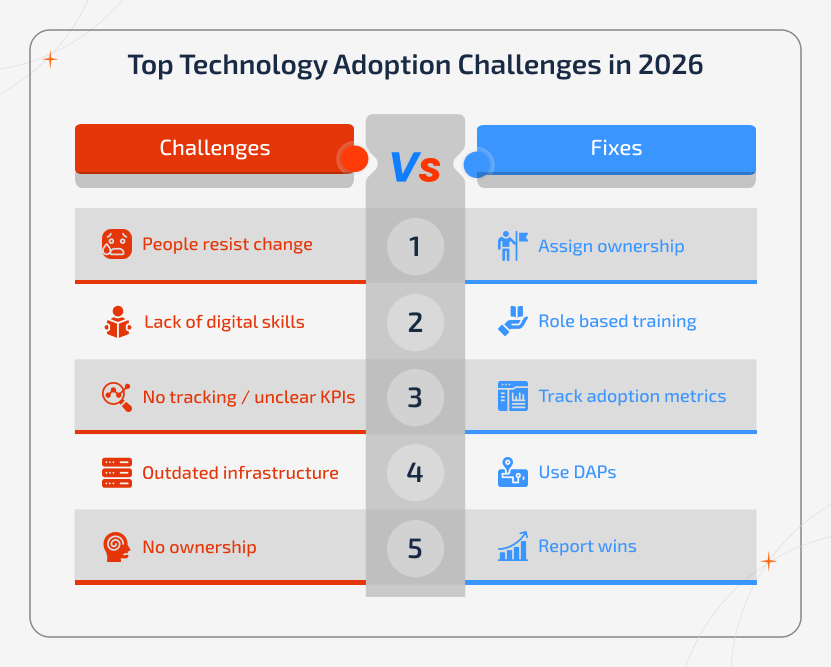
Top 5 adoption challenges:
- People resist change (fear, not logic)
- Employees lack digital skills and training gaps
- No one is tracking whether adoption is working or has unclear KPIs
- Outdated infrastructure and legacy system modernization
- No one owns the rollout internally
Top 5 fixes that work:
- Give every team a named person responsible for driving adoption
- Train people based on their role and not one-size-fits-all sessions
- Measure adoption rate, time-to-value, and whether people keep using the tool
- Use the in-app guidance (DAPs) from day one
- Report early wins to leadership weekly to keep momentum going
Why Technology Adoption Still Fails in 2026
Despite the heavy investment in digital transformation, many technology adoption initiatives still fail or fall short. This is common with generative AI for business, where poor training and unclear processes become the reason for low usage and missed value. The issue happens rarely because of the technology itself, or in other words, it's the way people, processes, and change are handled.
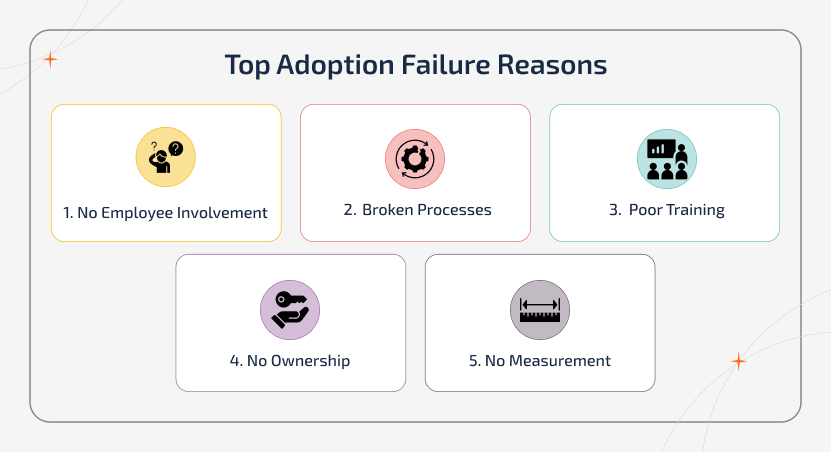
The most common reasons adoption fails:
1. Lack of Employee Involvement
When employees hear about a new tool through an announcement instead of being involved early, resistance occurs naturally.
2. Processes aren't Fixed Before Rollout
Adding new technology to broken workflows adds to the problem and does not make it any better.
3. Training is Treated as a One-Time Task
A short onboarding session may create awareness, but it will not build lasting habits or confidence among the employees.
4. No One Owns Adoption Success
Without a clear owner, issues turn into support tickets instead of being addressed early.
5. Success isn't Defined or Tracked
Organizations cannot course-correct adoption they are not tracking.
Even well-funded companies make these mistakes. They invest heavily in the tool but overlook the adoption, and that's where it fails.
Understanding the Technology Adoption Lifecycle in Modern Enterprises
Adopting new technology has become a strategic change process and not a technical one. Modern enterprises need to ensure that every new tool aligns with their overall technology adoption framework, digital maturity model, and overall business process modernization roadmap during their web development and app development. When this alignment is not followed properly, even the best technologies will fail to deliver the real business value.
Most of the organizations are moving towards a structured technology adoption lifecycle, and that typically includes:
- Innovation - Exploring new solutions and identifying potential use cases.
- Early Adoption - Piloting tools with select teams to validate impact.
- Mainstream Integration - Rolling out technology across departments.
- Optimization & Scaling - Improving performance and maximizing ROI.
Understanding where your organization stands in this lifecycle is important. Adoption challenges don't happen randomly, they occur at specific stages. For instance, a company being stuck in the pilot phase needs a different approach than dealing with low engagement after a full rollout.
This is the reason why a strong digital readiness assessment before the implementation is essential. With resistance to technological change, it is possible to find out if or not the people, processes, culture, data, and infrastructure are fully ready for the upcoming change.
Technology Adoption Challenges - Every Barrier with its Fix
Every organization comes across a unique mix of challenges. They often fall into four major categories, such as People & Change, Process & Governance, Technology & Data, and Measurement & ROI. These common barriers to technology adoption not just slow down but completely stall the digital transformation. Businesses need to understand these digital adoption barriers to make the right decisions before the rollout begins.
For each barrier you find, you will get to know what it looks like, specific fixes, and one metric to track the improvement.
People & Change - The Human-Side Barriers to Technology Adoption
Technology adoption succeeds only when people understand, accept, and use it effectively. The following key barriers highlight how people and change challenges impact adoption.
Barrier 1 - Resistance to Technological Change
People resist change because they feel unsure or worried. Some need training to use the tool while others need reassurance and support.
Common Reasons Behind Resistance:
- Employees may fear that the automation process will replace their role
- Being exposed as "not tech-savvy"
- Concern that the tool will add more work
- No involvement in decision-making
- Negative experiences from past rollouts
What to do:
- Communicate clearly what's changing, what isn't, and how it benefits them
- Involve users early by running pilot programs and gathering feedback before full rollout
- Assign change champions in every team to identify team-level advocates
- Ensure managers actively use the tool and not just promote it
- Acknowledge earlier failures and highlight what's improved this time
What to Track - Employee pulse score (NPS-style) at week 2 and week 6 to measure sentiment and adoption readiness.
Use Case:
At Klarna, employees initially resisted AI-driven customer support tools due to fear of job replacement. Adoption improved only after leadership clarified that AI would assist and not replace human roles and provided internal training.
Barrier 2 - Lack of Digital Skills & Training Gaps
Most often, teams will not have the digital knowledge that is required to use the new tools efficiently. This lack of digital skills leads to errors, dependency on IT, and low ROI on new platforms. If people don't change their behaviour after one-time training sessions, then they need ongoing, practical learning over time.
A simple training approach that works:
- Before launch - Cover basics, navigation, & key use cases
- Launch week - Offer guided tasks and a safe space to practice
- Weeks 2-6 - Run role-based sessions using real workflows
- After 1-2 months - Introduce advanced features & refreshers
Effective training formats:
- In-app walkthroughs (learn while using)
- Short videos (quick, task-based)
- Weekly support sessions for questions
- Internal FAQs or knowledge base
- Peer learning through team champions
Key Idea - Training is not a one-time activity, but it's an ongoing process that requires design, iteration, and ongoing delivery.
What to Track - Training completion rate and time-to-first-value
Use Case:
At Amazon, rapid adoption of AI development & automation showed a clear need for workforce reskilling. Therefore, the company scaled its "Upskilling 2025" initiative and trained hundreds of thousands of employees in cloud computing, AI, and machine learning to close digital skill gaps. This enabled effective use of new technologies.
Barrier 3 - No Change Champion or Internal Ownership
When no one owns the adoption, responsibility becomes unclear and emerging issues often go unnoticed until they grow.
What a Change Champion Does:
- Supports team members with day-to-day questions
- Runs short weekly check-ins on tool usage
- Shares feedback & challenges with the project team
- Highlights wins & progress within the team
- Helps onboard new users on the tool
How We Set Champions up for Success:
- Provide deeper, role-specific training
- Allocate dedicated time (2-3 hours per week)
- Involve them in key project discussions
- Recognize & reward their contribution
What to Track - Compare adoption rates between teams with a champion vs. those without.
Use Case:
At HSBC, digital transformation slowed as ownership was unclear. Therefore, the bank introduced standardized metrics and embedded ownership across teams to ensure accountability and consistent adoption across business units.
Barrier 4 - Poor Change Communication
When communication is unclear, there is a gap between leaders who feel confident and teams that feel confused or unsure. Clear, consistent, and two-way communication is key to closing that gap.
What to Communicate:
- What the tool does and why it matters
- What changes for each team's daily work
- Timeline and what to expect at each stage
- Where to get help
- Early wins and progress updates
Channels That Work:
- Team-level meetings (not just all-hands)
- Short weekly email updates during rollout
- Manager talking points before each phase
- A central, regularly updated FAQ
What to Track - Communication open rates and FAQ page views
Use Case:
Microsoft found in its Work Trend Index that employees were unclear about how AI tools applied to their work. When companies used structured communication and manager-led guidance, adoption improved.
Barrier 5 - App Fatigue and SaaS Sprawl
In 2026, the average enterprise employee uses about 15-20 different software tools. Now, a new technology rollout competes for attention with each of the existing tools. When employees already feel overwhelmed, adding another new tool triggers avoidance rather than adoption.
Signs of App Fatigue:
- Low usage in the first few weeks
- Employees go back to old tools like email and spreadsheets
- Feedback like "not another tool"
- Duplicate work across old and new systems
What to do:
- Stop using the old tool once the new one is in place
- Integrate the new tool into existing workflows
- Clearly show what replaces what (e.g., "use this instead of that")
- Aim to reduce tools and not add more
What to Track - Usage of old tools after rollout should decrease within 30 days
Use Case:
Cisco found that employees use too many apps, which reduces productivity. Companies improved this by reducing tools and simplifying workflows.
Process & Governance - Operational Barriers to Technology Adoption
If there are no clear processes and governance, even the best technology fails to deliver results. The following barriers show how process and governance gaps impact technology adoption.
Barrier 6 - Unclear Digital Transformation Strategy
A lot of organizations adopt technology without clearly defining the problem, expected results, and how success will be measured. This often leads to confusion and poor adoption.
A clear strategy should define:
- The business problem being solved
- Measurable outcomes and KPIs
- How the tool supports long-term growth
- Clear ownership at each stage
What to do:
- Run a digital readiness assessment before choosing tools
- Connect every technology decision to business value
- Define what success looks like, and not just deployment
- Review and update the strategy regularly
What to Track - % of teams that can clearly explain the tool's purpose
Use Case:
NHS struggled with digital adoption because systems were fragmented and the strategy was unclear. This made it harder for teams to use technology effectively.
Barrier 7 - Outdated Business Processes
Adding new technology to old workflows creates friction and not efficiency. Therefore, processes need to be updated along with the tool for adoption to work.
Warning Signs:
- Teams still use spreadsheets alongside the new tool
- Approval steps don't match the system
- Employees bypass the tool for urgent tasks
What to do:
- Map existing workflows before implementation
- Remove unnecessary or duplicate steps
- Build workflows directly into the new tool
- Automate manual tasks where possible
What to Track - Task completion time before vs. 60 days after rollout
Real-World Use Case:
In 2025, many enterprises implementing CRM and ERP systems faced low adoption as teams continued using old workflows like spreadsheets and email. This created duplicate work, poor data visibility, and reduced ROI. Only when organizations aligned processes with the new system did adoption and efficiency improve.
Studies show that 50-63% of CRM adoption initiatives still fail, mainly due to process misalignment and poor usage, and not the technology itself.
Barrier 8 - Ineffective Technology Onboarding Process
The first few days matter most. It is because if users don't see value quickly, they stop using the tool. Early onboarding is where most adoption is won or lost.
Common Onboarding Mistakes:
- Generic tours that don't match real user roles
- Too many popups or tooltips at once
- Training given before it's needed
- No safe space to practice
What to do:
- Design onboarding based on user roles
- Focus on the top 2-3 tasks each role performs
- Provide a sandbox with real scenarios
- Use in-app guidance for step-by-step support
- Follow up at day 7 and day 30
What to Track - Time-to-first-value (TTV) and day-7 active user rate
Use Case:
In 2025, SaaS companies reported that up to 75% of users drop off within the first week when onboarding is unclear or overwhelming. Whereas teams that simplified onboarding and helped users reach value faster saw significantly higher retention and adoption.
Barrier 9 - Total Cost of Adoption (Budget Misalignment)
Organizations often plan the budget for the tool alone while underestimating the cost of making it work. Adoption involves much more than just buying and installing software.
Costs Often Missed:
- Integration and engineering effort
- Data migration and clean-up
- Change management and communication
- Training content and delivery
- Security and compliance checks
- Ongoing maintenance and support
What to do:
- Build a total cost of adoption model upfront
- Allocate 20-30% of the tool cost to adoption efforts
- Plan for integration delays with a buffer
- Budget for at least 12 months of maintenance
What to Track - Actual adoption spend vs. initial budget forecast
Use Case:
A recent 2026 insights show that the real cost of AI adoption lies beyond licensing, especially in integration, governance, and ongoing operational effort, which many organizations fail to plan for.
Barrier 10 - No Centralized Governance or Change Management
When tools are implemented without clear ownership or rules, there is a high chance for the teams to use them differently, which leads to confusion, inconsistent workflows, and low adoption.
Governance Basics Needed:
- A named adoption owner with authority and budget
- Clear usage standards for each team
- A decision log for changes and updates
- Regular cross-team adoption reviews
What to do:
- Set up a steering committee before rollout
- Assign a clear owner for each major tool
- Create a shared governance playbook for all the teams
- Review adoption regularly across teams
What to Track - % of workflows documented and standardized
Use Case:
Many organizations adopting AI and enterprise tools in 2026 are seeing failures not because of the technology, but due to a lack of structured change management and governance. Without clear ownership, alignment, and defined processes, initiatives stall or deliver minimal value.
Technology & Data - Hidden Barriers That Break Adoption at the System Level
Even when strategy and people are aligned, technology itself can slow down the adoption if tools are hard to use or poorly designed. Systems that don't match the real user workflows bring in friction, reduce productivity, and increase dependency on support.
Barrier 11 - Complex or Confusing Tools (Usability Barrier)
A tool may be technically strong but still fail if it's too difficult to use. When interfaces don't match user skill levels or real workflows, adoption drops. Often, teams make the mistake of testing tools with technical users rather than with the actual end users.
Tool Selection Criteria:
- Can users complete key tasks without a manual?
- What is the time to complete the top 5 common tasks?
- Does it meet accessibility standards?
- How complex is setup and admin management?
- Is the mobile experience smooth (if required)?
What to Do:
- Involve real end-users in evaluation and not just IT
- Run usability tests with at least 5 users before finalizing
- Measure time-to-first-value during trial usage
- Avoid tools that require training for basic tasks
What to Track - Task success rate and support tickets by category (usability-related issues)
Use Case:
At Salesforce, studies showed that many CRM implementations fail to deliver value as users find systems too complex and difficult to navigate. Whereas organizations that simplified interfaces and aligned tools with user workflows saw significantly higher adoption and productivity.
Barrier 12 - Limited IT Infrastructure Modernization
Outdated infrastructure can quietly limit the success of new technology. Even the best tools fail whenever the systems, networks, or devices cannot support them effectively.
Common Infrastructure Blockers:
- Network bandwidth is insufficient for cloud tools
- End-user devices are too old or outdated to run new software
- API connectivity is limited by legacy security rules
- On-premise systems are incompatible with cloud platforms
What to Do:
- Conduct a full infrastructure audit before choosing tools
- Prioritize cloud migration for critical workflows
- Run pilots using real-world devices and environments
- Include infrastructure upgrades in the rollout plan
What to Track - System performance metrics (latency, load time, uptime) and IT-related support ticket volume
Use Case:
Outdated systems in aviation caused disruptions. This shows the need for legacy system modernization services that offer infrastructure upgrades to support modern technology.
Barrier 13 - High Technology Integration Challenges
Integration is often underestimated in enterprise rollouts. When systems don't connect smoothly, even those well-designed tools will fail to deliver desired value.
Integration Risk Factors:
- Undocumented legacy APIs or databases
- Real-time sync is not supported natively
- Multiple vendor dependencies
- Inconsistent data formats across systems
What to Do:
- Map all system touchpoints before implementation
- Build and test integrations in a staging environment first
- Allocate buffer time where integrations often take 2-3x longer than estimated
- Prefer native integrations over custom builds wherever possible
What to Track - Integration error rate and data sync latency
Use Case:
During the integration of Amazon and Whole Foods systems, fragmented tools and poor system integration brought inefficiencies and collaboration issues across teams. This eventually reduced productivity and showed how complex integrations can slow adoption.
Barrier 15 - Data Security and Compliance Concerns
In regulated industries, concerns related to security and compliance can slow down the technology adoption. While these risks are valid, delays often occur when compliance is not managed proactively.
Compliance Blockers:
- GDPR, HIPAA, or data residency requirements
- Third-party vendor risk assessments
- Audit trail and data retention obligations
- Missing encryption or security configurations
What to Do:
- Involve legal and compliance teams early
- Use a compliance checklist during vendor evaluation
- Finalize data processing agreements before signing
- Assign a security owner within the project team
What to Track - Open compliance issues and Security review completion rate
Use Case:
In 2025, Apple delayed the rollout of certain AI features in the EU due to strict data privacy and compliance requirements under regional regulations. This shows how compliance concerns can directly affect the technology adoption timelines.
- Source: https://www.reuters.com/business/apple-urges-eu-regulators-take-closer-look-tech-rules-2025-09-25/
Measurement & ROI - Value Barriers That Slow Technology Adoption
Without clear metrics and ROI, technology adoption loses momentum. The barriers given below show how a lack of measurement impacts long-term success.
Barrier 16 - Unclear KPIs and No Adoption Measurement
Without clear KPIs, organizations cannot measure whether adoption is working or failing. When success isn't clearly defined, teams end up assuming things instead of real insights.
What "No Measurement" Looks Like:
- Login counts are treated as adoption
- No visibility into feature usage
- Adoption considered complete at go-live
- No post-launch user feedback
What to Do:
- Define adoption KPIs before rollout
- Build a simple dashboard reviewed weekly
- Link metrics to business outcomes
- Review adoption metrics in leadership meetings
What to Track - See full KPI framework in the next section
Use Case:
An IBM CEO study shows that only 25% of AI initiatives delivered the expected ROI. It shows that many organizations fail to measure success effectively. This highlights how a lack of clear KPIs and ROI tracking leads to poor outcomes.
Barrier 17 - Rapidly Changing Technology Landscape
Technology evolves faster than organizations can implement it. As tools change rapidly, teams struggle to keep up, and this leads to delays, rework, and shifting priorities.
What Causes Decision Drift:
- Long implementation cycles are outpaced by updates
- Pressure to adopt newer features in the middle of rollout
- Switching tools even before full adoption
What to Do:
- Set a regular technology review cadence (e.g., every 6 months)
- Use modular, API-first platforms
- Separate "stable" vs "emerging" tools in your stack
- Avoid making changes during active rollouts
What to Track - Technology review frequency and change requests during rollout
Use Case:
Google rolled out updates to its AI image tool "Nano Banana," releasing new versions soon after its initial launch. This forced businesses to experiment with the tool to frequently adjust their workflows and expectations.
How to Measure Technology Adoption - 8 KPIs Every Leader Needs
Often, a lot of organizations measure technology adoption by tracking the login. However, logins don't reflect the real usage and only show that the user accessed the tool. True adoption is measured by whether users complete meaningful tasks, return consistently, and achieve intended business outcomes.
| Metric | Definition | Target Signal | Review Time |
|---|---|---|---|
| Adoption Rate | % of target users who log in & complete at least one key action | >70% by day 30 | Weekly |
| Weekly Active Users (WAU) | Users completing meaningful tasks (not just logins) each week | Steady growth (weeks 1-6), plateau by week 8 | Weekly |
| Feature Adoption Rate | % of users using core vs. advanced features | Core >80% (month 2), Advanced >40% (month 3) | Monthly |
| Time-to-First-Value (TTV) | Time taken to complete the first meaningful task independently | Below the defined threshold | Weekly (first 6 weeks) |
| Retention (30/60/90 days) | % of users staying active over time | <20% drop from day 7 → day 30 | Monthly |
| Task Completion Rate | % of users completing key workflows without errors | >85% for core workflows | Bi-weekly |
| Support Ticket Volume | Adoption-related tickets (training, navigation, errors) | Should decrease week-over-week | Weekly |
| Employee NPS / Pulse Score | Ease-of-use & recommendation score (1-10) | Positive trend; flag <6/10 | Week 2, Week 6, Monthly |
Weekly vs. Monthly Review:
- Weekly Review helps catch early issues - Track down the Adoption rate, WAU, TTV, and support ticket volume.
- The Monthly Review shows whether or not the adoption is improving or slowing down. Track Feature adoption, 30/60/90 day retention, Task completion rate, Pulse survey score.
Behaviour Analytics - Understanding the User Journey
Quantitative metrics show what is happening, while behavioural analytics tells you why. Tools like session recordings, heatmaps, and drop-off tracking help see where users.
- Get struck
- Leave tasks midway &
- Click repeatedly in confusion
When you identify these friction points, it is possible to fix them by improving the training, tooltips, and workload itself.
In simple words, don't just track where users drop, but rather fix where they struggle.
How to Improve Technology Adoption with Continuous Feedback
Often, adoption efforts get stopped at the go-live stage. However, real success comes from continuous improvement. The best organizations listen, fix, and improve based on user feedback continuously.
The simple loop - Gather feedback → Find issues → Measure → Share → Repeat
How to Collect Useful Feedback
- In-App Surveys - Ask one simple question after a task: "How easy was this?" rate (1-5) scale.
- Week 1 Check-in - What was difficult? What was unclear? And what could be better?
- Week 4 Check-in - What do users use most? What do they avoid? What's still frustrating?
- Monthly Champion Review - Collect feedback from team champions and prioritize top issues.
The visible backlog principle is to be transparent with users by stating "you said this, and we fixed this, you said this, and here's why we didn't change it." This obviously builds trust and shows users that their feedback actually matters.
Thus, it is vital to keep listening, keep improving, and show users that their input leads to real changes.
The Business Impact of Poor Technology Adoption
Weak or incomplete technology adoption affects every part of the business. When the new tools are not used properly, organizations will come across issues in adopting modern technology:
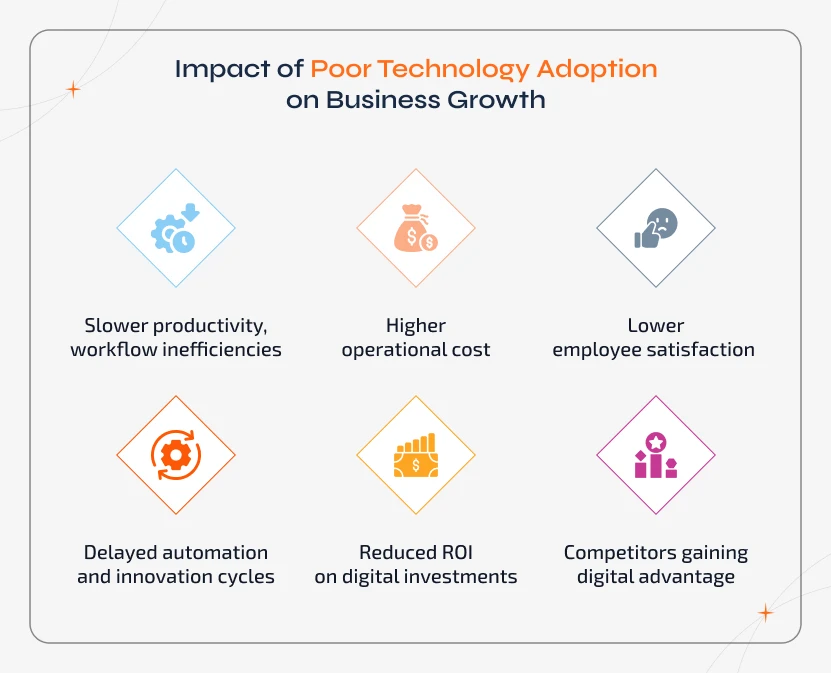
1. Slower Productivity
The team will continue using the outdated methods, which lead to longer turnaround times, duplicated work, and frequent issues.
2. Higher Operational Costs
When there is no proper adoption, automation never takes off, and this makes companies spend more on labour, support, and repetitive tasks.
3. Lower Employee Satisfaction
Due to unclear processes and confusing tools, teams will find it hard to use the tools. When technology makes work harder instead of easier, employees' morale drops and attrition rises.
4. Delayed Innovation
Innovation relies on strong digital foundations. Poor adoption slows experimentation, feature rollouts, and overall organizational agility.
5. Reduced ROI
When the tools are underused, organizations will not get the expected results. This reduces the profitability and delays future digital investments.
6. Competitive Disadvantage
Competitors who adopt technology faster will deliver better customer experiences, scale quicker, and react to the market shifts more effectively.
Hidden cost most organizations miss: Support overload. If more than 30% of your support tickets are navigation or how-to questions, this implies an adoption signal and not a support signal.
How to Build a Successful Technology Adoption Strategy (30-60-90 Day Plan)
A successful adoption strategy follows how people naturally adapt to change, prepare, roll out, and optimize.
Days 1-30: Prepare and Pilot
- Focus on building the foundation before the full rollout
- Complete a digital readiness assessment
- Find out the change champions for each team
- Design a role-based onboarding path
- Run a pilot with 10-20% of users
- Define baseline adoption metrics
- Test integrations in a staging environment
- Prepare training content and sandbox
- Launch a clear communication plan
Days 31-60: Roll Out and Support
- Expand adoption and support users actively
- Roll out by team or role
- Conduct role-based training sessions
- Review the adoption metrics weekly
- Run week 1 and week 4 feedback surveys
- Start champion-led office hours
- Fix key issues found in the pilot
- Share early results with leaders
- Update the knowledge base with real FAQs
Days 61-90: Optimize and Scale
- Deepen the adoption and improve efficiency
- Drive advanced feature adoption
- Optimize workflows based on usage data
- Automate stable processes
- Retire old tools being replaced
- Review performance against KPIs
- Build a 6-month adoption roadmap
- Share wins across teams
- Plan ongoing training and refreshers
Key Frameworks You Can Use
1. ADKAR (Awareness, Desire, Knowledge, Ability, Reinforcement) - This focuses on the individual change, guiding users from awareness to long-term adoption.
2. Kotter's 8-step model - This is best for large-scale digital transformation where cultural change is required.
Both frameworks can be adapted based on your organization's needs. They provide structure and not rigid rules.
Digital Adoption Platforms (DAPs)
DAPs help users learn while working by providing real-time, in-app guidance. They offer adoption through:
- Step-by-step walkthroughs
- Contextual tooltips
- On-demand help inside the tool
Why it Matters - DAPs help reduce the gap between training and actual usage. Thus, users will get value faster while improving overall adoption. DAPs are one of the highest-ROI investments.
The Role of AI + Automation in Solving Technology Adoption Challenges
AI development is reshaping the way organizations adopt, onboard, and scale new technologies. Rather than reacting to adoption problems, it is better to use AI as it helps enterprises prevent the issue even before it occurs. Across the entire lifecycle, AI and automation deliver smarter, faster, and more user-friendly adoption experiences.
- AI-Powered onboarding assistants that support employees through self-paced learning and reduce the dependence on trainers.
- Predictive analytics will help detect the early signs of employee resistance, low engagement, and skill gaps.
- Automated workflow mapping is used to analyse the outdated processes and recommend legacy system modernization services and efficient alternatives.
- Intelligent in-app guidance layers that will offer real-time tips, walkthroughs, and contextual support inside the application.
- AI-driven digital transformation consulting that recommends the right tools, architecture, and adoption strategies with data-backed accuracy.
- Behaviour analytics help identify where users get stuck, confused, or drop off across the entire user base in real time.
AI doesn't just minimize the challenges in digital transformation; it actively prevents them. Hence, technology rollout becomes smoother, faster, and more successful at enterprise scale.
Managing the AI Adoption Lag - A 2026-Specific Technology Adoption Challenge
As AI has become a part of everyday enterprise software like CRMs, ERPs, analytics, and more, a new challenge has emerged called AI adoption lag.
This challenge is especially common in generative AI for business tools, where new AI features change workflows but are not clearly explained to the users. As a result, users often ignore the feature, opt back to manual methods, and thus the business pays for AI that isn't used.
Why AI Features Get Ignored:
- The feature was released as a software update and not explained as a workflow change.
- Users don't trust AI outputs.
- The AI feature changes the task flow in a way that wasn't covered in the original training.
- No one demonstrated the time savings in the user's specific context.
- Employees fear that the AI feature will replace their jobs.
What to Do Differently for AI Adoption
- Treat every AI update as a mini-adoption rollout
- Show before vs. after workflows clearly
- Address job-security concerns directly
- Use in-app guidance specifically for AI features
- Track AI usage separately from general tool usage
- Assign AI adoption champions within teams
The Psychology Behind AI Resistance
People don't resist AI because it's complex. They resist it as it feels like a threat to their job. Hence, the most effective approach is not just training, but offering them reassurance. It involves clearly showing that AI reduces repetitive work and helps them perform better, and is not meant to replace them.
Role-Based Adoption Paths - Why Generic Onboarding Fails
Generic onboarding thinks that all users have the same needs, while each role uses the tool differently. Hence, role-based training helps improve technology adoption and reduce confusion.
Generic onboarding assumes identical needs, skill levels, and workflows. They do not.
| Role | Primary needs | Best training format | Key metric |
|---|---|---|---|
| Frontline users | Complete daily tasks quickly, minimal workflow interruption | In-app walkthroughs; short task videos; in-the-flow prompts | Task completion rate and TTV |
| Managers | Reporting, team oversight, approvals, coaching team usage | Dashboard walkthroughs; report-generation tutorials; live sessions | Feature adoption and team WAU |
| IT & admins | Configuration, permissions, integrations, security, logging | Technical documentation; vendor sandbox; dedicated admin training | Integration uptime and error rate |
| New hires | Learn the tool alongside learning the company, role, and processes | Structured 30-day onboarding path built into the tool itself | TTV and day-30 retention |
| Senior leadership | Strategic dashboards, ROI visibility, exception reporting | Executive briefings; 1-page scorecards; short demo of relevant views | Adoption progress vs. plan |
Role-based paths help reduce the total training time required per user by 30-40% when compared to generic sessions.
Case Study - A Real Technology Adoption Turnaround
A mid-sized logistics company with around ~1,200 employees rolled out a new operations management platform across six regional offices. After three months of launch:
- Adoption was at 34% of the target users
- Teams relied on spreadsheets instead of the tool
- IT handles 120+ support tickets every week
What Actually Went Wrong:
- Onboarding was a single 3-hour generic session conducted just before go-live
- No change champions were assigned, and adoption was left to IT
- The tool was configured for HQ workflows, while regional offices had different processes
- No metrics were being tracked except the login counts
- Managers had not been trained and were not actively using the tool themselves
What They Changed:
- Assigned one change champion per office (6 total with 3 hours/week)
- Replaced generic training with role-based 30-minute modules using the tool's actual workflows
- Introduced a weekly 2-question in-app survey
- Customized workflows for 3 regional offices with different workflows
- Set up a KPI dashboard to be reviewed weekly
Results at 90 Days:
- Adoption rate - Went from 34% to 78%
- Support tickets - From 120/week, got reduced to 35/week
- TTV reduced by approximately 60%
- Employee NPS on the tool - Went from 4.1 to 7.6 out of 10
- Spreadsheet usage for core tasks - reduced to ~70%
Thus, it is clear that technology was not the problem. Whereas the same tool with better change management gave dramatic outcomes. The cost of the intervention was a fraction of the cost of three months of failed adoption.
The Complete Technology Adoption Checklist for Enterprise Rollouts
Pre-Launch
✅ Digital readiness assessment completed
✅ Clear strategy with defined KPIs
✅ Infrastructure audit completed
✅ Tool selected based on usability (not just features)
✅ Data audit and migration plan in place
✅ Security and compliance approved
✅ Change champions identified and trained
✅ Role-based onboarding designed
✅ Sandbox or test environment ready
✅ Communication plan prepared
✅ Adoption KPIs defined with baseline metrics
✅ Adoption dashboard set up
Launch Week
✅ Announcement delivered (team-level or all-hands)
✅ Role-based onboarding sessions completed
✅ In-app guidance activated
✅ Change champions actively supporting teams
✅ Support tickets monitored daily
✅ Week-1 feedback survey scheduled
✅ Leadership actively using and promoting the tool
Post-Launch (Weeks 2-12)
✅ Week-1 feedback reviewed and issues addressed
✅ Weekly KPI reviews in place
✅ Champion office hours running
✅ Knowledge base updated with real FAQs
✅ Week-4 feedback survey completed
✅ Advanced feature adoption initiated (around week 6)
✅ Legacy tools being phased out
✅ 30-day adoption results shared with leadership
✅ 90-day optimization plan defined
Are You Ready for Successful Adoption?
Your organization is ready for smooth, scalable adoption if you have:
- A clear & measurable strategy
- Completed readiness assessment
- Modern, scalable infrastructure
- Role-based onboarding approach
- Strong leadership alignment
- Updated business processes
- Defined KPIs with tracking
- Change champions in place
When more than two of these are missing, your adoption is at high risk of failure or delay.
Should You Build In-House or Partner With Technology Adoption Experts?
Not every organization needs external support, but as complexity increases, so does the need for specialist guidance. Here's how to decide:
When In-House Works:
Managing technology adoption internally is effective when the scope is small and the team already has strong digital capabilities, like:
- Small-scale tools with limited impact
- Minimal or straightforward integrations
- Teams with strong digital skills and capacity
- Clear processes and low change-management requirements
When You Need Specialist Technology Adoption Partners:
For large, complex, or high-stakes projects, relying on external experts works better. You should partner with specialists to stay away from technology adoption challenges:
- Enterprise-wide rollouts across multiple departments.
- Multi-platform or cross-system integrations.
- Legacy modernization & infrastructure upgrades.
- Organizational change management and cultural adoption.
- Strategic transformation that affects people, processes, and systems.
Hire web developers to accelerate app development, reduce risk, and ensure smoother, more predictable adoption, especially when it comes to enterprise scale.
Why Choose Sparkout as Your Technology Adoption Partner
We help organizations overcome digital adoption barriers with a structured, step-by-step, and results-driven approach that is designed for enterprise scale. If you think of outsourcing vendor management, then our team of experts ensures every part of your digital transformation is aligned, optimized, and ready for seamless rollout.
- We use proven Technology Adoption Frameworks tailored to your organization.
- We have deep expertise in Digital Transformation Strategy and readiness planning.
- We offer end-to-end IT Infrastructure Modernization for scalable adoption.
- Our service covers enterprise-grade onboarding, training, and change management.
- We ensure to offer faster, smoother rollouts with reduced operational and integration risks.
- Hire web developers to get clear KPIs, measurable improvements, and ROI-backed outcomes.
With our specialists, your organization adopts technology faster, safer, and more effectively. This way, we ensure long-term digital success.
Conclusion - The Future of Technology Adoption in a Fast-Changing Enterprise World
Technology adoption in 2026 is more than just installing new software. It is all about transforming how the entire organization works, collaborates, and delivers value.
Businesses that invest in digital skills, process modernization, organizational readiness, and strong leadership alignment will speed up the transformation and stay ahead of their competitors. Those who don't follow will continue to fall behind in an increasingly digital-first market.
The barriers discussed in this guide are real, and every one of them has a fix, a responsible owner, and a measurable outcome.
With the right strategy and the right partner, you can overcome adoption challenges, drive consistent usage, and unlock long-term value across your organization.