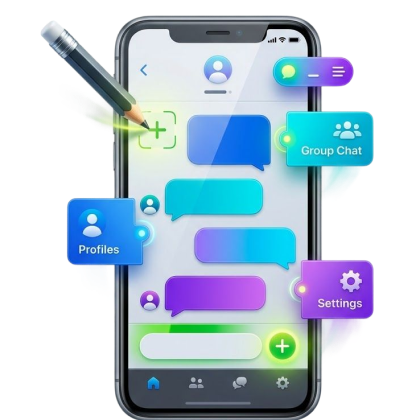



Building a chat app all by yourself sounds complex. However, with the right tools and architecture, it's more achievable than you think. Whether you're launching a startup messaging tool or adding real-time chat to an existing product, this guide walks through everything that you need.
Without further ado, pick the right tools, go through this guide, and create your own chat app now.
Why Building Chat Apps is Important in 2026
Unlike third-party platforms, building your own messaging solutions through advanced mobile application development helps design user experiences, features, and workflows that directly align with your business goals.
By taking complete ownership of your chat infrastructure, you can unlock several benefits:
- Full control over data and privacy
- Custom features tailored to your business
- Stronger customer engagement
- Flexible monetization opportunities
- Seamless integration with internal systems
In addition, custom chat applications also support niche communities, enterprise collaboration, AI-powered interactions, and localized user experiences.
Types of Chat Applications To Build on Your Own
Chat applications are designed to serve different communication needs. The most common types are as follows:
- One-to-One Messaging Apps - They enable private conversations between two users with real-time message delivery. Ex: WhatsApp
- Group Chat Applications - These apps support communication among multiple users within a single conversation or channel. Ex: Telegram
- Enterprise Messaging Platforms - They are built to handle internal business communication while offering security, integration support, and workflow collaboration. Ex: Slack
- Community & Chat Room Platforms - These apps are designed for large-scale interaction. Thus, users can join topic-based discussions or communities. Ex: Discord
To Build on Your Own
DIY! The first instant messaging service, ICQ, was launched in 1996 with just basic text messaging. In 2026, chat apps process billions of messages daily across multiple platforms and devices.
Top Chat App Examples to Benchmark Before You Create Your Own Chat App
By understanding the successful platforms, it is possible to plan, position, and build your own chat app with the right features and strategy.
WhatsApp, Telegram, Signal & WeChat - Built for fast, secure communication with features ranging from privacy-focused messaging to all-in-one social ecosystems.
Slack, Microsoft Teams, & Discord - Designed specifically for team collaboration, workflow management, and community engagement.
Twitch Chat, Reddit Chat, & LinkedIn Messaging - Focused on live interactions, community discussions, and professional networking.
Expert Insights! Don't copy every feature. Study how successful platforms solve specific user needs, then build a chat app with a clear niche and unique value proposition.
Key Features Every Chat App Should Have in 2026
To successfully create your own chat app, it is important to have a strong foundation that ensures performance, security, and user engagement. So, start with essential or core features and then scale with advanced capabilities as the product grows.
| Category | Feature | Description |
|---|---|---|
| Authentication | User Login & Profiles | Secure login (email, phone, social), profile setup, privacy controls |
| Messaging | Real-Time Messaging | Instant messaging, typing indicators, read receipts, & message status |
| Media | Media & File Sharing | Share images, videos, documents, voice notes, and location |
| Notifications | Push Notifications | Alerts, notification badges, customizable notifications, & Do Not Disturb |
| Communication | Group Chats | Multi-user chats, user roles & permissions, broadcast messaging, & group management tools |
| Security | Basic Security | Data encryption, account protection, privacy controls, backup & recovery |
| Security (Advanced) | End-to-End Encryption | Ensures complete privacy and secure conversations |
| Calling | Voice & Video Calls | One-to-one calls, group calls, screen sharing, & recording |
| Platform | Cross-Platform Support | Mobile (iOS, Android), web, desktop, real-time sync |
| AI | AI & Automation | Chatbots, smart replies, message search, & content moderation |
| Enterprise | Admin & Analytics | Role-based access, admin dashboards Analytics and reporting, & API integrations |
Expert Insights! Start with core features like messaging, notifications, and authentication. Then gradually scale with advanced features like AI, video calls, and enterprise integrations.
How to Create Your Own Chat App - A Step-by-Step Process
To successfully create your own chat app, you need a well-defined, scalable development strategy, from initial planning to post-launch optimization. By following a structured approach, it is possible to minimize risks, speed up development, and ensure long-term success.
Step 1: Strategic Planning & Research
- Define your goals - Identify the target audience and use case, prioritizing core vs advanced features, choosing platforms, and finally setting up the budget & timeline.
- Market Research - Analyze the competitor apps, find gaps, understand user expectations, and check compliance requirements.
- Technical Planning - Choose the right tech stack, plan infrastructure & scalability, estimate resources, and prepare technical documentation.
Step 2: Design (UI& UX)
UI and UX design play a critical role in how users interact with a chat app. This directly influences the user retention, engagement, and overall experience.
- User Experience (UX) - This aims to create a seamless and intuitive interaction flow by creating user personas, mapping user journeys, defining app structure, and developing wireframes.
- User Interface (UI) - This focuses on the visual and interactive aspects of the application by designing clean, intuitive visual layouts, creating a consistent design system, ensuring accessibility, and optimizing for all screen sizes.
Step 3: Development Setup
A well-prepared development environment and workflow are essential for smooth execution, better collaboration, and minimal issues during the build phase.
This step lays the foundation for efficient development by configuring version control systems, setting up development & staging environments, implementing CI/CD pipelines, and selecting appropriate project management tools.
Step 4: Core Development
This is the step where the actual chat application is built by developing the backend systems and frontend interfaces that power functionality and user interaction.
- Backend Development - It focuses on building the server-side logic and infrastructure. It includes setting up server infrastructure, building APIs, configuring the database, and implementing authentication.
- Frontend Development - This involves building UI components, managing application state, integrating APIs, and enabling real-time messaging.
Step 5: Core Features Implementation
This is the step that focuses on implementing the essential features that define the functionality and usability of the chat application.
- Authentication - This ensures secure access and user management. It includes user registration and login, password recovery, and session management.
- Messaging System - This helps support seamless communication between users. It includes sending and receiving messages, storing message history, and managing delivery and read status.
- Real-Time Communication - It improves user experience with instant interactions. It includes establishing WebSocket connections, typing indicators, and online/offline status.
Step 6: Advanced Features
This is the step where the chat application can be enhanced with advanced capabilities that improve functionality, security, and overall UX.
- Media & File Handling - This helps users share and access different types of content within the app. It covers image and video uploads, file storage & retrieval, and media previews.
- Security - It includes end-to-end encryption, secure data transfer using HTTPS/TLS, input validation, and rate limiting.
- Notifications - It keeps users informed and engaged with push notifications, in-app alerts, and customizable notification settings.
Step 7: Testing & QA
It is this step that ensures the char application created is reliable, secure, and capable of performing well under different conditions.
- Testing - Focuses on validating functionality, performance, and security. It includes unit testing, integration testing, end-to-end testing, load & performance testing, and security testing.
- Quality Checks - This ensures a consistent and smooth user experience across environments. It includes cross-device and browser testing, network condition testing, and accessibility validation.
Step 8: Deployment & Launch
This step is all about preparing the chat application for release and ensuring a smooth, controlled rollout to users.
- Pre-Launch - It ensures the chat application developed is stable, secure, and ready for production. This covers conducting security audits, optimizing performance, setting up backup systems, and configuring monitoring tools.
- Launch Strategy - This involves releasing the application effectively to users. It includes beta testing, executing a gradual rollout, submitting the app to app stores, and running marketing campaigns.
Step 9: Post-Launch Optimization
This step is all about continuously improving the chat application to improve its performance, user satisfaction, and long-term scalability.
- Monitoring - It ensures the chat application runs smoothly and securely after launch. It covers tracking server performance, monitoring user engagement, identifying errors, and managing security alerts.
- Continuous Improvement - This focuses on refining the chat application based on real user data and feedback. It includes collecting user feedback, analyzing usage patterns, releasing updates, and fixing bugs.
A Step-by-Step Process
Businesses looking to create their own chat app can start with an MVP (Minimum Viable Product) and scale gradually. This reduces development time, lowers mobile app development cost, and helps you validate your idea faster.
Plan Your Chat App in Minutes
Not sure where to start? Use the free interactive planner to map out and get a custom estimate under 1 minute to create chat application.
Just answer 5 quick questions and walk away with:
- Your recommended app type and platform
- Estimated timeline, cost, and team size
- The right tech stack for your goals
How Chat Applications Work in Real-Time
If you are not sure of how messaging apps work, then the process is built around real-time data exchange between users, servers, and devices. It is vital to understand this flow before creating your own chat app.
Core Message Flow - A Step-by-Step Guide:
Step 1: Message Creation
- User types and sends the message from their device.
Step 2: Client Processing
- App starts to encrypt and formats the message.
Step 3: Network Transmission
- The message is sent to the server via the Internet.
Step 4: Server Processing
- The server checks, stores, and routes the message.
Step 5: Message Delivery
- The server now pushes the message to the recipient.
Step 6: Client Display
- Recipient's app decrypts and displays the message.
Any modern chat app can deliver messages in near-real time, often within milliseconds, using technologies like WebSockets and optimized server infrastructure.
Chat App Architecture Explained - A Design Guide
In order to successfully create your own chat app, it is important to choose the right architecture. A well-designed system offers real-time performance, scalability, and reliability as your user base grows. Here’s the chat app architecture for better understanding.
One codebase · MVPs
Separate services · Enterprise
Auto-scale · Pay-per-use
Auth · routing
Accounts · auth
Files · images
Push · SMS · email
MongoDB · Cassandra
PostgreSQL · MySQL
SQL + NoSQL · production
Did You Know?
WhatsApp processes 100+ billion messages daily, relying on distributed database systems to deliver messages instantly at a global scale.
Technologies Used to Build a Chat App - 2026 Tech Stack Overview
To successfully create your own chat app, you need to select the right tech stack to ensure real-time performance, scalability, and user experiences. Your technology choices need to align with your product goals, user base, and scalability needs.
Popular Chat SDKs & API
- ➣ Sendbird - Free tier with usage-based pricing
- ➣ Stream Chat - Free developer plan available
- ➣ Twilio Programmable Chat - Pay-as-you-go pricing model
- ➣ PubNub - Tiered pricing plans
- ➣ Firebase - Free tier with scalable pricing
Build a Chat App
Development Tools
- ➢ Frontend: Swift | Kotlin | React Native | Flutter | React | Tailwind CSS
- ➢ Backend: Node.js | Python | Go | Socket.io | SignalIR | Phoenix (Elixir)
- ➢ Cloud & Infrastructure: AWS | Google Cloud | Heroku | Web Socket | WebRTC | XMPP
- ➢ Testing Tools: Jest/Mocha | Pytest | Selenium | JMeter
Among these, choose a tech stack that fits your app’s goals, scalability needs, and team expertise. A familiar and proven technology often delivers better results than a complex or trend-driven one.
How to Build a Chat App for Free Without Coding - A No-Code Approach
If you are looking to create a chat app for free without coding or technical expertise, then it is possible with the help of no-code platforms.
These no-code tools provide pre-built components, real-time messaging infrastructure, and visual builders. Thus, making it ideal for MVPs and small-scale applications.
Top No-Code Platforms to Create a Chat App
- Sendbird - Pre-built chat UI components
- Stream Chat - Powerful chat API and SDK
- Firebase + FlutterFlow - Visual app builder with built-in backend services
- Bubble.io - Full-stack no-code development
By opting for no-code platforms, you can reduce the development timeline by 70-80%. However, the scaling cost can be 2-3x higher than the custom-built solutions.
How to Create a Messaging App in Python - A Step-by-Step Guide
Python is a great choice to develop a chat application with rapid prototyping and backend development. Follow the steps below to create a chat app with Python:
Required Technologies
- Flask or Django (web framework)
- Socket.IO (real-time communication)
- SQLAlchemy (database ORM)
- PyJWT (authentication)
- Boto3 (AWS integration)
Basic Chat Application Tutorial using Python
1. Set up Flask Server
from flask import Flask
from flask_socketio import SocketIO

app = Flask(__name__)
socketio = SocketIO(app)
2. Handle Real-Time Messaging
@socketio.on('message')
def handle_message(data):
    emit('message', data, broadcast=True)
3. Implement Authentication
from flask_jwt_extended import JWTManager
jwt = JWTManager(app)
4. Database Integration
from flask_sqlalchemy import SQLAlchemy
db = SQLAlchemy(app)
FYI! Python works for quick development. However, for high-scale chat application development, teams switch to Node.js or Go for better performance.
How to Monetize Your Chat App
Once you have a steady user base, your chat app can be a solid revenue stream. Here are the most effective monetization models to consider.
- Freemium: Offers basic features for free and charges for its premium functionality.
- Subscriptions: Will generate recurring revenue through monthly or annual plans.
- In-App Purchases: Sell interactive stickers, themes, emojis, and other digital add-ons.
- API Access: Let developers pay to integrate your chat capabilities into their apps.
- Enterprise Licensing: Provide custom, branded solutions for businesses and enterprises.
- Advertisements: You can earn revenue from ads without disturbing the messaging experience.
Common Challenges in Chat App Development & How to Solve Them
When you create your own chat app, it is obvious to come across technical and business challenges. Addressing them early helps ensure scalability, performance, and long-term success.
Scaling a User Base
- Challenge: Handling millions of users and messages in parallel can be challenging.
- Solution: By using load balancing, horizontal scaling, and a microservices architecture.
Protecting User Data
- Challenge: Protecting user data and preventing cyber threats is complex.
- Solution: By applying end-to-end encryption, secure APIs, and regular security audits.
Managing Large Data Volumes
- Challenge: It's hard to compete in a crowded messaging app market.
- Solution: Focus on niche audiences, strong differentiation, and targeted marketing.
Driving Revenue
- Challenge: It's difficult to generate revenue without harming user experience.
- Solution: By adopting freemium models, premium features, or enterprise pricing.
& How to Solve Them
Cost to Build a Chat App - 2026 Pricing
The cost to create your own chat app depends on features, complexity, team structure, and infrastructure. Take a look at the section below for the realistic breakdown that helps you estimate your investment.
Basic Chat App (MVP)
- Timeline: 3-4 months
- Estimated Cost: $25,000 - $50,000
- Features: Text messaging, user authentication, & basic group chat
Intermediate Chat App
- Timeline: 5-7 months
- Estimated Cost: $50,000 - $100,000
- Features: Media sharing, voice calls, notifications, & advanced groups
Advanced Chat App
- Timeline: 8-12+ months
- Estimated Cost: $100,000 - $300,000+
- Features: End-to-end encryption, video calls, bots, & enterprise-grade security
Adding AI features significantly increases both the development and operational costs of the chat app.
Industry Insight! The average cost to build a messaging app with production-ready features typically ranges between $75,000 and $150,000. It comes with a monthly operational cost of $2,000 to $8,000 based on scale and usage.
Future Trends to Consider When You Make Your Own Messaging App
When you create your own chat app, it is vital to stay aligned with emerging technologies to remain competitive, scalable, and future-ready. These are trends that are shaping the next generation of messaging platforms.
So, in the future, if you think of how to make a chat app for yourself, just keep up with these trends to build a more future-ready product.
AI & Machine Learning
AI is becoming the core component when businesses create their own chat app with advanced capabilities.
- Advanced chatbot integration
- Predictive text & smart replies
- Automated content moderation
- Personalized UX
- Real-time language translation improvements
Web3 & Blockchain
Those looking to create a chat app with enhanced privacy and decentralization shall consider Web3 and Blockchain, as they offer:
- Decentralized messaging platforms
- Token-based economies
- Enhanced privacy through blockchain
- NFT integration for digital assets
Augmented Reality (AR)
AR is transforming the chat apps into immersive communication platforms with:
- AR filters & interactive effects
- Virtual meeting & collaboration environments
- 3D avatars & expressive communication
- Spatial audio experiences
5G and Edge Computing
These are the technologies that offer high-performance chat applications with:
- Ultra-low latency communication
- High-quality video & media streaming
- Enhanced mobile UX
- Distributed data processing for faster performance
Super Apps
A lot of businesses now create their own chat app as part of a broader ecosystem with:
- Integrated payments and financial services
- E-commerce within chat interfaces
- Mini-apps & third-party integrations
- All-in-one platforms for communication & services
Make Your Own Messaging App
Develop Your Own Chat App With Sparkout
Creating a high-performing messaging platform with scalability requires the right expertise. At Sparkout, we help you create your own chat app with a focus on performance, security, and user experience.
1. End-to-End Development - Starting from strategy to deployment, we provide complete chat application development customized to your goals.
2. AI-Powered Solutions - We offer AI-powered chat application development and custom GPT app development solutions with chatbot integration, smart replies, and automation.
3. Scalable Architecture - Our team ensures that your chat app is built on modern chat server architecture with chat database design and end-to-end encryption messaging.
4. Cross-Platform Expertise - We develop cross-platform messaging apps across mobile app development and web application development.
5. Fully Custom Solutions - Whether you need to create a messaging app like WhatsApp or build a chat app like Discord, we customize every feature and detail as you need.
Winding Up
Creating your own chat app in 2026 is an exciting opportunity for any business or individual. Whether you are building a chat application for a specific community or developing an enterprise-grade messaging platform with advanced features, plan well, design securely, and focus on user experience.
By following the steps discussed in this guide and adapting to user needs, you can build chat app that stands out in a competitive market.