


How to build a cross-platform app is one of the most common questions businesses ask when they want to launch on iOS, Android, and the web without maintaining separate codebases. With modern frameworks, cross-platform app development supports faster releases, lower development costs, and ensures consistent user experiences across multiple platforms.
Whether you are building an MVP, enterprise application, or customer-facing mobile app, success depends on choosing the right framework, architecture, and development strategy—not just the technology.
In this guide, you will learn how to build a cross-platform app step by step, the best frameworks, estimate development costs, testing, common mistakes to avoid, and proven best practices to build a scalable cross-platform application in 2026.
Quick Answers
Building a cross-platform app requires a structured development process. The key steps include defining project requirements, selecting the right framework, designing the user experience, developing and testing the application, and maintaining it after launch.
| Step | What You Do |
|---|---|
| 1. Define Requirements | Identify business goals, users, features, and target platforms. |
| 2. Choose a Framework | Select Flutter, React Native, .NET MAUI, or another framework based on your needs. |
| 3. Design the App | Create intuitive UI/UX and user flows for all supported platforms. |
| 4. Develop the Application | Build the app using a shared codebase and integrate backend services. |
| 5. Test Across Devices | Validate performance, functionality, security, and compatibility. |
| 6. Deploy & Maintain | Publish the app, monitor performance, and release regular updates. |
What Is Cross Platform App Development?
Cross-platform app development is the process of building applications that run on multiple operating systems using a single shared codebase. Unlike native app development, which requires separate applications for iOS and Android, cross-platform software development allows developers to create one application that can be deployed across multiple platforms with minimal platform-specific changes.
This development approach is widely adopted by start-ups, SMEs, and enterprises looking to build cross-platform mobile applications that reach a broader audience while simplifying development and long-term maintenance. It is equally suitable for
- MVPs
- Customer-facing mobile apps
- Enterprise solutions
- SaaS platforms &
- Cross-platform web applications
They require a consistent experience across devices.
Modern cross-platform development frameworks such as Flutter, React Native, and .NET MAUI offer reusable components, access to native device capabilities, and flexible development workflows. Choosing the right framework depends on your project needs, performance expectations, scalability goals, and long-term maintenance strategy, which we'll explore later in this guide.
As businesses continue to support users across mobile, web, and desktop platforms, cross-platform mobile app development has become a practical approach for building scalable applications while maintaining consistency across different operating systems. Understanding how this development model works is the first step before comparing it with native or hybrid app development.
Why Businesses Are Choosing Cross-Platform App Development in 2026
The demand for cross-platform app development continues to increase as businesses in 2026 are looking for faster, scalable ways to build applications for multiple platforms. So, instead of maintaining separate codebases, organizations are adopting modern development frameworks to simplify delivery while meeting growing user expectations.
1. Faster Product Launches
Businesses are under constant pressure to bring new features and products to the market. Developing a single application across iOS, Android, & the web helps teams speed up release without extending development timelines.
2. Mature Development Frameworks
Frameworks like Flutter, React Native, and .NET MAUI have evolved, making cross-platform mobile app development a reliable option for many business & enterprise applications.
3. Growing Multi-Device Usage
Customers no longer interact with applications on just one device. They expect a consistent experience across phone, tablet, desktop, or browser. Thus, making cross-platform development an increasingly practical choice.
4. AI-Driven Development Workflows
AI-assisted coding, automated testing, and intelligent debugging are transforming how applications are built. Combined with a shared codebase, these functionalities help development teams improve efficiency and maintain code quality.
5. Easier Long-Term Maintenance
Managing updates, bug fixes, and feature enhancements becomes more efficient when teams work from a unified codebase, reducing development complexity as applications grow.
Native vs. Cross-Platform App Development: Which Approach is Right for You?
Choosing between native and cross-platform app development isn't about finding a universally better option. Rather, it's about selecting the approach that aligns with your business goals, budget, timeline, performance requirements, and long-term scalability. Understanding where each approach excels will help you make a more informed development decision.
| Factor | Native App Development | Cross Platform App Development |
|---|---|---|
| Codebase | Separate codebase for each platform | Single shared codebase for multiple platforms |
| Development Time | Longer due to platform-specific development | Faster with shared development |
| Development Cost | Higher | More cost-effective |
| Performance | Best for graphics-intensive and hardware-heavy apps | Near-native performance for most business applications |
| User Experience | Fully native UI and interactions | Consistent experience across platforms |
| Maintenance | Separate updates for each platform | Centralized updates and maintenance |
| Scalability | Platform-specific scaling | Easier to expand across multiple platforms |
| Best Suited For | Gaming, AR/VR, hardware-intensive applications | Business apps, SaaS, eCommerce, healthcare, fintech, MVPs |
When Native App Development Makes Sense
Choose native development if your application:
- Needs maximum graphics performance
- Relies heavily on device-specific hardware or APIs
- Includes advanced AR/VR or 3D capabilities
- Requires extensive platform-specific customization
- Prioritizes the highest possible performance over development speed
When Cross Platform App Development Is the Better Choice
Choose cross-platform app development if your goal is to:
- Launch on iOS & Android simultaneously
- Minimize overall development & maintenance effort
- Reach users across multiple platforms from a single project
- Build an MVP or validate an idea quickly
- Scale your application with a shared development approach
Expert Recommendation:
There is no one-size-fits-all solution. If your application depends on advanced hardware capabilities or graphics-intensive experiences, native development remains the preferred option.
However, for most business applications, cross-platform app development provides an excellent balance of development speed, scalability, cost efficiency, and user experience.
In 2026, many businesses choose cross-platform development for customer-facing apps, while reserving native development for highly specialized use cases where platform-specific performance is essential.
Priority-Based Comparison Filter
Select your top priority, such as speed, cost, performance, or scalability, and find out which development approach best suits your project.
| Factor | Native | Cross-platform |
|---|---|---|
| Performance | Best for graphics-heavy apps | Near-native for most apps |
| Development cost | Higher | More cost-effective |
| Time to launch | Slower, two codebases | Faster, one codebase |
| Scalability | Platform-specific scaling | Easier to expand |
Cross Platform vs Hybrid App Development: What's the Difference?
Although the terms cross-platform app development and hybrid app development are often used interchangeably, they are not the same. Both development approaches allow developers to build applications for multiple platforms, but they differ in architecture, performance, user experience, and the technologies used.
Understanding these differences will help you choose the right development approach based on your business goals, application complexity, and long-term scalability.
Cross Platform App Development
Cross-platform app development uses a shared codebase to build apps that run on multiple operating systems while rendering near-native user interfaces.
Frameworks such as Flutter, React Native, and .NET MAUI provide access to native device features and deliver performance suitable for most business applications.
Best suited for:
- Customer-facing mobile apps
- SaaS products
- eCommerce applications
- Healthcare and fintech solutions
- Enterprise business apps
- MVP development
Hybrid App Development
Hybrid app development involves building applications using web technologies such as HTML, CSS, and JavaScript, which run inside a native container (WebView). While this approach can reduce development time for simpler applications, performance and access to native device capabilities may be more limited than with modern cross-platform frameworks.
Best suited for:
- Content-driven applications
- Internal business tools
- Simple business applications
- Rapid prototypes
- Progressive enhancement of web apps
- How to Choose the Right Approach
Instead of asking "Which is better?", ask:
Your answers will help find if cross platform mobile app development or hybrid app development is the better fit.
Modern cross-platform app development has significantly narrowed the gap with native applications and is the most preferred choice for many business applications. Hybrid app development remains a practical option for simpler, content-focused projects where rapid development and web technologies are the primary priorities.
How to Choose the Right Cross Platform Framework
Choosing the right cross-platform framework is one of the most important decisions in the app development process. The framework you choose is responsible for your application's performance, scalability, development timeline, maintenance effort, and long-term flexibility. Instead of choosing the most popular option, evaluate each framework based on your project needs, technical goals, and future growth plans.
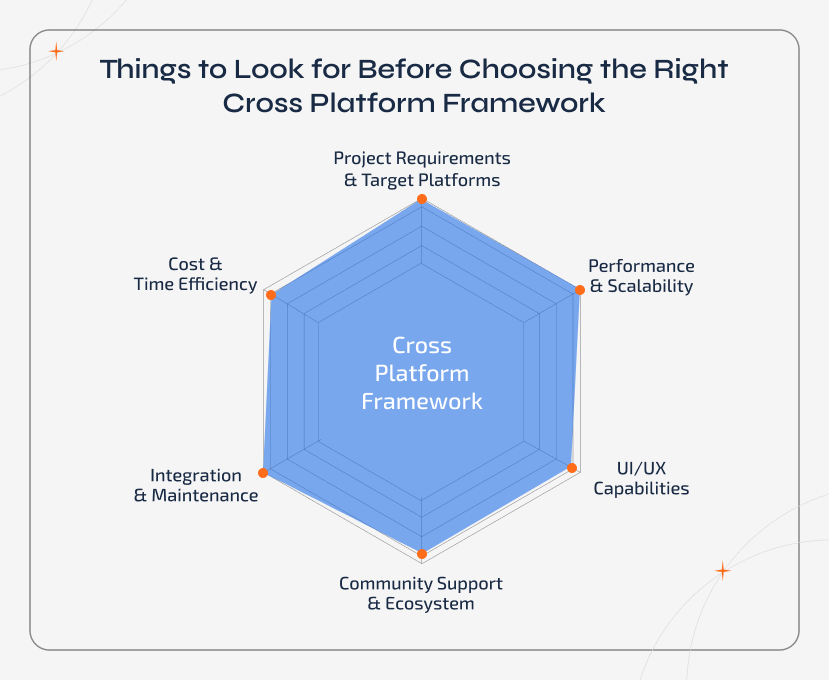
Evaluate These Factors Before Making a Decision
1. Define Your Project Goals
Start by identifying what you want to build. An MVP, enterprise application, customer-facing mobile app, or internal business tool will each have different technical requirements. Your project goals should guide your framework selection from the beginning.
2. Identify Your Target Platforms
Decide whether your application will support iOS, Android, the web, desktop, or all of them. It is to note that not every framework offers the same level of support across platforms. So, it is vital to choose one that aligns with your product roadmap.
3. Evaluate Performance Requirements
If your application includes real-time interactions, animations, media processing, or complex business logic, choose a framework that delivers the performance your users expect without compromising the experience.
4. Consider the User Experience
A well-designed app should feel intuitive regardless of the device being used. So, look for frameworks that provide responsive layouts, reusable UI components, accessibility support, and native-like interactions.
5. Check Integration Capabilities
Most modern applications rely on APIs, payment gateways, cloud services, analytics tools, and third-party SDKs. Ensure the framework can integrate seamlessly with the technologies your application requires.
6. Think About Long-Term Scalability
Choose a framework that can support future feature additions, increased user traffic, and evolving business requirements. Migrating frameworks at any time later can be costly and time-consuming.
7. Assess Community & Ecosystem Support
A mature ecosystem means better documentation, active community support, frequent updates, and a wider range of plugins, libraries, and development resources.
Quick Tip: There is no single "best" cross-platform framework. The right choice depends on your business goals, application complexity, target platforms, team expertise, and long-term product vision.
Best Cross Platform App Development Tools & Frameworks to Use in 2026
The success of any cross platform app development project is often based on choosing the right framework. Also, the framework you choose should align with your app's performance needs, budget, and scalability goals. This ensures faster development, better UX, and reduced costs.
Given below are the top frameworks to choose in 2026, along with their strengths, limitations, and ideal use cases.
1. Flutter
Best for: Startups, MVPs, eCommerce, consumer apps, custom UI
It is an open-source framework developed by Google that uses a single codebase to deliver apps with native-like performance and expressive UIs. It features a rich widget library and thus makes it easy to create visually consistent apps across iOS, Android, and the web. Flutter is often loved by developers for its fast development cycles and hot-reload features.
This is ideal for pixel-perfect custom UI, near-native performance, and for fast development cycles.
Tech Specs:
- Programming Language - Uses Dart, optimized for UI rendering.
- Rendering Engine - Powered by Skia for smooth 60fps animations.
- Hot Reload - Speeds up debugging & development cycles.
- Multi-Platform Reach - iOS, Android, Web, & Desktop.
- Widget Library - Extensive, customizable UI components.
Pros, Cons & Best Fit:
- Pros - High speed, customizable design, & strong Google support.
- Cons - Larger app size, smaller third-party library ecosystem.
- Use Case - Best for MVPs, startups, and apps requiring a sleek design.
2. React Native
Best for: Existing React teams, business apps, SaaS platforms
It is backed by Meta and is one of the most widely adopted cross-platform app development frameworks. React Native provides near-native performance as it combines JavaScript and native components. With a huge developer community and robust library support, it never fails to offer scalability and flexibility for complex apps.
This is the best one if your team is strong in JavaScript and you need easy hiring and community support.
Tech Specs:
- Programming Language - JavaScript & TypeScript.
- Rendering - Bridges to native components for performance.
- Hot Reload & Fast Refresh - Quick debugging.
- Ecosystem - Huge library of third-party plugins.
- Integration - Easy with existing iOS/Android codebases.
Pros, Cons & Best Fit:
- Pros - Large ecosystem, reusable code, & near-native performance.
- Cons - It may at times require native modules for advanced functionality.
- Use Case - Suitable for e-commerce, social platforms, and enterprise apps.
3. Xamarin (.NET MAUI)
Best for: Native UI with shared business logic
It is yet another top framework that is owned by Microsoft and supports seamless integration with the .NET ecosystem. Thus, it is the top choice for enterprise-grade projects. It supports code sharing across platforms while still supporting platform-specific customization when needed. Xamarin is highly preferred by businesses seeking long-term stability and enterprise-grade security.
Tech Specs:
- Programming Language - C# with .NET Framework.
- Compilation - Compiles to native ARM code.
- UI Options - Xamarin.Forms for shared UI or Xamarin.Native.
- Enterprise Support - Strong Visual Studio integration.
- Cross-Platform - iOS, Android, Windows apps.
Pros, Cons & Best Fit:
- Pros - Enterprise support, strong .NET integration, & robust for complex apps.
- Cons - Steeper learning curve, heavier app size.
- Use Case - Ideally works for corporate apps, fintech, and large-scale enterprise solutions.
4. Ionic
Best for: Web-first applications, internal business tools, rapid development
Ionic can be used to build hybrid apps faster and more affordably as it harnesses standard web technologies like HTML, CSS, and Angular. It ideally works for projects that prioritize speed and budget, as it offers flexible UI components and plugins for quick prototyping. However, the performance is based on WebView, which is a limitation when it comes to graphics-heavy apps.
It's great for web-first and content-heavy apps with faster prototyping needs.
Tech Specs:
- Programming Languages - HTML, CSS, JavaScript, Angular.
- Framework Type - Hybrid app development.
- UI Components - Pre-built, customizable templates.
- Plugins - Uses Capacitor & Cordova for native features.
- Cross-Platform Reach - iOS, Android, Web (PWA).
Pros, Cons & Best Fit:
- Pros - Cost-efficient, rapid prototyping, & strong web tech support.
- Cons - Less performance-intensive than native or Flutter.
- Use Case - Perfect for content-driven apps, hybrid app development, & cross-platform web apps.
5. Unity
Best for: Games, AR/VR, immersive experiences
It is a real-time development platform that works for gaming and immersive app development with 2D, 3D, AR & VR support for mobile, desktop, and gaming consoles. It is highly useful for developing interactive apps as it offers powerful rendering capabilities and extensive asset store support.
Tech Specs:
- Programming Language - C# scripting.
- Rendering - Advanced 2D/3D engine.
- Platform Support - iOS, Android, Desktop, Consoles, AR/VR.
- Asset Store - Huge ecosystem of plugins & assets.
- Specialization - Ideal for gaming & immersive experiences.
Pros, Cons & Best Fit:
- Pros - Best for AR/VR, multi-platform support, and powerful graphics engine.
- Cons - Complex for simple apps as it requires skilled developers.
- Use Case - Works best for games, AR/VR solutions, and simulation apps.
6. Kotlin Multiplatform Mobile (KMM)
Best for: Native UI with shared business logic, Android-first teams, enterprise applications
It is the latest from JetBrains and allows you to share the business logic across iOS and Android while maintaining native UI flexibility. It effectively balances code sharing and native performance and acts as a popular option for enterprises testing multi-platform app development.
Well-suited for applications that need shared business logic but native UI flexibility.
Tech Specs:
- Programming Language - Kotlin, shared code for iOS & Android.
- Compilation - Compiles to native binaries for each platform.
- Code Sharing - Business logic shared, UI written natively.
- Integration - Works seamlessly with existing native codebases.
Pros, Cons & Best Fit:
- Pros - Native performance, strong JetBrains support, & growing ecosystem.
- Cons - Smaller community compared to Flutter & React Native.
- Use Case - Works for enterprise apps with complex logic and platform-specific UI needs.
7. NativeScript
Best for: Feature-rich applications with direct native API access
It lets developers build apps using JavaScript, TypeScript, or Angular. This gives direct access to native APIs without additional wrappers. NativeScript is great for developing apps that require high performance but still reuse the code across platforms.
Tech Specs:
- Programming Languages - JavaScript, TypeScript, or Angular/Vue.
- Rendering - Direct access to native APIs (no web views).
- Plugins - Strong community-driven plugin ecosystem.
- Performance - Near-native speed since UI is rendered via native APIs.
Pros, Cons & Best Fit:
- Pros - Full native API access, strong community support, & great performance.
- Cons - Smaller ecosystem compared to React Native and Flutter.
- Use Case - Ideal for feature-rich apps that need native integrations.
8. Cordova
Best for: Simple applications and legacy hybrid projects
It is one of the earliest hybrid app development frameworks that lets developers use HTML, CSS, and JavaScript for app creation. It is lightweight and ideal for simple applications.
Tech Specs:
- Programming Languages - HTML, CSS, JavaScript.
- Framework Type - Hybrid app development using WebView.
- Plugins - Cordova plugins give access to native device APIs.
- Cross-Platform - iOS, Android, Windows, Browser.
Pros, Cons & Best Fit:
- Pros - Simple, cost-effective, and uses web development skills.
- Cons - Limited performance and doesn't work for graphic-heavy apps.
- Use Case - Best for basic apps, content-driven solutions, and prototypes.
Understanding Cross-Platform App Architecture
A well-designed cross-platform architecture helps ensure your app is scalable, secure, and easy to maintain. It defines how different components of your app work together, making development, future updates, and third-party integrations much more efficient.
The Key Layers of a Cross-Platform App
1. Presentation Layer
Handles the user interface & user interactions across iOS, Android, web, or desktop applications.
2. Business Logic Layer
Processes user actions, manages workflows, & controls how the application behaves.
3. API & Integration Layer
Connects the application with external services like payment gateways, CRMs, cloud platforms, analytics tools, & AI services.
4. Backend & Database Layer
Stores application data, manages authentication, and powers features through cloud services and databases.
5. Security Layer
Protects user data using secure authentication, encrypted communication, & access controls throughout the application.
Typical Architecture Flow
Framework Recommendation Matrix
Tell us what matters most, and we'll point you to the strongest fit.
| Framework | |||||
|---|---|---|---|---|---|
| Flutter | ●●●●● | ●●●●● | ●●●●● | ●●●●● | ●●●●● |
| React Native | ●●●●● | ●●●●● | ●●●●● | ●●●●● | ●●●●● |
| .NET MAUI | ●●●●● | ●●●●● | ●●●●● | ●●●●● | ●●●●● |
| Ionic | ●●●●● | ●●●●● | ●●●●● | ●●●●● | ●●●●● |
| Kotlin Multiplatform (KMM) | ●●●●● | ●●●●● | ●●●●● | ●●●●● | ●●●●● |
How to Build a Cross-Platform App: Step-by-Step Process
Building a successful cross-platform app involves more than selecting a framework. It requires careful planning, the right technology stack, intuitive design, thorough testing, and ongoing maintenance. Follow these ten essential steps to build a scalable, high-performing cross-platform application that delivers a consistent experience across multiple platforms.
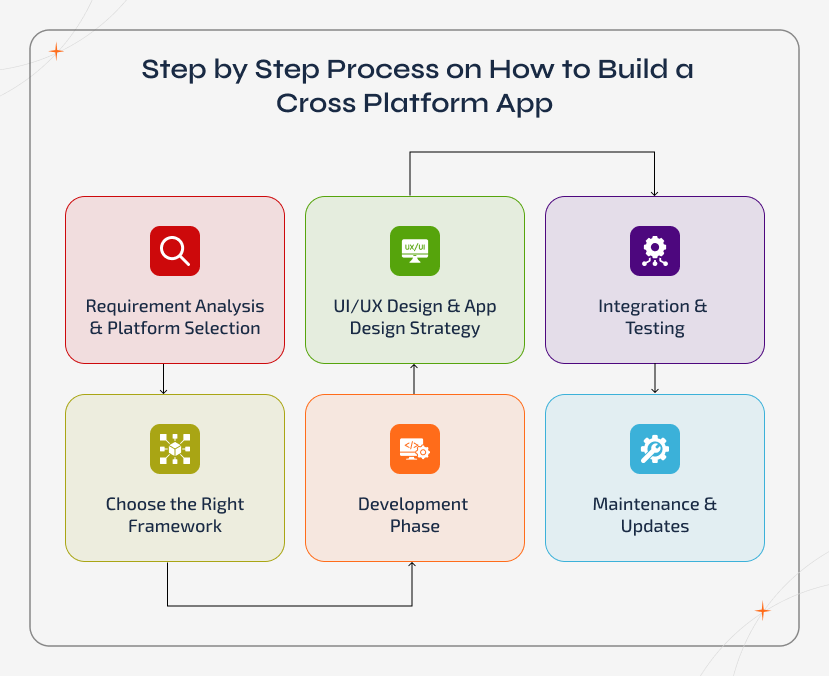
Step 1: Define Your Business Goals
Before writing a single line of code, identify what you want your application to achieve.
Define your target audience, core features, business objectives, and the platforms you want to support.
A clear project scope helps reduce development risks and keeps the project aligned with business goals.
Step 2: Choose the Right Development Approach
Decide whether cross-platform app development is the right fit for your project or if native development better supports your performance and functionality requirements.
The decision you make should be based on your timeline, budget, scalability goals, and user expectations.
Step 3: Select the Best Framework
Evaluate frameworks such as Flutter, React Native, .NET MAUI, Kotlin Multiplatform, or Ionic based on your application's complexity, team expertise, and future scalability.
Step 4: Plan Your App Architecture
Define your application's frontend, backend, APIs, database, authentication, cloud infrastructure, and third-party integrations before development begins.
A scalable architecture simplifies future maintenance and feature expansion.
Step 5: Design the User Experience
Create wireframes, user journeys, prototypes, and responsive UI designs that offer a consistent experience across all supported platforms.
Step 6: Build the Application
Develop the application using a shared codebase and integrate with required APIs, payment gateways, cloud services, notifications, and analytics.
Step 7: Test Across Devices
Proceed by performing functional testing, usability testing, performance testing, security testing, and compatibility testing across multiple devices, operating systems, and screen sizes.
Step 8: Deploy to App Stores
Prepare the application for release by completing platform guidelines, optimizing app store listings, and publishing to Google Play, Apple App Store, Microsoft Store, Mac App Store, or your preferred web hosting platform.
Step 9: Monitor Performance
Track crashes, user engagement, analytics, and application performance to identify opportunities for optimization after launch.
Step 10: Maintain & Improve
Release updates, improve security, introduce new features, and optimize the application based on user feedback and changing business requirements.
Cross Platform App Development Timeline
While every cross-platform app development project is different, the timeline below provides a realistic estimate of each development stage.
Define business goals, project scope, features, and technical requirements.
| Phase | Estimated Timeline | Key Activities |
|---|---|---|
| Discovery & Planning | 1–2 Weeks | Define business goals, project scope, features, and technical requirements. |
| UI/UX Design | 2–4 Weeks | Create wireframes, prototypes, user flows, and visual designs. |
| App Development | 6–16 Weeks | Build the frontend, backend, APIs, and core application features. |
| Testing & Quality Assurance | 2–4 Weeks | Test functionality, performance, security, compatibility, and usability. |
| Deployment & Launch | 1 Week | Publish the application, complete final checks, and release it to users. |
| Post-Launch Support | Ongoing | Monitor performance, fix issues, release updates, and add new features. |
Most often, cross-platform app development projects may take 3 to 8 months based on complexity and business needs. Starting with clear requirements, choosing the right framework, and following a structured development process can help keep your project on schedule.
Benefits of Cross Platform App Development for Businesses
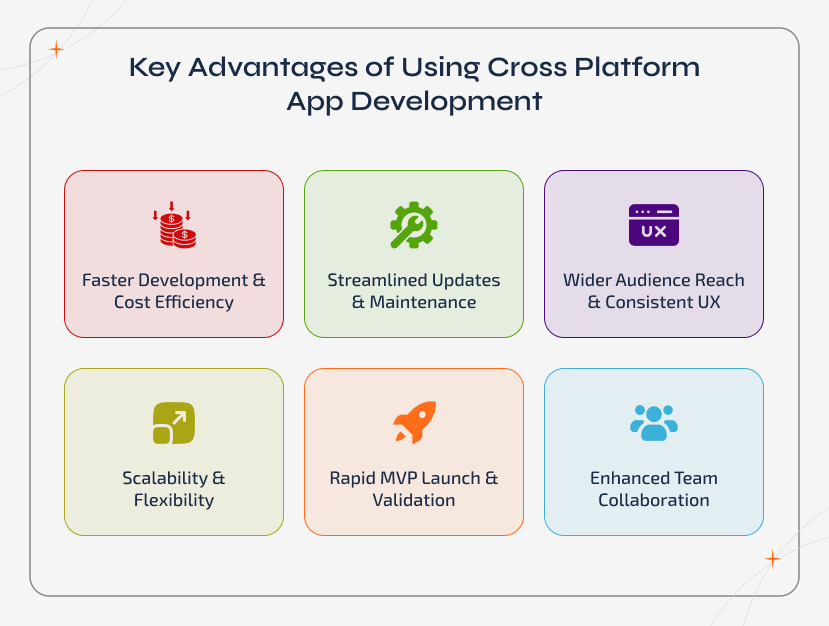
Now that you know how to build a cross-platform app. It's time to understand why so many businesses choose this approach. From faster development to easier maintenance and better scalability, cross-platform app development offers several advantages that support long-term business growth.
1. Faster Time to Market
Cross-platform development involves building once and deploying across multiple platforms. Thus, allowing businesses to launch products, validate ideas, and release updates much faster than managing separate native applications.
2. Lower Development & Maintenance Costs
A shared codebase not just reduces duplicated development effort but also simplifies the ongoing maintenance, updates, and bug fixes throughout the application's lifecycle.
3. Consistent User Experience
It helps maintain a unified interface, navigation, and functionality across iOS, Android, desktop, and web applications. Thus, helping users get a familiar experience regardless of the device they use.
4. Easier Scalability
Cross-platform development helps add new features, support additional platforms, and expand your application more efficiently without rebuilding the entire solution.
5. Simplified Maintenance
It is possible to roll out feature enhancements, security updates, and performance improvements from a centralized codebase, reducing operational complexity.
6. Broader Market Reach
You can launch your application across multiple platforms from day one. Thus, helping your business reach a larger audience while maintaining a consistent brand experience.
7. Improved Team Collaboration
Developers, designers, testers, and product teams can work from a shared codebase and unified workflows. It helps improve collaboration and reduce project complexity.
Modern cross-platform app development enables businesses to support multiple platforms with a single development strategy, making it easier to launch new features, maintain applications, and adapt to changing business needs.
Industries Using Cross Platform App Development
From start-ups to large enterprises, cross-platform app development helps businesses build applications that work across multiple platforms. It's widely used to create scalable solutions for both customers and internal teams.
1. Healthcare & Digital Health
Healthcare units can use a cross-platform approach to build telemedicine platforms, patient portals, remote monitoring solutions, appointment booking apps, and healthcare applications. These apps ensure secure and accessible experiences across devices.
2. Banking, Fintech & Insurance
It is possible to develop digital banking, payment, investment, budgeting, and insurance applications with cross-platform development. It delivers reliable performance and supports secure financial transactions.
3. Retail & eCommerce
With a cross-platform approach, retail and eCommerce sectors can create shopping apps, online marketplaces, loyalty programs, inventory management systems, and omnichannel retail experiences. These apps help keep customers connected across multiple devices.
4. Enterprise & Business Applications
It is possible to build CRM, ERP, HRMS, project management, workflow automation, and employee collaboration applications that improve productivity across teams and departments.
5. AI-Powered Business Applications
With a cross-platform development approach, businesses can develop AI assistants, customer support platforms, sales enablement tools, knowledge management systems, and productivity applications powered by modern AI technologies.
6. Manufacturing & Industrial Operations
Businesses can build production monitoring, quality inspection, maintenance management, inventory tracking, and IoT-enabled applications that support efficient day-to-day operations.
7. Logistics & Supply Chain
It is possible to create fleet management, warehouse management, shipment tracking, delivery, and field service applications that improve operational visibility and coordination.
8. Education & eLearning
Businesses can develop learning management systems, virtual classrooms, student portals, online assessments, and training platforms that support learning from anywhere.
9. Media & Entertainment
You can build video streaming, music, OTT, news, gaming companion, and creator applications using a cross-platform development approach. Thus, delivering engaging digital experiences across multiple devices.
10. Travel & Hospitality
Businesses can develop hotel booking platforms, travel planning apps, itinerary management systems, customer loyalty programs, and tourism applications that simplify the travel experience.
From start-ups to global enterprises, cross-platform app development supports a wide range of industries and business models. Choosing the right framework and development strategy depends on your industry requirements, application complexity, and long-term business goals.
Should You Build In-House or Outsource Cross-Platform App Development?
Choosing the right development model is just as important as choosing the right framework. While some businesses build an in-house development team, others partner with an experienced cross-platform app development company to reduce development time and get access to specialized expertise. However, the right approach depends on your project goals, budget, timeline, and available resources.
When to Build an In-House Team:
An in-house team is a good choice when app development is a long-term business investment and you want complete control over the product.
It's ideal if you:
- Have ongoing development needs
- Plan to build multiple products
- Have the budget to hire and retain developers
- Need day-to-day collaboration with your team
- Want complete control over the development process
Keep in mind: Hiring skilled developers, setting up infrastructure, & managing the team can increase both the project timeline and overall cost.
When to Outsource Development:
Outsourcing is often the better option when you need to launch faster or don't have an in-house development team.
It's ideal if you:
- Want to reduce development time
- Need experienced cross platform developers
- Have a fixed budget or project scope
- Need access to UI/UX, QA, DevOps, and cloud specialists
- Want to focus on growing your business while experts build your application
Keep in mind: Choose a development partner with proven experience, transparent communication, and a structured delivery process.
Questions to Ask Before You Decide
Before choosing your development approach, ask yourself:
- Is this a one-time project or a long-term product?
- Do we have the technical expertise in-house?
- How quickly do we need to launch?
- What's our development budget?
- Will the application require continuous updates and new features?
Your answers will help determine whether an in-house team or an outsourcing partner is the better fit.
What Can You Build with Cross Platform App Development?
Today's cross-platform frameworks support far more than building basic mobile apps. Businesses use them to develop customer experiences, streamline internal operations, deliver AI-powered solutions, and develop web and desktop applications from a single project.
1. Customer-Facing Mobile Apps
Build applications that help customers interact with your business anytime, anywhere.
- eCommerce & marketplace apps
- Food delivery apps
- Travel & booking apps
- Banking & payment apps
- Healthcare & telemedicine apps
- Fitness & wellness apps
- Social networking apps
2. Enterprise Business Applications
Develop secure business applications that improve productivity and streamline daily operations.
- CRM & ERP systems
- HR & employee management
- Inventory management
- Field service applications
- Project management tools
- Business workflow automation
- Internal communication platforms
3. AI-Powered Applications
Create intelligent applications that automate tasks and improve customer and employee experiences.
- AI chatbots & virtual assistants
- Customer support platforms
- Sales & marketing assistants
- Knowledge management systems
- AI recommendation engines
- Document processing applications
- AI-powered productivity tools
4. Web & Progressive Web Apps (PWAs)
Deliver app-like experiences directly through the browser without requiring users to install a mobile application.
- Customer portals
- Self-service platforms
- Online booking systems
- Business dashboards
- Progressive Web Apps (PWAs)
- SaaS platforms
5. Desktop Applications
Extend your application beyond mobile by supporting desktop users with a single development approach.
- Business management software
- Point of Sale (POS) systems
- Data analytics dashboards
- Productivity applications
- Design & collaboration tools
- Internal enterprise software
6. Connected & IoT Applications
Build applications that connect users with smart devices and real-time operational data.
- Smart home applications
- Connected healthcare devices
- Fleet & vehicle management
- Industrial monitoring systems
- Asset tracking applications
- Wearable companion apps
The versatility of cross-platform app development makes it suitable for everything from simple business apps to complex enterprise solutions. Choosing the right technology stack ensures your application is built for today's needs and future growth.
Cross Platform App Testing Checklist
Building a cross-platform app is only half the job. Before launching, you should ensure it performs consistently across different devices, operating systems, screen sizes, and network conditions. Use this checklist to identify issues early and deliver a reliable user experience.
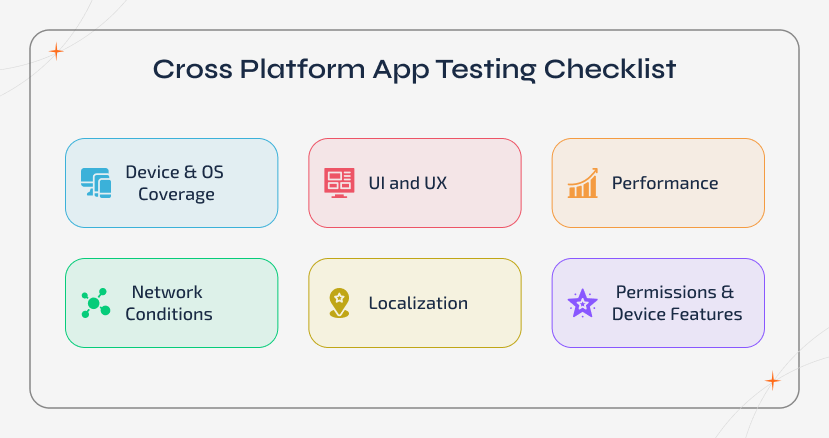
1. Test Across Different Devices
Ensure your application works consistently across different hardware and operating system versions.
- ✔ Latest iOS and Android versions
- ✔ Older supported OS versions
- ✔ Smartphones and tablets
- ✔ Different screen sizes and resolutions
2. Verify the User Interface
Check that your application's interface remains responsive and visually consistent.
- ✔ Layout and screen alignment
- ✔ Font scaling and readability
- ✔ Dark and light mode
- ✔ Navigation and gestures
- ✔ Orientation changes
3. Measure Performance
Evaluate how your application performs under different usage scenarios.
- ✔ App launch time
- ✔ Loading speed
- ✔ Smooth scrolling
- ✔ Memory usage
- ✔ Battery consumption
- ✔ Animation performance
4. Test Under Different Network Conditions
Verify that the application continues to function under varying network environments.
- ✔ Slow mobile networks
- ✔ Wi-Fi interruptions
- ✔ Offline mode
- ✔ Background synchronization
- ✔ API response handling
5. Validate Device Features
Confirm that native device capabilities work as expected.
- ✔ Camera
- ✔ GPS
- ✔ Push notifications
- ✔ Biometrics
- ✔ Storage access
- ✔ Bluetooth
- ✔ Microphone
6. Check Security & Compliance
Protect user data and verify that your application meets platform requirements.
- ✔ Secure authentication
- ✔ Data encryption
- ✔ API security
- ✔ Privacy permissions
- ✔ Error handling
7. Verify Accessibility & Localization
Ensure your application is accessible to a wider audience.
- ✔ Multiple languages
- ✔ Date & time formats
- ✔ Currency formats
- ✔ Text scaling
- ✔ Screen reader support
Thus, testing on real devices is just as important as testing on emulators. A combination of manual testing, automated testing, and real-device testing helps identify issues before they affect your users.
How Much Does It Cost to Build a Cross-Platform App?
The cost to build a cross-platform app depends on several factors, including your application's complexity, features, design, integrations, target platforms, and development team. While every project has unique requirements, the estimates below provide a realistic pricing overview for cross-platform app development in 2026.
| Application Type | Estimated Cost (USD) | Typical Timeline |
|---|---|---|
| MVP / Basic App | $20,000 – $45,000 | 2 – 4 Months |
| Mid-Complexity App | $45,000 – $90,000 | 4 – 7 Months |
| Enterprise App | $90,000 – $250,000+ | 7 – 12+ Months |
Note: These estimates may vary depending on your project scope, feature requirements, technology stack, and development partner.
What Affects Cross-Platform App Development Cost?
App Complexity
AI Features
Backend Infrastructure
Security & Compliance
Target Platforms
UI/UX Design
Third-Party Integrations
Testing & QA
What's Included in the Development Cost?
Most cross-platform app development projects typically include:
- ✔ Discovery & project planning
- ✔ UI/UX design
- ✔ Frontend & backend development
- ✔ API & third-party integrations
- ✔ Quality assurance & testing
- ✔ App deployment
- ✔ Project management
- ✔ Initial post-launch support
Ways to Optimize Your Development Budget
- Prioritize must-have features for your first release.
- Start with an MVP and expand based on user feedback.
- Finalize project requirements before development begins.
- Choose the right framework for your long-term goals.
- Reuse existing APIs and third-party services where possible.
There's no fixed cost to build a cross-platform app. The final budget depends on your project scope, features, and business requirements. Careful planning helps you avoid unexpected costs later.
Estimate your Cross-Platform Project Cost
Answer three quick questions and get a personalized cost and timeline estimate for your cross-platform app — based on complexity, platforms, and AI features.
Can You Build a Cross-Platform App Without Coding or Using AI?
Yes. You can build a cross-platform app without coding by using no-code or low-code platforms. These tools are suitable for simple apps, prototypes, and internal business solutions. However, if your app requires advanced features, custom integrations, AI capabilities, or enterprise-level scalability, custom cross-platform app development is often the better choice.
When No-Code or Low-Code is a Good Choice
No-code and low-code platforms are ideal if you want to:
- Build an MVP or prototype quickly
- Create internal business tools
- Develop simple booking or appointment apps
- Automate forms and business workflows
- Launch a basic customer portal
- Validate an app idea before investing in full development
When Custom Development Is the Better Option
Custom development is recommended when your application needs:
- Advanced business logic and workflows
- AI-powered features or automation
- Third-party API and enterprise system integrations
- Real-time collaboration or live data processing
- Strong security and compliance
- High performance and long-term scalability
- A fully customized user experience
What About AI App Builders?
AI-powered app builders can generate interfaces, workflows, and code much faster and is useful for rapid prototyping and simple applications. However, they still have limitations when it comes to complex business requirements, custom functionality, enterprise integrations, and long-term scalability.
No-code, low-code, and AI-powered app builders are great for getting started quickly. If your goal is to build a scalable, secure, and feature-rich application, investing in cross-platform app development provides greater flexibility, customization, and long-term value.
Common Mistakes to Avoid When Building a Cross-Platform App
It is vital to stay away from making common mistakes, as it helps improve performance, reduce development delays, and create a better user experience.
1. Choosing the Wrong Framework
Select a framework based on your project requirements instead of just looking at the popularity.
2. Trying to Build Everything at Once
Focus on the essential features first. You can always add more after launch.
3. Ignoring Platform Guidelines
Design your app to look and feel natural on both iOS and Android while keeping a consistent brand experience.
4. Skipping Real Device Testing
Test your app on real devices to find out the issues that even the emulators and simulators may miss.
5. Not Planning for Future Growth
Build an architecture that supports new features, more users, and future integrations without major rework.
The above mistakes can be avoided with proper planning, the right technology, and thorough testing. Taking the time to get these fundamentals right will help you build a more reliable and scalable cross-platform app.
Common Challenges in Cross Platform App Development
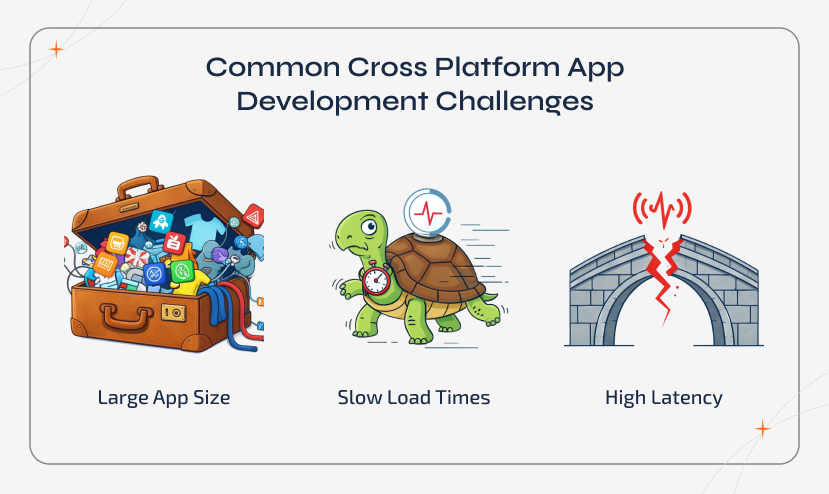
Like any development approach, cross platform app development does come with its own challenges. Understanding these early helps you make informed decisions, avoid common pitfalls, and build apps that perform the best across different platforms.
1. Performance Optimization
Applications with complex animations, graphics-intensive features, or heavy processing may need additional optimization to deliver smooth performance across all supported platforms.
How to overcome it: Choose the right framework, optimize code, & test performance regularly throughout development.
2. Platform-Specific Features
Accessing device-specific features such as Bluetooth, NFC, advanced camera features, or biometric authentication may require platform-specific development.
How to overcome it: Plan native integrations early & use well-supported plugins or native modules where needed.
3. Consistent User Experience
Different platforms require different design guidelines, making it challenging to provide a familiar experience for every user.
How to overcome it: Design responsive interfaces that respect platform conventions & also maintain a consistent brand experience.
4. Third-Party Integrations
Integrating payment gateways, cloud services, enterprise systems, or external APIs can increase development complexity.
How to overcome it: Choose reliable APIs, document integrations properly, & test them throughout the development lifecycle.
5. Testing Across Multiple Platforms
Applications must be tested on different devices, operating systems, browsers, and screen sizes to ensure consistent performance.
How to overcome it: Combine manual testing, automated testing, & real-device testing to find out the issues even before release.
6. Ongoing Maintenance
As platforms and operating systems continue to evolve, applications require regular updates to remain secure, compatible, and high-performing.
How to overcome it: Schedule regular maintenance, monitor performance, & keep frameworks & dependencies up to date.
Best Practices to Minimize These Challenges
- Plan your application architecture before development begins.
- Select the right framework for your project requirements.
- Build reusable and well-structured code.
- Test on real devices throughout development.
- Keep third-party libraries and dependencies updated.
- Monitor application performance after launch and release regular updates.
Most cross-platform development challenges can be addressed with proper planning, the right framework, and a structured development process. Focusing on quality from the start helps reduce rework, improve application performance, and deliver a better user experience.
Why Choose Sparkout to Build Cross-Platform Apps?
Building a cross-platform app is not just about writing code. It is all about ensuring speed, scalability, and user experience across devices. At Sparkout Tech, we not only handle traditional mobile app development, but we also develop cross-platform apps by combining strategic planning, the right cross-platform software development frameworks, and faster execution.
Thus, we ensure the delivery of apps that work seamlessly on iOS, Android, and the web. Here is why businesses should choose Sparkout:
- We have expertise and proven experience in Flutter, React Native, Kotlin Multiplatform, and hybrid app development.
- With a single codebase and optimized processes, we ensure faster time-to-market and shorten launch timelines.
- We offer budget-friendly development without compromising on performance and UI/UX design for mobile apps.
- As a trusted cross-platform software development company, we support adding customized features that align with your industry and business goals.
- The cross-platform apps we build and deliver are secure, scalable, and future-ready for start-ups and enterprises.
- Our team of experts will keep your app ahead of market competition with ongoing maintenance and upgrades.
Ready to turn your app idea into reality?
Our cross-platform app development experts can help you choose the right framework, plan your project, and build a scalable application tailored to your business goals.