


Does your business still rely on legacy systems and already feel that your system is slowing down the operations, causing security risks, or limiting innovation? It means your business needs a clear modernization strategy and not just fixing up temporary issues. This is where enterprise software for legacy modernization becomes essential. As part of a broader enterprise modernization strategy, it allows organizations to upgrade outdated applications, improve performance, and align technology with current business goals without disrupting operations.
Legacy or outdated systems are not just old but are also consuming large IT budgets to keep them running. But now with the modernization services and advanced legacy application modernization tools, businesses can upgrade the old systems, move to the cloud, and make AI-driven decisions. At the same time, digital transformation software helps businesses grow faster, stay secure, and quickly adapt to change.
What You Will Learn in this Guide:
- What is enterprise software for legacy modernization, and why it matter
- The best strategies and tools to modernize systems in 2026
- How to handle common challenges like cost, risk, and downtime
- Possible ways to build scalable, future-ready systems
Companies modernizing proactively report that up to 74% reduction in IT costs and 65% faster time-to-market. Whether you are a CIO, IT leader, or business executive, this guide offers the actionable insights of 2026 and industry best practices. Let's explore how enterprise software for legacy modernization can transform your organization.
Did you know?
At present, nearly 70% of Fortune 500 companies rely on systems over 20 years old. At the same time, the enterprise modernization software market is growing fast and is expected to rise from $24.98 billion in 2025 to $56.87 billion by 2030. This shows the importance of modernization and why it is a business priority.
What is Enterprise Software for Legacy Modernization
Enterprise software for legacy modernization refers to a set of tools, frameworks, and platforms that help businesses upgrade their outdated systems into modern, cloud-ready, and scalable solutions. It ensures data integrity and ensures the core functions continue to work during the upgrade.
Rather than replacing old systems entirely, legacy enterprise modernization software focuses on improving them to meet the current business needs without disrupting operations. This helps organizations to modernize faster, reduce operational risks, and retain what already works, while unlocking innovation.
What is a Legacy System
A legacy system refers to any system that no longer supports your business effectively. While it may still run, it often slows innovation, brings in security risks, and is hard to integrate with modern tools.
For example, it could be:
- A mainframe system that runs outdated languages
- A custom app that doesn't connect with new platforms
- Software that is expensive and difficult to maintain
In simple terms, if your system works but limits growth, then it is a legacy system.
Understanding Legacy Modernization Software
Enterprise legacy modernization software includes all the necessary tools that make upgrading easier and more efficient. This includes:
- Assessment tools - Used to find the system issues, dependencies, and risks
- Code modernization tools - Help update or convert old code using AI-driven automation
- Data migration platforms - Used to move data securely to modern systems with minimal downtime
- Cloud migration solutions - Help shift applications to scalable cloud environments
- Integration layers (APIs) - Used to connect old systems with modern applications
These legacy application modernization tools along with software modernization services, help simplify complex transformations and reduce manual effort.
Different Approaches to Modernization
Modernization is not always a one-size-fits-all. Often, businesses choose from:
- Migration (Rehosting) - Move systems to the cloud as they are
- Modernization (Refactoring/Replatforming) - Improve code, architecture, and performance
- Replacement (Rebuilding) - Completely replace the old system
Most often, organizations choose a mix of these approaches based on their business needs.
Why Legacy Modernization for Enterprise Software Matters in 2026
Modernization has become a critical option in enterprise software modernization for the following reasons:
- Rapid advancements in AI are accelerating code transformation and automation
- Increasing cybersecurity threats that legacy systems cannot effectively handle
- A shrinking talent pool for maintaining outdated technologies
With the help of digital transformation software, businesses can easily modernize step-by-step while reducing costs, improving performance, and staying competitive.
Why Legacy Systems are Holding Enterprises Back
Legacy systems still help run your businesses, but they silently slow down the growth, increase costs, and limit innovation. So, getting to know about these challenges is the key to understanding why enterprise software legacy modernization is no longer optional.
1. The Financial Drain
Many enterprises spend at least 60-70% of their IT budgets to maintain the old systems. So, when the system gets older, maintenance costs increase, expertise gets limited, and technical debt increases.
In addition, some hidden costs add up and reduce the overall business value. This includes slow development, frequent fixes, and complex integration.
2. Increased Security Risks
Legacy systems work on outdated software that no longer receives updates and becomes an easy target for cyberattacks.
With rising data breach costs and strict security requirements, older systems will not be able to support modern security frameworks. Thus, putting sensitive data and business operations at risk.
3. Operational Inefficiencies
Legacy systems bring in operational inefficiencies across the organization. This includes poor integration between tools to increased reliance on manual workarounds, duplicate processes, and limited scalability.
Instead of supporting business growth, these outdated systems force the teams to adjust their work around technology limitations. This limits productivity, increases operational costs, and slows the time-to-market.
4. The Talent Gap
With growing modern systems, finding experts who can manage the legacy application is becoming harder. It is because many experienced professionals are retiring and newer developers' preferences are rising towards modern tools and platforms.
This eventually creates dependency risks. i.e., when the key resources leave, maintaining critical systems becomes difficult to manage or update.
5. Competitive Disadvantage
Companies that rely on modern systems can launch features faster, adapt quickly, and rely on technologies like AI and analytics. Whereas legacy systems block innovation and slow down time-to-market. All these make it harder for businesses to stay ahead in the competitive digital landscape.
6. The Integration Challenge
Every new tool or platform needs to connect with core systems. With legacy architecture, integrations become difficult, costly, and fragile. This adds complexity to the future upgrades.
The Reality Check: With all the above challenges, it is evident that legacy systems are not outdated. But they limit business growth, increase risk, and reduce agility. By adopting enterprise legacy modernization software and digital transformation software, businesses can reduce costs, improve security, and build scalable, future-ready systems that offer long-term success.
Core Components of Enterprise Software for Legacy Modernization
Enterprise software for legacy modernization is a collection of tools that work together to analyse, upgrade, and transform outdated systems into modern, scalable platforms. Each component plays a specific role, and the result is a faster, safer, and more efficient modernization.
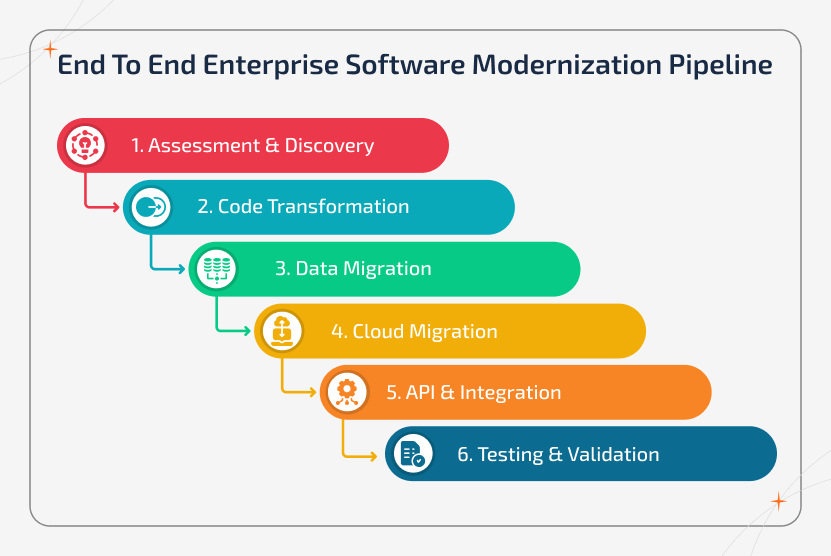
1. Assessment & Discovery Tools
Before starting the modernization process, businesses should have a clear understanding of their systems. The tools that help you plan modernization the right way before making changes include:
- Application Portfolio Analysis - Used to review all the applications to find out important systems, quick improvements, and ones that can be removed.
- Dependency Mapping - This shows how systems are connected and thus helps avoid issues during the modernization process.
- Technical Debt Analysis - Used to identify the outdated code and inefficiencies so you know where upgrades are actually needed.
- Business Impact Assessment - Helps prioritize systems based on their impact on revenue, performance, and user experience.
2. Code Transformation Engines
These components use AI to automatically analyse and upgrade old code, making modernization faster and easier. The following are tools that help upgrade old code quickly, accurately, and with minimal manual effort.
- AI-Powered Code Analysis - Helps scan legacy code to find bugs, dependencies, and improvement areas. This saves hours of manual work.
- Automated Refactoring - Used to improve the code structure, performance, and maintainability without changing how it works.
- Language Translation - It converts outdated languages into modern ones (e.g., COBOL to newer frameworks) with the help of tools like GitHub Copilot.
- Documentation Generation - They help automatically create system documentation and architecture details from existing code.
3. Data Migration Solutions
Data migration is one of the most critical parts of modernization. They help move data safely from old systems to new ones without errors or downtime. They ensure your data is clean, secure, and correctly transferred during modernization.
- ETL Tools (Extract, Transform, Load) - Helps move and convert data into the right format for modern systems.
- Data Quality & Cleansing - Used to fix errors, remove duplicates, and ensure clean, accurate data before migration.
- Real-Time Synchronization - Helps keep old and new systems in sync during the transition to avoid data loss.
- Compliance & Governance - Ensures data meets regulatory standards like GDPR and maintains security and audit tracking.
4. Cloud Migration Platforms
These platforms help move your applications and systems to the cloud safely, with minimal risk and downtime. The tools include:
- Lift-and-Shift Automation - Used to quickly move the existing systems to the cloud without major changes.
- Container Orchestration - Helps package apps into containers for easy deployment using platforms like Kubernetes.
- Multi-Cloud & Hybrid Support - Allows you to run systems across multiple cloud providers and on-premise environments.
- Infrastructure as Code (IaC) - Supports automating infrastructure setup using code to make deployments faster and more reliable.
5. API and Integration Layers
These layers help connect legacy systems with modern applications. Thus, making them easier to use and scale.
- API Gateway Solutions - Used to manage APIs in one place with security, monitoring, and control.
- Legacy System Wrapping - Helps add modern APIs around old systems (using tools like OpenLegacy) without changing the core code.
- Microservices Enablement - Ensures breaking large systems into smaller, independent services for better flexibility.
- Event-Driven Architecture - Used to offer real-time communication between systems for faster and more scalable operations.
6. Testing and Validation Frameworks
These tools are used to ensure your modernized systems work correctly, perform well, and stay secure.
- Automated Testing - Helps run test cases automatically to check if everything works as expected.
- Parallel Run - Used to compare results from old and new systems to ensure accuracy.
- Performance Benchmarking - Helps test speed, scalability, and system performance under real conditions.
- Security Scanning - Used to detect vulnerabilities before systems go live.
Leading Tool Categories
Modernization relies on different tools for different needs. Most often, businesses combine multiple tools to handle the full transformation.
- Cloud Migration Tools - AWS Application Migration Service and Azure Migrate.
- AI Code Transformation Tools - IBM Watsonx Code Assistant.
- Platform Modernization Tools - Google Cloud Migrate.
- API & Integration Tools - OpenLegacy and DreamFactory.
- Mainframe & Hybrid Modernization - Rocket Software.
Must-Have Features to Look for in Enterprise Software for Legacy Modernization
Selecting the right enterprise software for legacy modernization becomes easier when you focus on a few must-have features. They ensure to handle the process faster, safer, and more effectively.
1. AI-powered Automation - This helps scan old code, find issues, and even upgrade it automatically. It can also help predict the risks early and speed up the entire modernization process.
2. Multi-Cloud and Hybrid Support - It helps systems run across cloud platforms and on-premise environments. This not only offers flexibility but also helps avoid being tied to one vendor.
3. Strong Security (zero trust) - Ensures that only the right people can access your systems. It continuously checks users and protects data while meeting compliance standards like GDPR and HIPAA.
4. Incremental Modernization Support - It helps upgrade systems in phases instead of all at once. With this, you can test changes, release features slowly, and roll back if something goes wrong.
5. Data Accuracy and Governance - This ensures your data is clean, secure, and correctly transferred. It also helps track the changes and ensures compliance during migration.
6. Easy Integration - Connects old systems with new ones using APIs, connectors, and real-time data sharing. Thus, everything works together smoothly.
7. Monitoring and Analytics - This offers clear visibility and progress towards progress, system performance, and costs. This helps you make better decisions.
8. Scalability and Performance - Ensure the system can handle large workloads, evolve with your business needs, and run efficiently with minimal downtime.
9. User-Friendly Support - This helps teams to use the platform, with simple interfaces, good documentation, and expert help when needed.
In simple terms, the best enterprise legacy system modernization software is a combination of automation, security, flexibility, and ease of use. Thus, helping businesses modernize with less risk and better results.
Top Enterprise Software & Tools for Legacy Modernization
It is vital to choose the right enterprise software for legacy modernization to transform outdated systems into scalable, secure, and future-ready platforms. From AI-driven platforms to low-code solutions, enterprise IT solutions & enterprise SaaS solutions provide multiple approaches based on your business needs, infrastructure, and modernization goals.
1. Comprehensive Modernization Platforms
These are the platforms that offer end-to-end capabilities from assessment and code transformation to cloud migration. Thus, these tools are ideal for full-scale modernization.
| Tool | Key Strength | Best For | Deployment |
|---|---|---|---|
| IBM Watsonx Code Assistant | AI-driven code transformation | Regulated industries | Hybrid / Cloud |
| AWS Application Migration Service | Fast lift-and-shift migration | Cloud-first orgs | Cloud |
| Azure Migrate | Strong assessment + MS ecosystem | Microsoft users | Hybrid / Cloud |
| Google Cloud Migrate | Analytics + Kubernetes support | Data-heavy orgs | Cloud |
2. API-First Modernization Tools
These tools help modernize systems quickly by exposing the legacy functionality through APIs and thereby avoiding full replacement while enabling seamless integration.
| Tool | Key Strength | Best For | Deployment |
|---|---|---|---|
| OpenLegacy | API wrapping without code changes | Quick integration | Hybrid |
| DreamFactory | Auto API generation | Database modernization | Cloud / Hybrid |
3. Hybrid Cloud Solutions
These tools are designed for organizations that need to balance legacy systems with modern cloud environments. i.e., these tools ensure secure and scalable transformation.
| Tool | Key Strength | Best For | Deployment |
|---|---|---|---|
| Rocket Software | Mainframe + hybrid expertise | Mission-critical systems | Hybrid |
4. Enterprise Consulting & Services
The list of providers given below delivers end-to-end modernization strategies, combining expertise, tools, and execution for large-scale enterprise transformation.
| Company | Key Strength | Best For | Deployment |
|---|---|---|---|
| Accenture | Large-scale transformation | Enterprise programs | Global / Hybrid |
| IBM Consulting | Secure hybrid cloud solutions | Compliance-heavy orgs | Hybrid |
| Cognizant | AI + automation modernization | Mid-large enterprises | Hybrid |
Low-Code & No-Code Tools
These are the tools that simplify modernization with minimal coding, offering faster development and workflow automation.
| Tool | Key Strength | Best For | Deployment |
|---|---|---|---|
| Pega Platform | Rapid app development | Process automation | Cloud |
| Kissflow | No-code workflows | SMBs / mid-market | Cloud |
Legacy System Migration - Strategies & Approaches
Modernizing legacy systems differs for every business. The right legacy system migration depends on your goals, system complexity, and risk tolerance. In 2026, companies started using a mix of proven strategies along with legacy application modernization tools and software for legacy system upgrade to transform the system efficiently.
1. The 7 Rs Framework
The 7 R's framework helps organizations choose how to approach each app based on business value, complexity, and urgency.
1. Rehost (Lift & Shift) - Move the applications to the cloud with minimal or no changes.
- Best for: Quick migration of stable systems
- Pros: Fast & involves low risk
- Cons: Limited cloud optimization
- Tools: AWS Application Migration Service, Azure Migrate
2. Replatform (Lift, Tinker, and Shift) - This supports making small improvements while moving to the cloud.
- Best for: Gaining cloud benefits without a full redesign
- Pros: Balanced speed & improvement
- Cons: Not fully optimized
- Tools: Migrating databases to managed cloud services
3. Refactor/Re-architect - Helps redesign applications using modern, cloud-native architectures.
- Best for: Scalability, agility, & long-term growth
- Pros: Maximum performance & flexibility
- Cons: High time and resource investment
- Tools: Break monoliths into microservices
4. Repurchase (Replace) - Used to replace legacy systems with SaaS or ready-made solutions.
- Best for: When modern alternatives exist
- Pros: Access to the latest features with less maintenance
- Cons: Data migration complexity, vendor lock-in
5. Retire - Used to decommission systems that are no longer needed.
- Best for: Applications with little or no usage
- Pros: Cost savings & reduced complexity
- Process: Audit → archive → shut down
6. Retain - Used to keep the systems as they are for now.
- Best for: Low-priority or stable systems
- Note: Set a clear timeline for future review
7. Relocate - Helps move infrastructure (like virtual machines) to the cloud without changing the application.
- Best for: Large-scale infrastructure migration
- Pros: Minimal disruption & faster transition
- Cons: Limited modernization benefits
2. Modern Execution Patterns
Choosing the right strategy alone will not determine success, whereas execution patterns do.
1. Strangler Fig Pattern - It is the most recommended pattern that helps build new features along with legacy systems and gradually replace them.
- Incrementally shift users to modern components
- Reduce risk with phased transformation
- Deliver value early
2. Phased Migration - This is used to modernize systems step by step.
- Upgrade modules individually
- Manage complexity and risk
- Ideal for large enterprise systems
3. Parallel Run - Used to run old and new systems at the same time.
- Compare outputs for accuracy
- High confidence, but resource-intensive
- Best for mission-critical systems
4. Big Bang Migration - Helps replace the entire system all at once.
- Fast but high risk
- Requires extensive testing
- Suitable only for simple systems
3. Data Migration Strategy
Data migration is an important part of legacy system processes and is often the most complex phase of all.
| Focus Area | Business Value |
|---|---|
| Data inconsistencies and duplicates | Clean and validate data before migration |
| Format and encoding issues | Define mapping and transformation rules |
| Broken relationships between datasets | Use validation and reconciliation checks |
| Managing historical data | Migrate in phases with checkpoints |
Real-World Migration Approach
A structured approach ensures smoother execution, and this involves:
- Assessment (2-4 weeks) - Evaluate systems and dependencies
- Strategy Selection (1-2 weeks) - Choose the right migration path
- Proof of Concept (4-6 weeks) - Test and validate approach
- Execution (3-12 months) - Migrate in phases
- Optimization (Ongoing) - Enterprise performance optimization and scalability
Successful legacy system migration demands the right strategy, tools, and execution model. By applying the 7 Rs framework and using modern software for legacy system upgrade, enterprises can gradually reduce risk, speed up transformation, and build scalable, future-ready systems that drive long-term business growth.
Benefits of Enterprise Software for Legacy Modernization
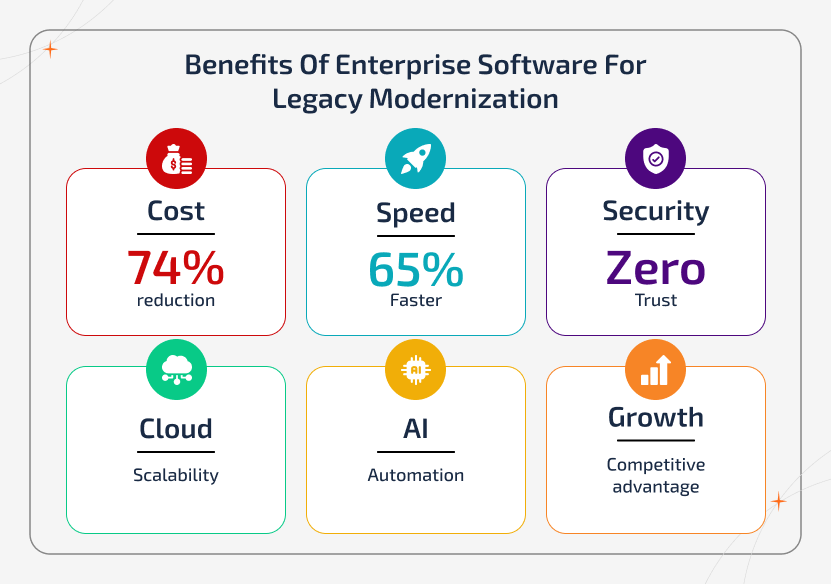
By using the right enterprise software for legacy modernization and software modernization services, businesses can reduce costs, improve performance, and speed up digital transformation via automation, cloud capabilities, and intelligent tools.
1. Financial Impact & ROI
| Focus Area | Business Value |
|---|---|
| Cost Efficiency | Enterprise modernization software minimizes IT costs by up to 74% by automating maintenance, removing legacy licensing, & optimizing cloud usage |
| Faster Returns | With advanced enterprise automation software, businesses can achieve 65% faster time-to-market with improved system performance |
2. Security & Compliance Gains
| Focus Area | Business Value |
|---|---|
| Stronger Security | Modern enterprise IT solutions offer zero-trust architecture, continuous updates, & built-in threat protection |
| Built-in Compliance | Enterprise-grade platforms offer GDPR, HIPAA, and SOC 2 with automated governance & audit trails |
3. Operational Efficiency
| Focus Area | Business Value |
|---|---|
| Business Agility | Digital transformation software offers faster innovation, scalability, & improved CX |
| Seamless Integration | API-driven enterprise platforms connect legacy systems with modern applications in real-time |
4. Modern Technical Capabilities
| Focus Area | Business Value |
|---|---|
| Cloud-Native Power | Enterprise architecture tools support auto-scaling, global deployment, & cost-efficient infrastructure |
| AI & Automation Ready | Built-in AI feature supports automation, analytics, & predictive insights |
5. Talent & Productivity Benefits
| Focus Area | Business Value |
|---|---|
| Modern Development Environment | Developers work with modern tools & not with outdated systems |
| Reduced Dependency | Automated documentation and maintainable systems helps reduce reliance on legacy experts |
6. Competitive Advantage
| Focus Area | Business Value |
|---|---|
| Faster Innovation | Enterprise software provides 2-3x faster AI readiness & real-time decision-making |
| Proven Outcomes | Businesses can see measurable improvements like 40% higher accuracy & ~35% lower risk |
Challenges in Legacy Modernization & How to Overcome Them
Modernizing with enterprise software for legacy modernization not just offers significant value but also comes with challenges. From technical complexity to organizational resistance, businesses should address these issues to ensure a successful transformation.
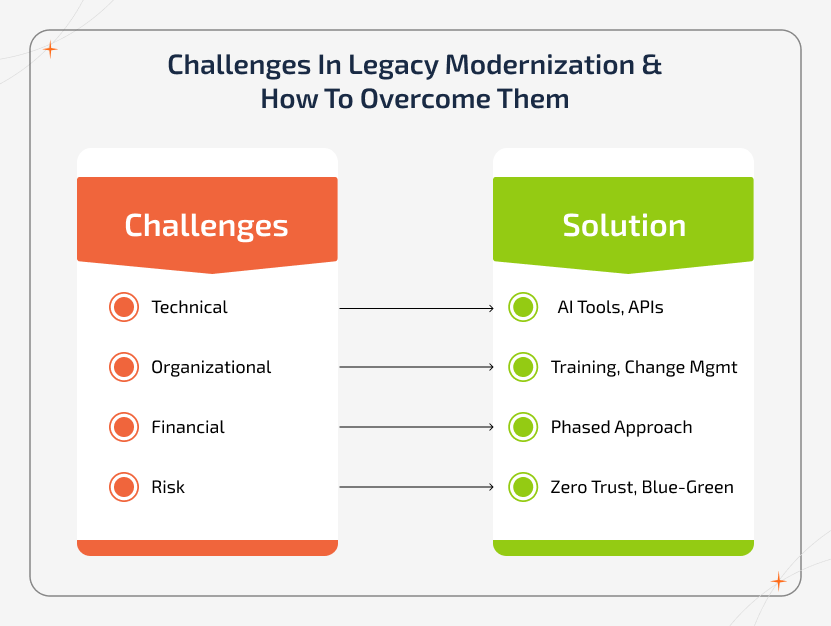
1. Technical Challenges
Complex Dependencies - Legacy systems include hidden and undocumented connections. This can lead to unexpected failures during the migration process.
- How to overcome: By using AI-powered dependency mapping and choosing an incremental modernization approach to reduce risk.
Data Migration Complexity - Migrating data from legacy systems brings in inconsistencies, format issues, or even data loss.
- How to overcome: By using data migration tools like ETL, validation frameworks, and parallel runs. It is better to always clean and validate data before migration.
Technical Debt - Quick fixes and outdated practices make systems harder to upgrade. This even slows development and increases costs.
- How to overcome: Refactor code during modernization using software re-engineering solutions, improving performance and maintainability.
Integration Challenges - Connecting legacy systems with modern applications is often complex and fragile.
- How to overcome: By using API gateways, middleware, and patterns like the Strangler Fig approach for gradual integration.
2. Organizational Challenges
Knowledge Loss - Many legacy systems don't have proper documentation. Similarly, experienced professionals may no longer be available.
- How to overcome: It is better to start documentation early, use AI-assisted tools, and ensure knowledge transfer across teams.
Resistance to Change - Teams are often resistant to existing systems, even if legacy tools have their own limitations. This can slow the adoption of new solutions.
- How to overcome: Companies shall invest in change management, offer training, and ensure strong leadership support.
Talent Shortage - It is difficult to find professionals skilled in both legacy and modern technologies.
- How to overcome: Partner with experienced software development companies, invest in training programs, or use managed services to fill skill gaps.
3. Financial Challenges
Budget Overruns - Unexpected costs and scope changes often delay or stop the entire modernization efforts.
- How to overcome: By using a phased approach, defining clear budgets, and monitoring costs with modern tools.
ROI Uncertainty - It can be difficult to measure the value of modernization upfront.
- How to overcome: Start with pilot projects, define clear KPIs, and track measurable business outcomes early.
4. Risk Management Challenges
Downtime Risk - System downtime during migration can directly impact the existing business operations and revenue.
- How to overcome: Choose to use blue-green deployments, canary releases, and gradual traffic shifting.
Security During Transition - Systems can become more vulnerable during the transition phase.
- How to overcome: By implementing zero-trust security from the beginning and continuously monitoring systems.
Compliance Gaps - Meeting regulatory requirements during migration can be challenging.
- How to overcome: By using built-in compliance frameworks and conducting regular audits throughout the process.
Best Practices to Follow for Successful Legacy Modernization
To overcome modernization challenges, businesses shall follow a structured and strategic approach. This includes:
- Begin with a comprehensive system assessment - This helps understand the existing systems, dependencies, and technical gaps before making changes.
- Choose the right strategy for each application - Choose whether to migrate, modernize, or replace based on the business value and complexity.
- Follow a phased modernization approach - Choose to upgrade systems step by step to reduce risk and ensure smooth transitions.
- Establish clear governance and monitoring - This involves defining clear processes, tracking progress, & maintaining control throughout the transformation.
- Invest in training and change management - Businesses shall prepare teams to adopt new systems and workflows effectively.
- Continuously measure, optimize, and improve - This involves monitoring performance, identifying improvements, and refining your modernization strategy over time.
When Enterprises Should Avoid Investing in Legacy Modernization:
Note that modernization may not be the right step when the system is stable and still meets business needs or if documentation and expertise are unavailable. Also, avoid migration when the costs exceed current operational costs or if there is no clear business benefit.
Try the Alternative: During these times, businesses shall consider API wrapping, containerization, managed legacy services, and strategic retention.
Thus, it is possible to overcome the limitations with the right enterprise IT modernization platforms and legacy system migration tools. By following a structured approach with enterprise software for legacy modernization, businesses can reduce risk, maintain continuity, and transition to modern systems.
The Role of Modern Architecture in Legacy Transformation
Modern architecture plays a key role in making enterprise software for legacy modernization successful. They help businesses move from outdated systems to flexible, scalable, and future-ready platforms.
1. Cloud-Native Architecture
It allows businesses to scale easily and reduce costs. Also, helps run applications more efficiently.
- Support hybrid & multi-cloud environments
- Improve flexibility & avoid vendor lock-in
- Offers better disaster recovery & global access
2. Microservices Architecture
Instead of one large system, applications are broken into smaller services. It improves flexibility and supports faster innovation.
- Each service handles a specific function
- Easier to update & scale
- Faster development & deployment
3. Zero Trust Security
Modern systems follow a "never trust, always verify" approach. It is essential for protecting modern, cloud-based systems.
- Strict access control & authentication
- Continuous monitoring
- Reduced security risks
4. Event-Driven Architecture
Systems respond to events in real time. It is useful for dynamic, real-time applications.
- Enables faster data processing
- Supports real-time analytics
- Improves system responsiveness
5. Containerization & Orchestration
Tools like Docker and Kubernetes help run applications consistently. Thus, making applications portable and scalable.
- Easy deployment across environments
- Better resource usage
- Automatic scaling
6. API Management
API management platforms connect legacy systems with modern applications. They act as a key to building connected digital ecosystems.
- Enable seamless integration
- Improve communication between systems
- Support scalable architectures
7. Modern Data Architecture
Modern systems focus on better data usage. They help businesses make faster, data-driven decisions.
- Real-time data access
- Improved data management
- Supports analytics and AI
8. DevOps & Platform Engineering
DevOps tools for modernization improve how software is built and delivered. It also helps increase productivity and reduce errors.
- Faster development cycles
- Automated testing & deployment
- Better system reliability
9. Serverless & Edge Computing
These approaches ensure performance improvement and reduce infrastructure management. Hence, they are ideal for modern, distributed systems.
- Auto-scaling applications
- Lower operational overhead
- Faster processing, closer to users
Choosing the right architecture helps enterprise software for legacy modernization be more effective by improving scalability, security, and flexibility. Thus, with the right approach, businesses can modernize faster and build systems that offer long-term support and growth.
How to Choose the Right Enterprise Software for Modernization
Choosing the right enterprise software for legacy modernization offers a smooth, low-risk transformation that aligns with your business goals.
- Start with Business Goals - Involves finding the objectives, such as cost reduction, agility, and security.
- Assess Current Systems - Evaluate existing systems to find complexity, dependencies, integration needs, and high-impact systems.
- Choose the Right Vendor/Tool - Ensure to check for proven enterprise IT solutions with modern capabilities.
- Evaluate Risks Early - Ensures phased migration, rollback options, and continuity planning.
- Plan for Scalability - Choose solutions that support growth, AI, and future technologies.
- Prioritize Systems - Ensure to balance business value, effort, risk, and ROI.
- Run a Proof of Concept - It is vital to validate the approach before full implementation.
- Execute in Phases - Follow a phased execution process to modernize the legacy system and reduce disruption.
- Monitor & Optimize - Continuously track the performance and improve outcomes.
Why Choose Sparkout for Enterprise Software for Legacy Modernization
At Sparkout, as a leading software development company, we don't just upgrade systems; we help you transform your business with the right enterprise software for legacy modernization. We focus on delivering scalable, secure, and future-ready solutions that align with your long-term goals.
Our Expertise:
- We have proven experience in enterprise IT solutions and modernization
- Our team has a strong domain expertise across fintech, healthcare, retail, and more
- We have successfully delivered complex legacy transformation projects
- We offer consistent cost optimization and performance improvements
What Sets Us Apart:
- Industry Expertise - We understand the unique challenges of your domain and customize solutions accordingly
- Proven Frameworks - We follow a structured methodology that helps achieve faster, reliable modernization
- Technology Leadership - Our expertise expands across leading cloud and modernization platforms
- Knowledge Transfer - We empower your team with skills and documentation, in addition to delivering solutions
- Transparent Pricing - We offer clear, flexible pricing with no hidden costs
Future Trends in Enterprise Software Legacy Modernization
The future of enterprise software legacy modernization is all about AI, cloud, and smarter architectures. Businesses are moving beyond basic upgrades to build scalable, intelligent systems with the help of advanced digital transformation software and enterprise IT solutions.
1. AI-Driven Modernization
Enterprise software for legacy modernization is increasingly powered by AI, which supports automated code analysis, faster migration, and smart optimization. Tools like GitHub Copilot are speeding up code updates and reducing timelines significantly.
2. Low-Code/No-Code Growth
Modernization platforms now include low-code capabilities that deliver faster development and quick prototyping. Tools like Kissflow and Pega Platform help businesses modernize with minimal coding effort.
3. Composable Architecture
Enterprise modernization tools are shifting to modular, API-first architectures. This allows systems to be built as flexible components and thus makes updates faster.
4. Edge Computing
Modernization software is expanding to support edge computing, enabling real-time data processing closer to users. This improves speed, reduces latency, and supports advanced use cases like IoT and real-time analytics.
5. Advanced Security
Enterprise modernization platforms are integrating advanced security features like AI-based threat detection, continuous monitoring, and automated compliance. All these help protect the modern systems.
6. Sustainable IT
Modern enterprise software for legacy modernization is focusing on energy-efficient cloud solutions. This, in turn, reduces costs and supports sustainability goals.
7. Platform Engineering
Modern enterprise IT solutions now feature internal platforms that simplify development, standardize tools, and improve productivity for teams.
Thus, the future of enterprise software for legacy system modernization lies in AI-driven automation, flexible architectures, and scalable cloud platforms. Businesses that adopt these trends early can modernize faster with minimal risks and build systems that are ready for continuous innovation and long-term growth.
Final Thoughts
Thus, enterprise software legacy modernization is not just about outdated systems but is all about building flexible, secure, and data-driven platforms that offer long-term growth. With the right strategies and aligning them with clear outcomes, organizations can stay competitive. So, those businesses that act early gain a clear advantage, while those who delay need to face the risk of falling behind in the digital landscape.