



A mobile app redesign is not a visual upgrade. It is a strategic business decision that directly affects user retention, conversion, revenue, and brand trust. Often, redesigns fail not because of poor UI/UX development and design, but because teams redesign without data, change too much at once, skip usability validation, and launch without a rollout plan.
This guide explains how to redesign a mobile app the right way with a proven framework that reduces the risk, avoids rework, and delivers real growth.
What is a Mobile App Redesign & What It's Not
A mobile app redesign is a structured, data-driven improvement of an existing application that enhances how users experience, navigate, and complete the key actions without affecting what already works.
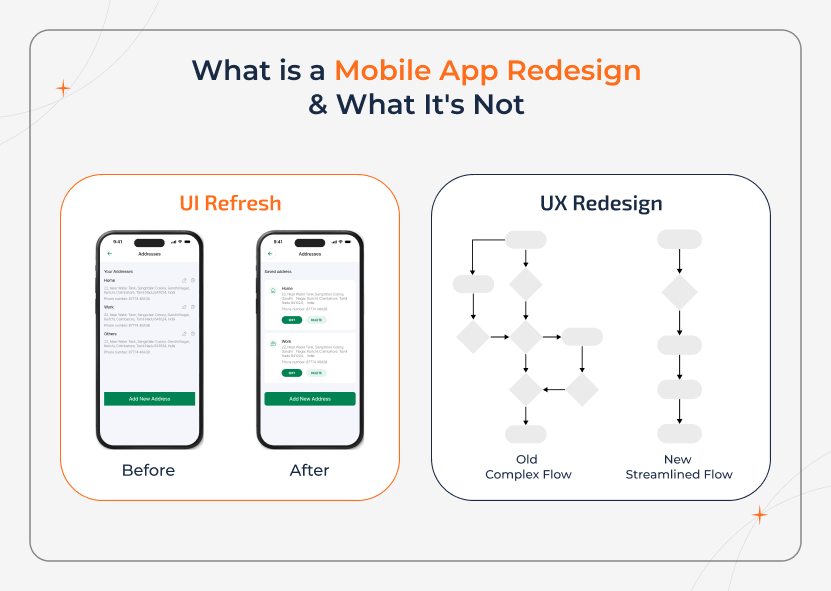
A true redesign focuses on improving:
- User experiences (UX) - How easily users achieve their goals.
- User Interface (UI) - Offers visual clarity, consistency, and interaction patterns.
- Navigation & User Flow - Covers onboarding, feature discovery, and task completion.
- Performance & Accessibility - Includes speed, responsiveness, and inclusivity.
- Supporting Backend Logic - To ensure better UX and not replace the product.
A mobile app redesign is not a trend-driven UI change, cosmetic makeover, or a shortcut to fix any deeper problems with the product.
Why Most Mobile App Redesigns Fail & How to Prevent It
Many of the redesign projects fail as teams believe that starting fresh fixes the engagement issues. Thus, without understanding what's broken during the mobile app development, they simply replace one set of problems with another. The most common reasons redesigns fail include:
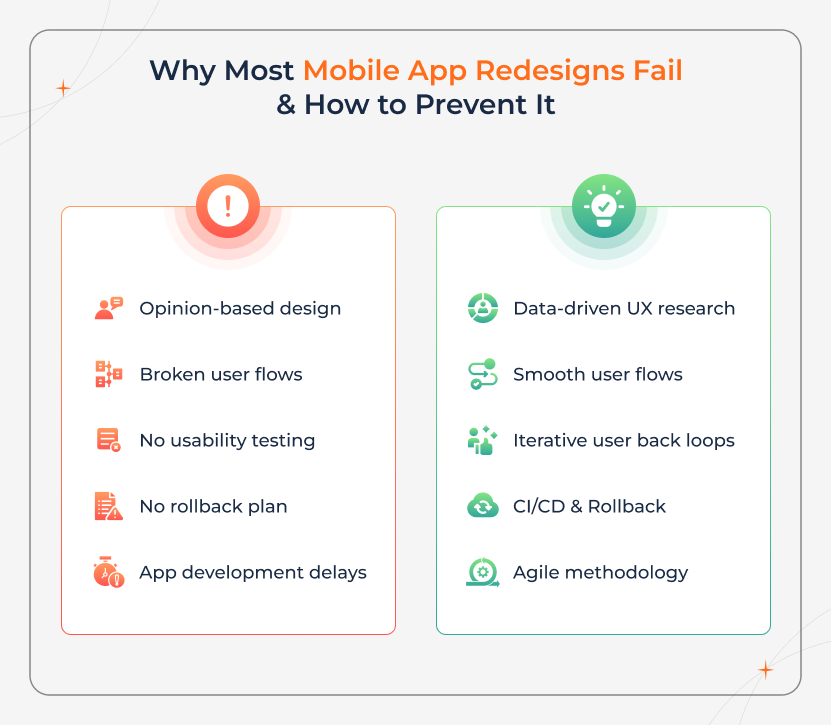
- Redesigning based on opinions rather than analytics.
- Replacing familiar user flows with untested patterns.
- Skipping usability testing to save time.
- Underestimating technical dependencies.
- Launching everything all at once without rollback.
The above mistakes often lead to churn spikes, poor reviews, and costly app development delays that affect the roadmap and frustrate stakeholders.
Redesign With Evidence, Not Assumptions
See which UX issues actually drive churn, delays, and drop-offs, before you invest in a full redesign.
The 5-Phase Mobile App Redesign Framework Built for Measurable Growth - An Overview
A successful mobile app redesign follows a structured, insight-driven process.
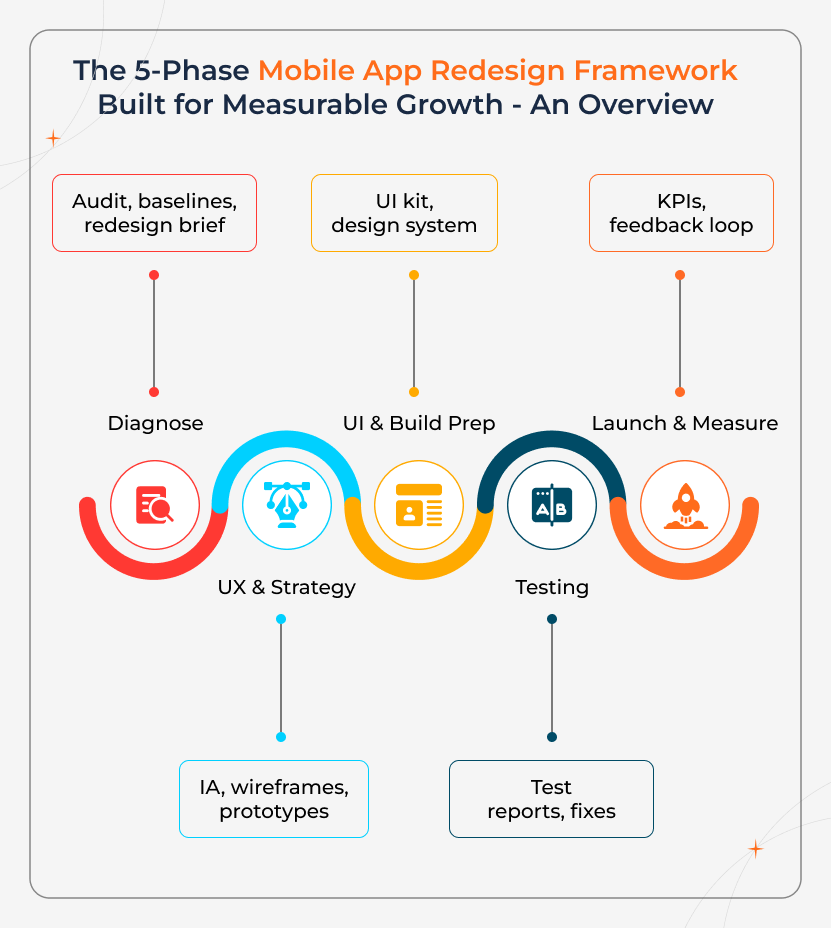
This five-phase framework helps reduce risk, aligns teams, and ensures every design change delivers measurable business impact rather than just visual improvement.
| Phase | What Happens | Key Deliverables |
|---|---|---|
| Before You Start | Diagnose problems, set goals, define KPIs | Audit, baselines, redesign brief |
| UX & Strategy | Fix flows, structure, journeys | IA, wireframes, prototypes |
| UI & Build Prep | Visual design + dev-ready assets | UI kit, design system |
| Testing | Validate usability, quality, accessibility | Test reports, fixes |
| Launch & Measure | Rollout, monitor, iterate | KPIs, feedback loop |
Things to Consider Before Redesigning - A Reality Check
When there is no clarity on what and why redesigning is done, it leads to losing existing users. It is better to answer these questions before touching the design files:
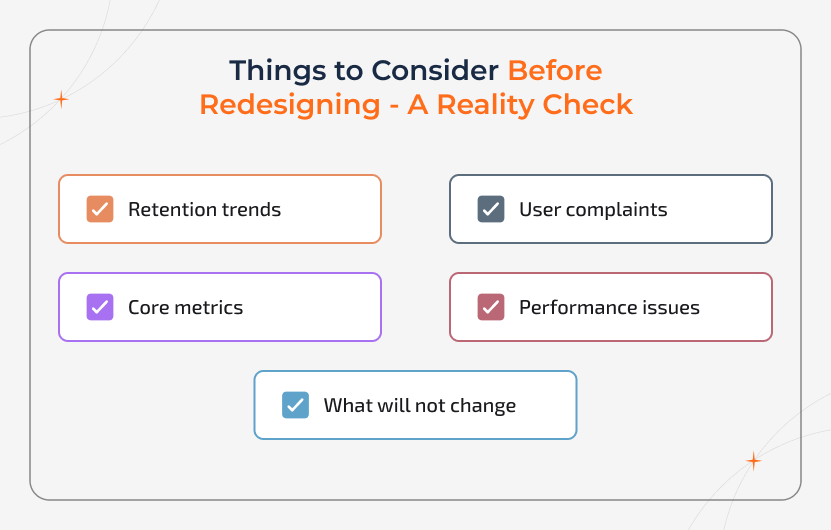
- What does the app do well today?
- Where do users struggle, drop off, or complain?
- Which one metric must improve for this redesign to matter?
- What constraints are real, such as budget, timeline, tech, and compliance
- What will not change in this redesign?
If you are unable to answer these clearly, pause the redesign.
Signs You Actually Need a Redesign:
You likely need a redesign if you see:
- Declining D1/D7 retention
- Increasing onboarding drop-offs
- Falling app ratings or reviews
- Repeated support complaints about the same issues
- Low adoption of core features
- Performance or usability issues after OS updates
So, if the above things are not true, then a full redesign may be unnecessary. You only need small UX improvements or performance fixes, and not a complete overhaul.
Step-by-Step Mobile App Redesign Process
A successful mobile app redesign is all about a structured, data-led process and not based on guesswork or visual experimentation. The steps given below ensure redesign decisions are grounded in user behaviour, business goals, and measurable outcomes.
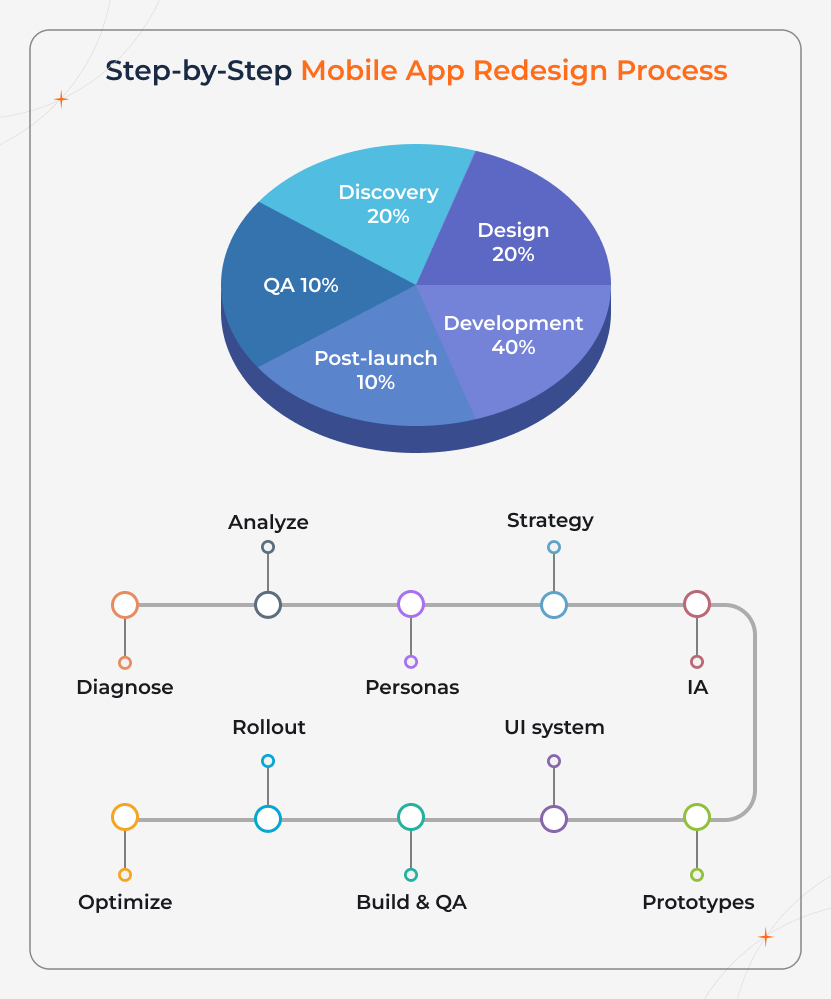
Skipping steps or changing their order often leads to poor adoption, increased churn, and even costly rework after launch.
Teams can follow this step-by-step framework to redesign with clarity, reduce risk, and deliver improvements users actually notice and value
- Each step focuses on a specific outcome.
- Identifying real problems and not assumptions.
- Fixing high-impact user journeys.
- Validating changes before development.
- Continuously improving the app after release.
No matter if you are refreshing the UI or reworking core user flows, following the right order ensures the redesign improves usability, performance, and long-term engagement-not just aesthetics.
Step 1: Diagnose App Problems and Set Redesign Baselines
Begin the process by finding out what is working, what's broken, and what must improve. Review analytics, retention data, crash reports, and user feedback to create a clear baseline metrics. These baselines are essential to define success and prevent subjective redesign decisions later.
Step 2: Analyze Real User Behaviour Using App Analytics
It is vital to go beyond reviews and opinions. Use behavioural data like funnels, drop-offs, feature usage, and session patterns to understand how users actually interact with the app and where they struggle.
Step 3: Refresh User Personas and Map User Journeys
The next step is to update user personas to reflect current behaviors and expectations. By mapping critical journeys like onboarding, core actions, and account management, it is possible to uncover friction points and redesign opportunities.
Step 4: Define Redesign Strategy and Prioritize What Matters
Not every issue needs to be fixed at once. By prioritizing the changes based on the impact and effort, businesses can focus first on usability blockers, revenue-driving flows, and retention-critical features.
Step 5: Restructure Information Architecture and Navigation
Simplify how information is organized and accessed. Clear navigation and logical content structure minimize confusion, improve task completion, and make the app easier to use across all screen sizes.
Step 6: Create Wireframes, Prototypes, and Validate with Usability Testing
Translate the ideas into wireframes and clickable prototypes. Then, test them with real users to validate flows, find usability issues early, and refine designs before development begins.
Step 7: Design the UI System with Accessibility Built In
Develop a consistent visual language using a scalable design system. Ensure accessibility standards like contrast, text size, and touch targets are integrated to support all users.
Step 8: Build, QA, and Optimize App Performance
Implement the redesigned experience with careful attention to performance, responsiveness, and stability. Test across devices, operating systems, and usage scenarios to prevent regressions.
Step 9: Launch the Redesigned App Using Beta & Staged Rollouts
This step is all about releasing the redesigned app gradually using beta testing and phased rollouts. Monitor crashes, reviews, and key metrics closely to catch issues early and reduce user backlash.
Step 10: Track KPIs, Collect Feedback, and Continuously Improve
Measure post-launch performance against baseline KPIs. Use analytics, user feedback, and support insights to iterate, optimize, and improve the app over time.
This approach treats mobile app redesign as an ongoing improvement cycle and not as a one-time update. By combining analytics, usability testing, structured rollout, and continuous measurement, teams can easily deliver redesigns that drive real business value and long-term user satisfaction.
Ready to Start Your Mobile App Redesign?
Talk with our product experts to scope your redesign, timelines, risks, and next steps.
Mobile App Redesign Cost - What Actually Drives the Budget
There is no fixed price for a mobile app redesign. However, the cost is predictable once you understand the things involved.
Redesign budgets increase based on decisions. The following factors have the biggest impact on the budget:
1. Scope - A UI refresh costs far less than a full UX redesign.
2. Platforms -Redesigning for iOS, Android, or both changes the effort.
3. Research & testing depth -User interviews, analytics review, usability testing.
4. Number of screens and flows - i.e., more complexity is equal to more design and validation.
5. Backend changes -This is required only if UX improvements need new logic.
6. Accessibility requirements -Includes WCAG compliance, screen readers, contrast, and inputs.
7. Timeline pressure - Faster timelines often mean higher cost.
The more validation and precision you want, the more effort is required. This otherwise implies the less risk you take.
Mobile App Redesign Cost Breakdown (2026)
| Redesign Type | What's Included | Typical Cost Range |
|---|---|---|
| UI Refresh | Visual updates only (colors, typography, components). No flow or logic changes | $5,000 - $15,000 |
| UX Redesign | User research, flow redesign, onboarding improvements, usability testing, prototyping | $15,000 - $40,000 |
| UX Redesign + Development | UX redesign plus front-end and required backend updates, QA, and release support | $40,000 - $90,000+ |
| Full Rebuild | New architecture, platform upgrades, security, and performance improvements | $90,000 - $200,000+ |
Phase-Wise Budget Breakdown:
Most redesign projects follow this structure:
1.Discovery & research takes 10-20% of the budget - Covers goals, metrics, user insights, problem definition.
2.Design & prototyping takes 25-35% of the budget - Includes UX flows, UI systems, interactive prototypes.
3.Development takes about 30-50% of the budget (if included) - Includes implementing approved designs
4.QA & release covers 10-15% of the budget - Covers testing, bug fixes, app store readiness.
5.Post-launch fixes take 5-10% of the budget - Includes iteration based on real user behavior
Budget Tip:
- When you hire a custom software developer, don't ask for estimates based on hours alone. Ask for Clear deliverables, a defined testing scope, and what's included in post-launch support.
The other consideration is that although No-Code allows you to reduce your custom software development cost it will take some time for you to learn how to use these tools, especially if you're a non-technical founder. At a glance, No-Code companies may charge you some $20 or up for using their SaaS tools, but it can take you anywhere from 3-6 months to properly learn how to use these tools. When in business, time is money.
UX & Visual Design - When to Refresh Vs When to Reinvent
Any best redesigns will not force the users to relearn your app. Whenever the existing interaction patterns already work, they should be protected instead of replaced. A dedicated software development redesign succeeds when it improves the clarity and usability without disrupting the user habits. This, in turn, means:
- Keeping familiar flows and behaviours that users rely on.
- Improving visual hierarchy through spacing, layout, and contrast.
- Updating typography and components for better readability and consistency.
- Using motion intentionally to guide actions, not create a distraction.
- The objective is clearer usage, faster task completion, and fewer mistakes.
When there is a need for larger UX changes, they should be introduced gradually and tested early. Incremental rollout and validation minimize cognitive load and prevent user frustration during the transition.
Besides, cross-platform consistency is equally important. When mobile and web app development experiences share a design system, users should move between platforms without confusion. This is possible when a single Web Development Company manages both the frontend experience and backend services. i.e., the company ensures design decisions remain consistent, scalable, and technically sound.
Engineering & Architecture Considerations That Reduce Redesign Risk
Often, mobile app redesigns fail not in design, but in engineering decisions.
Architectural shortcuts may accelerate the delivery, but they often create instability, performance issues, and difficult rollbacks once changes go live.
A low-risk redesign depends on strong technical foundations. It is vital to prioritize:
1. Component-based UI systems
Reusable components ensure consistency, faster updates, & fewer regressions.
2. Feature flag architecture
New designs can be gradually released, tested with real users, and rolled back instantly if needed.
3. Backward-compatible APIs
Design changes don't break existing integrations, workflows, or user data.
4. Performance budgets
Visual updates are constrained to ensure load times and responsiveness will not be affected.
5. Scalable release pipelines
Automated builds, testing, and deployments often reduce human error and speed up iteration.
These practices help teams to redesign safely without destabilizing the app. They are especially critical when working with distributed teams or external partners, where coordination, consistency, and rollback control directly impact user experience.
Understand the Technical Trade-offs Before Redesigning
Learn how architecture, performance, and rollout decisions impact stability, speed, and long-term scalability.
Rollout Strategy - How to Launch Without Breaking Trust
The best redesigns are not just about the launches. Also, it is worth noting that redesigns should never be released to everyone at once.
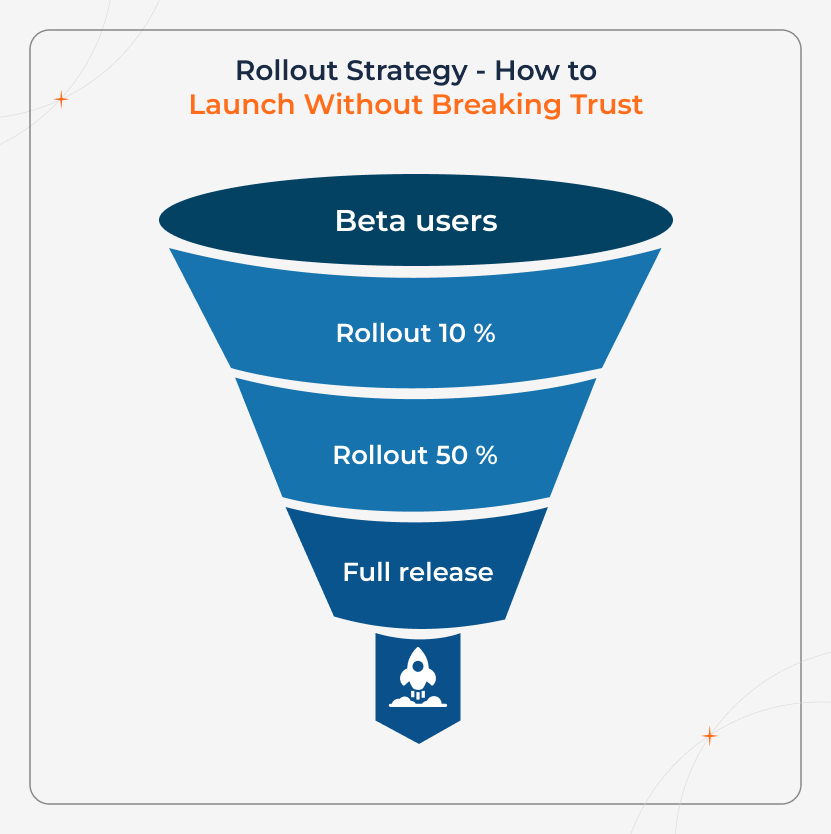
A controlled rollout is always the best option as it protects user trust and reduces risk. It is best to rely on:
1. Percentage-based rollouts - This is where new designs are released to a small group of users first, and then gradually expanded as stability is proven.
2. Real-time monitoring dashboards - Key metrics like crashes, load times, drop-offs, and conversions are tracked the moment changes go live.
3. Clear rollback criteria - Teams define in advance what signals a problem. Thus, decisions aren't made under pressure.
4. User feedback loops - In-app prompts, support data, and reviews help find out the friction early, before it impacts ratings.
This approach allows teams to validate redesigns with real users, in real conditions, while keeping the wider audience protected.
The result is often fewer negative reviews, faster recovery from issues, and a redesign that scales without sacrificing trust or stability.
Real-World Redesign Outcomes & What Actually Changes
It is to note that properly executed redesigns not just look better, but they change measurable behaviour.
Case 1: Retention Recovery
A phased onboarding redesign focused on simplifying early steps and clarifying value. During this phase, no core navigation was changed.
Result:
- User drop-offs decreased by 22%
- Existing users stayed comfortable
- New users reached activation faster
This implies that even small, targeted UX changes can deliver major gains without risking familiarity.
Case 2: Faster Releases, Fewer Delays
In another redesign, all UI and UX changes were separated behind feature flags.
Result:
- The team was able to avoid major app development delays
- Design updates shipped 30% faster
- Issues were fixed or rolled back without app store rejections
In this case, engineering flexibility is visible, and not speed alone was the key driver here.
What This Proves:
Global product teams use the same approach. Whether collaborating with a mobile app development agency in Austin or working with the mobile app development companies in the UK, controlled rollouts and modular design systems allow teams to:
- Localize experiences for different markets
- Test changes safely
- Avoid fragmenting the codebase
The result isn't just a better redesign, but it's lower risk, faster iteration, and sustained user trust.
How to Choose the Right Redesign Partner
The right partner will treat redesign as a product and business problem and not as visuals. When choosing the redesign partner, it is better to look for partners who can consistently demonstrate the following qualities:
1. They lead with data and not opinions - Decisions are backed by analytics, user behaviour, and testing, not design trends.
2. They use automated testing frameworks - This reduces regressions, protects existing functionality, and accelerates releases.
3. They plan phased rollouts from the beginning- Changes are gradually introduced, validated early, and rolled back if needed.
4. They define success metrics upfront - Clear KPIs are chosen before work begins. Thus, results determine the success.
No matter if you are working with an internal team, a mobile app development agency in Austin, or an experienced mobile app development company in the UK, the same rule applies. i.e., a data-driven process will outperform a visually impressive but poorly validated redesign. Hence, consider choosing partners like Sparkout who can optimize for stable learning and measurable improvement.
Conclusion
A successful mobile app redesign is all about how clearly it works and not its visual appearance. The best redesigns are backed by data, validated through testing, and rolled out safely. They focus on eliminating the friction, protecting those already working, and improving features that matter the most to the users. When a redesign is done right, it can improve retention and engagement, increase conversion and task completion rate, create a foundation for long-term, scalable growth, while reducing support issues and user dissatisfaction.
Thus, those planning a mobile app redesign can partner with an experienced app development team to help reduce risk and turn design changes into measurable business outcomes.