


In 2026, UI/UX design trends are no longer about flashy visuals or short-lived styles. Every design decision taken today provides a measurable impact on usability, accessibility, conversion rates, retention, and long-term product adoption. What's changed is the intent behind the trends.
The most influential UI/UX design trends of 2026 are shaped by real user behaviour, AI-driven interfaces, product maturity, and accessibility standards, etc. Teams that win aren't chasing what looks modern. Rather, they are choosing the patterns that reduce friction, guide user decisions, and scale with business growth.
After analysing hundreds of live websites and applications, reviewing usability studies, and speaking with founders and UI/UX development teams, one insight stands out. i.e., The best performing products don't adopt every UI/UX design trend. They adopt the right ones for the right users at the right stage.
This blog breaks down the most impactful UI/UX design trends shaping 2025-2026 with a practical, outcome-driven approach. For each trend, we will explain:
- Why the trend exists & the problem it solves.
- How users actually respond, beyond the visual appeal.
- Which UX & business outcomes does it improve?.
- When and where the trend should be avoided.
No matter if you are planning a redesign, launching a new product, or scaling an existing platform, this blog isn't just a list of UI/UX design trends. It is all about a decision framework for building interfaces that perform.
The Top UI/UX Design Trends That Will Define Product Success in 2026
The UI/UX design trends for 2026 aim to improve how users interact, understand, and move through digital products. These trends shape what works well today and what should be used carefully.
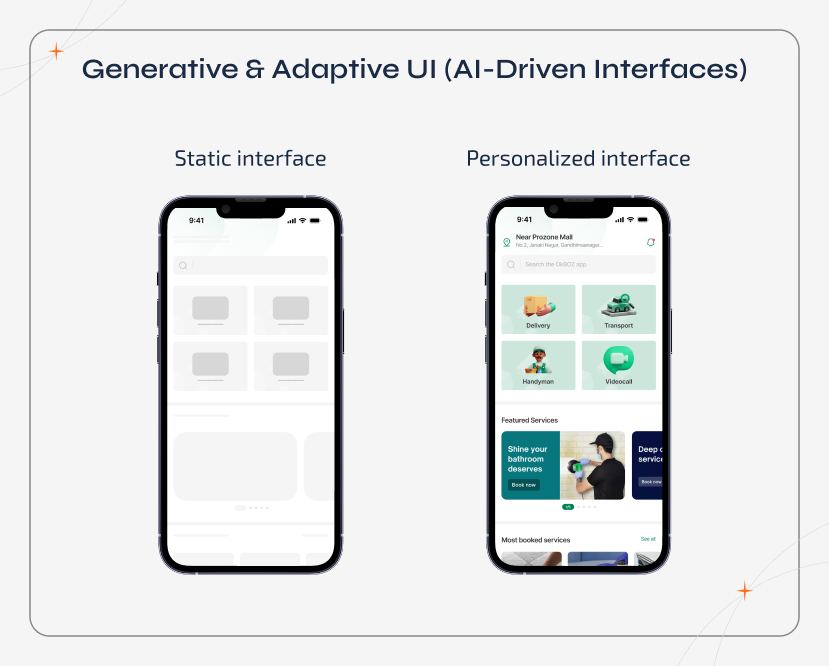
1. Generative & Adaptive UI (AI-Driven Interfaces)
What it is:
Generative UI relies on AI to dynamically adapt the layouts,
content hierarchy, and interactions based on real user behaviour. This is not a static persona.
Why this Trend Exists:
User behaviour is no longer non-linear. The
session recordings, heatmaps, & AI analytics show that different users scan, scroll, and decide
differently on the same interface. Thus, it is clear that any static layouts struggle to serve
everyone equally.
UX Outcomes:
- Reduced cognitive load
- Faster task completion
- Better onboarding for first-time users
Business Impact:
Adaptive interfaces improve SaaS activation rates,
feature discoverability, & long-term engagement.
When Not to Use It:
- Early-stage MVPs with limited user data.
- Highly regulated enterprise tools require strict UI consistency.
Best Suited For:
- SaaS dashboards, analytics platforms, and personalization-heavy products.
2. Spatial UI & Immersive Design
What it is:
Spatial UI moves beyond flat screens by designing across
depth, motion, and focus. It uses elements like Z-axis layering, gesture controls, eye tracking, and
spatial memory. Hence, it creates interfaces that feel closer to real-world interaction.
Why this Trend Exists:
As spatial computing and immersive platforms
become more common, users look for digital experiences to work more like physical spaces and not
static screens.
UX Outcomes:
- Better spatial understanding
- Fewer navigation mistakes
- Higher immersion in complex tasks
Business Impact:
Spatial UI improves comprehension & task accuracy in
complex digital environments. Thus, offers faster onboarding, reduced user errors, and higher
perceived product value.
When Not to Use It:
- Content-heavy websites.
- Standard mobile apps.
- Simple transactional flows.
Best Suited For:
- Training simulations, product visualization, and mixed-reality tools.
3. Bento Grid Layouts (Minimalism 2.0)

What it is:
Bento grid layouts make use of modular, card-based sections.
This helps users scan and explore content in a non-linear way, without feeling too difficult and
overwhelmed.
Why this Trend Exists:
Often, most users skim before they read. Bento
grids match this natural scanning behaviour and help adapt well across screen sizes and devices.
UX Outcomes:
- Faster understanding of content.
- Stronger visual hierarchy.
- Better responsiveness across the devices.
Business Impact:
Bento grid layouts help surface key features and
actions faster. This eventually improves the engagement and usability in information-dense
interfaces.
When Not to Use It:
- Long-form editorial or storytelling content.
- Platforms with strict accessibility constraints.
Best Suited For:
- SaaS dashboards, productivity tools, and feature-rich applications.
4. Ethical, Sustainable & Accessible UX
What it is:
Used for designing interfaces that prioritize accessibility,
energy efficiency, privacy, and inclusive interaction.
Why this Trend Exists:
Accessibility and sustainability directly impact
the usability, trust, and regulatory compliance.
UX Outcomes:
- Reduced visual strain
- Better assistive technology support
- Improved overall usability
Business Impact:
Accessible UX expands audience reach, reduces legal
risk, and improves retention across diverse user groups.
When Not to Use It:
- This is not optional, as only the depth of implementation varies.
Best Suited For:
- Enterprise software, fintech, healthcare, and eCommerce.
5. Micro-Interactions, Motion & Sensory Design
What it is:
Micro-interactions, including small animations, sound cues,
and haptic feedback, confirm user actions and help guide them through an interface.
Why this Trend Exists:
Users depend on immediate feedback to understand
what's happening, feel in control, and avoid mistakes.
UX Outcomes:
- Fewer interaction errors.
- Higher confidence during tasks.
- Stronger emotional connection with the product.
Business Impact:
Thoughtful micro-interactions help minimize the
friction and increase perceived product quality. This leads to better engagement and retention.
When Not to Use It:
- During accessibility-critical or motion-sensitive environments.
- Overloaded enterprise or data-heavy tools.
Best Suited For:
- Mobile apps, onboarding experiences, and consumer-facing products, especially UI/UX design mobile app experiences, where feedback and responsiveness matter most.
6. Location-Aware & Contextual UX
What it is:
Location-aware and contextual UX adapts content, layout, and
interactions based on a user's location, language, cultural norms, and usage context.
Why this Trend Exists:
Most often, those global users don't interact with
products in the same way as local users. Reading direction, content priorities, and expectations
often vary by region, thus making one-size-fits-all design less effective.
UX Outcomes:
- Reduced friction for international users.
- More relevant, localized experiences.
- Easier content understanding.
Business Impact:
Context-aware UX helps global products improve
conversions and engagement by matching the design with regional user behaviour.
When Not to Use It:
- Small products without proper localization or regional support.
Best Suited For:
- Marketplaces, global SaaS platforms, and international digital products.
7. Data-Driven Visualization Interfaces
What it is:
Data-driven visualization uses charts, maps, and interactive
visuals. Thus, helps turn complex data into information that users can quickly understand and act
on.
Why this Trend Exists:
Users don't want to rely on raw data. Visualizing
information helps them spot patterns, understand insights faster & better, and make decisions with
less effort.
UX Outcomes:
- Faster discovery of insights.
- Lower mental effort when reading data.
- Clearer understanding of information.
Business Impact:
Well-designed data visualizations minimize user
confusion and support requests while helping users make better and faster decisions inside the
product.
When Not to Use It:
- Simple transactional or form-based interfaces.
- Products dealing with very small or static datasets.
Best Suited For:
- Analytics platforms, reporting tools, and enterprise dashboards.
8. Deconstructed Hero Sections
What it is:
Deconstructed hero sections is used to break away the
traditional hero layouts by using bold typography, asymmetry, and layered visual elements. This
helps create a strong first impression.
Why this Trend Exists:
Users are used to seeing the standard hero
sections and often ignore them by scrolling. Visual disruption helps capture attention and make key
messages stand out.
UX Outcomes:
- Higher engagement at first glance.
- Better recall of core messages.
Business Impact:
Deconstructed hero sections encourage deeper scrolling
and higher campaign engagement, especially on brand-focused pages.
When Not to Use It:
- Utility-focused or accessibility-critical sites.
Best Suited For:
- Marketing websites, creative platforms, brand storytelling.
9. Purposeful Brutalism
What it is:
Purposeful brutalism involves a raw, minimal design style
that focuses on clarity and function instead of polished or decorative design.
Why this Trend Exists:
Some brands prefer to look honest, bold, and
different rather than refined. This approach even helps them stand out and communicate authenticity.
UX Outcomes:
- Strong visual focus on key content.
- Fewer distractions from unnecessary design elements.
Business Impact:
Brutalist design helps niche brands become more
memorable in crowded markets by standing out through simplicity and boldness, not visual polish.
When Not to Use It:
- Trust-sensitive industries like finance or healthcare.
- Mainstream consumer or mass-market apps.
Best Suited For:
- Fashion brands, art platforms, and experimental digital products.
10. Cursor-Based Interaction Design
What it is:
Cursor-based interaction design transforms the cursor into an
active part of the experience. So, instead of just pointing, the cursor responds with movement,
shape changes, or effects that react to user actions.
Why this Trend Exists:
On desktop devices, the cursor is always present.
So using it thoughtfully helps guide attention, hint at interactions, and encourages users to
explore without needing any extra instructions.
UX Outcomes:
- Higher user engagement.
- More playful and interactive exploration.
Business Impact:
Interactive cursor behaviour can increase session time
and improve storytelling on desktop-focused experiences.
When Not to Use It:
- Mobile-first or touch-only products.
- Accessibility-critical interfaces.
Best Suited For:
- Creative websites, portfolios, and immersive storytelling experiences.
How to Choose the Right UI/UX Design Trends for Your Product
Not every UI/UX trend is meant for every product. The biggest UI/UX design mistakes that the teams make in 2026 is adopting trends even before their product is ready for them.
Hence, the right approach is to align the design trends with product maturity, user expectations, and operational capacity. This is where UI/UX design agencies comes into play. Upon choosing the right choices early helps control the cost to design an app, preventing expensive redesigns caused by poor design decisions.
Partnering with any reputed UI/UX design company guides teams to choose the trends that improve usability instead of adding unnecessary complexity.
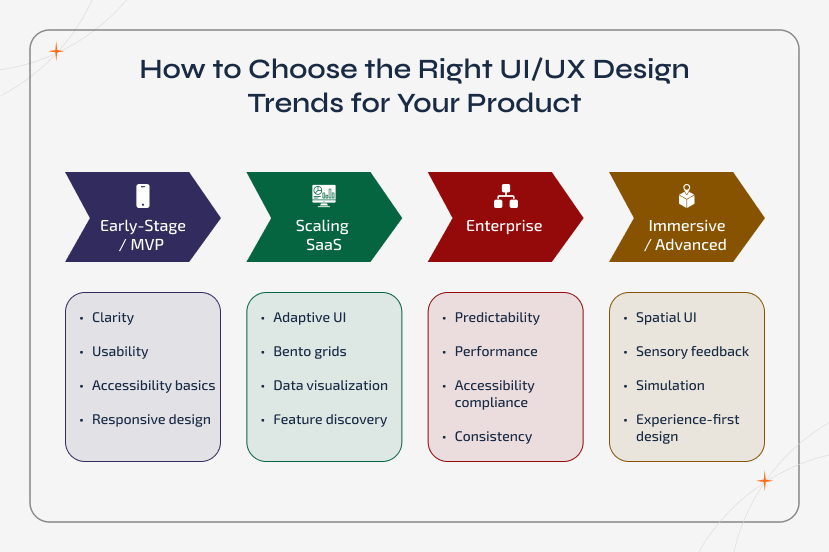
1. Early-Stage Start-ups - Optimize for Clarity First
If you are validating an idea or launching an MVP, your priority should not be on visual sophistication. It should usually be on the usability and comprehension.
At this stage:
- Users are still learning what your product does.
- Design clarity directly affects activation and retention.
- Over-designed interfaces increase confusion and abandonment.
Focus on:
- Clear layouts.
- Strong accessibility basics.
- Responsive design across devices.
Advanced trends like Spatial UI or Generative UI can wait until the usage patterns are very well understood.
2. Scaling SaaS Products - Design for Efficiency & Discovery
Once a product gains traction, complexity increases. New features, dashboards, and workflows can feel overwhelming for users if the design doesn't evolve.
Now the following trends become valuable:
- Adaptive UI.
- Bento grid layouts.
- Data visualization.
These trends help:
- Surf important features faster.
- Reduce cognitive overload.
- Improve feature adoption without constant user training.
During this stage, UI/UX design trends are no longer fancy. They directly support scalability and retention.
3. Enterprise Products - Prioritize Predictability & Performance
Enterprise users value consistency over novelty. Their workflows are repetitive, high-stakes, and time-sensitive.
For Enterprise Products:
- Accessibility is mandatory.
- Performance and reliability are more important than animation.
- Predictable layouts minimize the training and errors.
Trends should be adopted conservatively and only when they enhance efficiency, not experimentation.
4. Immersive & Advanced Products - Invest Where Experience Is the Product
For products built around training, visualization, or simulation, the experience is the value.
Here, investing in spatial UI, sensory feedback, and immersive interaction patterns makes sense. It is because this:
- Improves the comprehension.
- Reduces real-world training costs.
- Increases perceived product sophistication.
In these cases, advanced UI/UX design trends directly support the business outcomes and not just engagement.
Conclusion
Great UI/UX design in 2026 is not about chasing trends. It's about understanding human behaviour, product maturity, and usability trade-offs. The most successful products don't look impressive at first glance. They often feel effortless to use.
Hence, choose trends intentionally. Validate decisions with user research. It is also important to always prioritize usability over visual novelty.