


A mobile app launch delay is rarely caused by one major failure. It typically occurs as the result of unclear scope, unstable builds, late-stage performance issues, decision bottlenecks, or app store rejection cycles.
When a launch slips, the impact goes beyond engineering timelines. It directly affects the marketing campaigns, revenue projections, investor and stakeholder confidence, competitive market positioning, and team morale and delivery momentum.
Whether you are a founder, product manager, or CTO, this guide offers immediate clarity and a structured recovery path. You will get to know:
- What "mobile app launch delayed" actually means
- The real causes behind missed release dates
- A 14-day recovery plan
- IOS & Android launch checklists
- Technical and performance benchmarks to validate readiness
- How to prevent launch delays from happening again
With this framework, you can stabilize systems, validate performance, and deliver a mobile app with confidence.
Even experienced mobile app development companies will end up facing launch delays when factors like governance, performance validation, or store compliance are not tightly managed. Whether you are working with an in-house team or a mobile app development agency, a structured release approach helps find whether your launch ships smoothly or slips.
What "Mobile App Launch Delayed" Actually Means
A mobile app launch delay doesn't imply the app isn't finished. Rather, delays can occur at any stage of the release lifecycle, and each type needs a different recovery strategy. Thus, understanding the category in which the delay occurs is the first step towards fixing it. The common categories include:
1. Development Delay - Pre-Launch Build Not Ready
This is a product execution problem and occurs when the app cannot reach production readiness state due to unstable or incomplete core functionality. The common causes include:
- Scope creep close to the release date
- Unclear product requirements
- Architectural rework
- Integration failures
- High-severity bugs are still open
- Repeated build instability
Know it's Impact - Often, engineering timelines slip, QA cycle resets, and release confidence drops.
2. Release Delay - Built, But Blocked from Going Live
It is the phase where the app is technically complete but often delayed due to external or operational blockers that prevent the app from being published. This is a compliance and release management problem. The typical blockers include:
- App Store rejection (guideline violations, privacy disclosures, UI issues)
- Google Play policy compliance gaps
- Incorrect provisioning profiles or signing errors
- CI/CD pipeline misconfiguration
- Metadata or submission documentation errors
Know it's Impact - The app is ready internally. However, its distribution is stalled.
3. Adoption Delay - Launched, But Failing to Gain Traction
It is the stage where the app is live, but the launch underperforms. This is a product-market alignment and performance optimization problem.
Often, teams test their initial web app ideas for business successfully. However, when moving to a full-scale mobile app launch, user expectations and performance demands become much higher.
Common symptoms include:
- Low downloads despite campaign spend
- Poor onboarding conversion
- High crash rates post-launch
- Slow load times are impacting retention
- Weak alignment between product & marketing
The benefits of web app development are useful in the early stages; there is much more beyond it. i.e., mobile apps need better optimization, smoother onboarding, and stronger performance to keep users engaged.
Know it's Impact - Revenue projections fall short, retention drops, and even stakeholder confidence weakens.
Distinguishing delays under these categories matters, as not all launch delays require the same solution. For instance,
- Development delays require scope control and build stabilization
- Release delays need to concentrate on compliance fixes and operational readiness
- Adoption delays need performance tuning and go-to-market alignment
Why Mobile App Launches Get Delayed
Most mobile app development delays happen for multiple reasons. They happen when small issues across product, engineering, QA, release management, and leadership multiply over time.
As the launch date gets closer, those unresolved gaps become harder to manage. As a result, the timeline starts to slip. Most of the delays fall into five predictable categories.
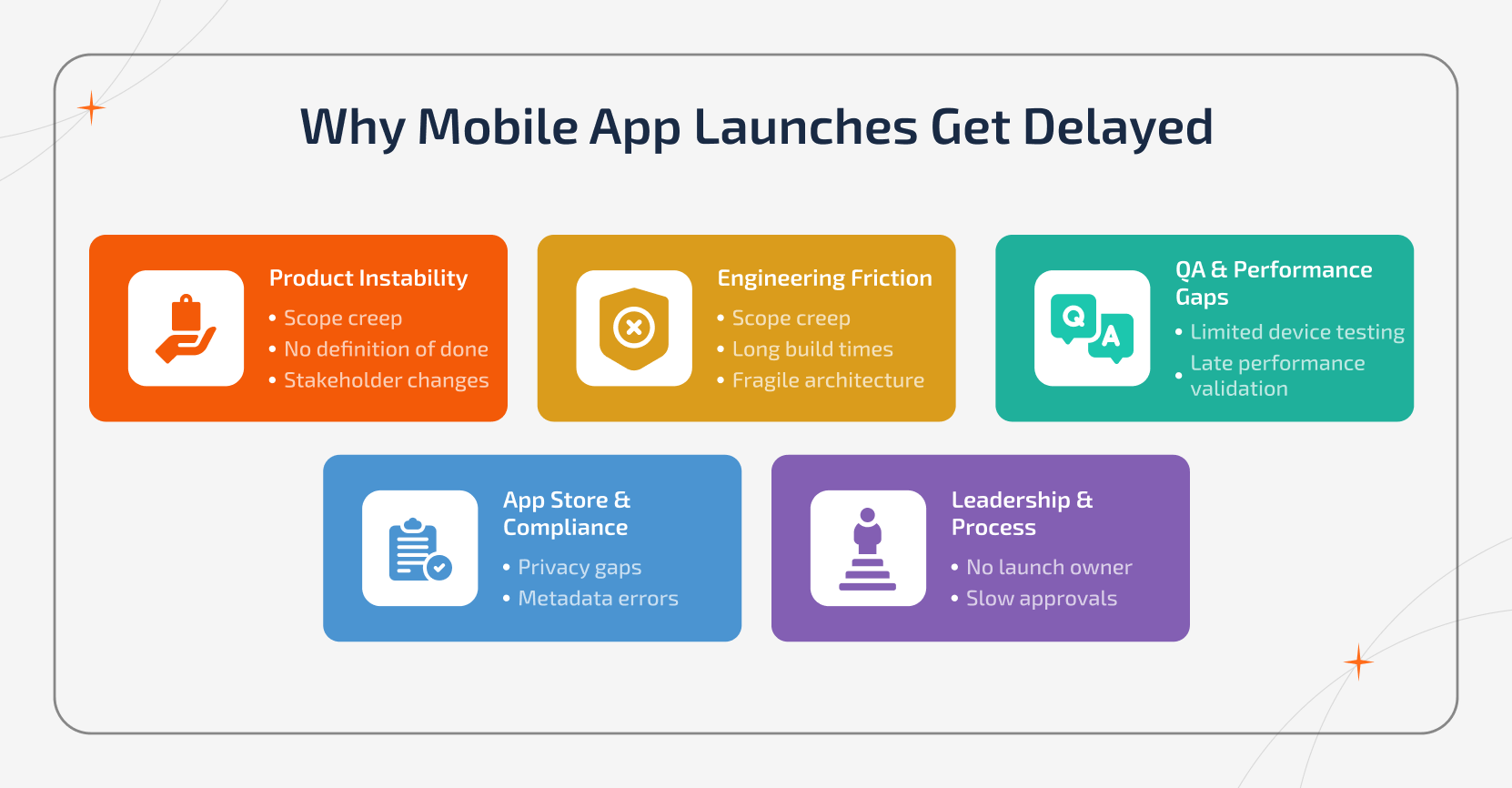
1. Product Instability
When the product features or goals keep changing, the timeline collapses.
Common signals include:
- Scope creep after MVP approval
- There is no clear "definition of done."
- Often, features get added lately to satisfy stakeholders
- Decision approvals get stuck in the review cycles
In other words, if the product isn't stable, then the build will never be stable either. Thus, it is not a development problem, but is a clarity issue.
2. Engineering Friction
Despite having a defined scope, technical execution can often slow down the momentum. As a result, you will witness:
- Growing technical debt
- Longer build times
- Fragile architecture that breaks under change
- Integration bugs that get discovered late
So, those engineering gaps erode the launch confidence quietly. By the time it is identified, recovery takes longer than expected.
3. Quality & Performance Blind Spots
A lot of times, teams validate the functionality of the mobile app while ignoring the real-world performance until it's too late. Common breakdowns that occur include:
- Limited devices & OS testing
- Manual-heavy QA processes
- No regression safety net
- Performance testing is done days before submission
The timeline obviously slips when a crash or latency appears close to the launch date. Hence, this occurs due to late validation.
Teams that rely only on manual QA come across last-minute instability. Using automated mobile app testing tools for regression, device coverage, and performance validation will eventually minimize the release risk and prevent repeated QA cycle resets.
4. App Store & Compliance Barriers
Occasionally, the app is ready internally but is blocked externally. The typical issues include:
- Privacy disclosure mismatches
- Inaccurate permission handling
- Metadata inconsistencies
- Missing reviewer credentials
- Policy violations
Each and every rejection cycle resets the momentum and adds unpredictable delays. It is this stage that exposes how prepared your release management is actually performing.
5. Leadership & Process Gaps
Often, the most underestimated cause of delay is organizational misalignment. As a result, you will get to see the following:
- No single launch owner
- Slow cross-team approvals
- Constant requirement changes
- No structured release governance
Whenever accountability goes unclear, the timeline clearly shifts. This happens not because of the technology but because of unclear ownership.
The Hidden Pattern Behind Mobile App Launch Delays
Mobile app launch delays are the cause of system breakdown. It includes scope instability, technical issues, weak validation, compliance gaps, and unclear ownership. Understanding which category is driving your delays helps you find how fast you can recover.
It is to note that you cannot fix unclear product direction by adding more QA, and you cannot solve a process issue by writing more code.
Mobile App Launch Delayed - A Practical Diagnostic Framework
Just before you start to fix up a delayed launch, you should proceed to find out the real bottleneck.
Teams often jump straight into doing more QA, more development, and more meetings. All these usually make the delay even worse. Instead, use the given 30-minute diagnostic framework to find what's actually blocking your app launch.
Step 1: Identify the Symptom
Start by asking one simple question: What is actually preventing us from shipping? With this, you shall map the symptom to the root cause:
| Symptom | Likely Cause | Fix Focus |
|---|---|---|
| "Almost done" features that never finish | No clear scope freeze | Lock MVP & stop feature additions |
| QA keeps finding out new critical bugs | Weak acceptance criteria or unclear requirements | Strengthen test plan & definition of done |
| Slow builds & unstable releases | Tooling inefficiencies or dependency sprawl | Optimize CI/CD & stabilize environments |
| App Store rejection or review delays | Compliance or submission gaps | Run a pre-submission compliance checklist |
| Constant requirement or decision changes | No single launch owner | Assign clear authority & release ownership |
Step 2: Fix the Right Layer
When you get the pattern, start to fix at the correct layer:
- Product problem - Clarify scope
- Engineering problem - Stabilize architecture
- QA problem - Strengthen validation
- Compliance problem - Improve submission readiness
- Governance problem - Establish ownership
It is better to avoid solving the wrong problem. Most of the mobile app launch delays are caused by misdiagnosis. i.e., teams start to treat the symptoms instead of the causes. Diagnosis before making actions helps prevent another timeline slip and eventually reduces the recovery time.
Mobile App Launch Delayed? A 14-Days Recovery Plan
Is your mobile app launch already delayed? You don't need to panic. All you need to do is follow a controlled reset. Just follow the 14-day recovery plan given below to quickly stabilize the product, eliminate blockers, and relaunch with confidence while ensuring the quality.
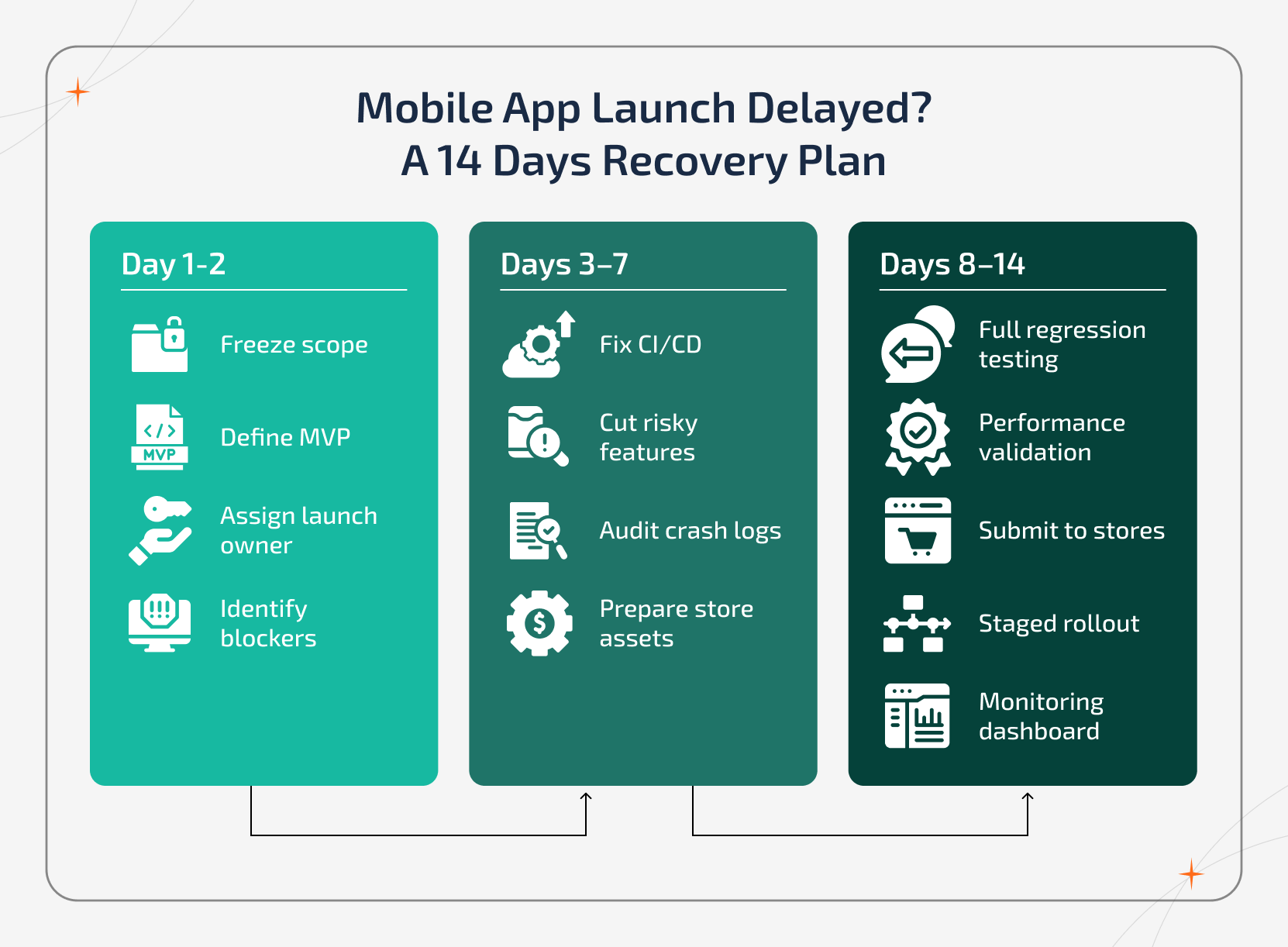
Phase 1: First 48 Hours - Regain Control
The ultimate goal of the first two days is clarity and containment.
Primary Owner: Product + CTO
Immediate Actions To Be Taken:
- Freeze all new feature requests
- Define the minimum launch scope (one-page alignment document)
- Identify the top five blockers preventing your release
- Select and assign a single launch decision owner
- Then, set a revised, realistic launch date
This step stops the bleeding. It is because no recovery plan will work when there is no scope control and ownership.
Phase 2: Week 1 - Stabilization
During this phase, you should shift the focus to technical stability and operational readiness.
Primary Owner: Engineering + DevOps + QA
Priority Actions To Take:
- Cut down those non-essential or risky features
- Fix CI/CD pipeline failures
- Minimize the build times and eliminate environment inconsistencies
- Audit crash logs and resolve high-severity issues
- Prepare complete App Store/Play Store submission assets
- Implement feature flags for components that carry risk
The objective is simple: You should make the build stable enough to trust.
Phase 3: Week 2 - Validation & Controlled Release
Once the build is stabilized, start to validate it under real-world conditions before shipping.
Primary Owner: QA + Product + DevOps
Critical validation steps:
- Start running full regression testing
- Execute performance testing for load, memory usage, and startup time
- Submit to App Store and Google Play
- Prepare a staged rollout strategy (5% ? 25% ? 100%)
- Activate real-time monitoring dashboards
- Define a hotfix protocol for rapid response
This is the phase that ensures you launch your product now with visibility and not mere hope.
Why This 14-Day Reset Plan Works:
Most delayed launches fail again because teams rush to 'catch up.' At the same time, this framework slows things down, which is just enough to restore control. It brings back the scope clarity, technical stability, performance validation, and release governance.
How to Overcome Mobile App Launch Delayed Issue on iOS & Android Without Sacrificing Quality
Whenever the launch timeline slips, teams often end up rushing things up. However, speeding up without proper structure often creates more risk.
So, with clarity, automation, and disciplined release management, it is possible to launch a cycle. Given below are the practical and low-risk strategies that help you speed up your iOS and Android launch while protecting the UX and stability.
1. Lock the MVP Scope Early
Whenever there is a change in features close to the app submission, builds become unstable, QA cycles restart, and release confidence drops.
What to do:
- It is better to freeze all features at least two weeks before the submission.
- Move enhancements to a clearly defined v1.1 roadmap.
- Define and document a strict 'definition of done' for every feature.
Why it works:
- Often, a locked scope helps minimize the rework, limit regression risk, and provides engineering & QA teams with a stable target.
What not to do:
- It is better to avoid adding small features near release. Because even the minor changes often trigger major instability.
2. Automate Builds & Distribution
Following manual steps often slows down the team's efficiency and increases the risk of release-day errors. By automating processes, it is possible to create faster feedback, consistent builds, and predictable releases.
What to do:
- Use CI/CD pipelines for automated builds.
- Automated unit, integration, and smoke tests.
- Auto-distribution to TestFlight and Play Internal Testing.
Why it works:
- This helps engineers get immediate validation. QA works on stable builds. Release packaging becomes repeatable and reliable.
What not to do:
- It's better to avoid manual build signing or assembling release artifacts at the last minute.
3. Use Staged Rollouts Instead of Big-Bang Releases
Often, releasing the rollouts to 100% of users on day one increases the chances of risks. Whereas a staged rollout lets you move quickly while keeping in control.
How to execute:
- Start with 5-10% of users.
- Monitor crash-free sessions, performance, and early feedback.
- Then, gradually increase the rollout in controlled phases.
Why it works:
- With staged rollouts, issues can be fixed early without pulling the entire release.
What not to do:
- Avoid full public launches without real-time monitoring and rollback readiness.
4. Optimize Build and Compile Time
Long build times often slow down the iteration and reduce the team's momentum. Thus, faster builds mean faster validation.
How to speed up:
- Cache dependencies.
- Remove unused libraries.
- Parallelize build processes.
- Clean up legacy modules.
Why it works:
- Shorter build cycles allow quicker testing and faster bug resolution.
What not to do:
- Avoid letting the build times exceed 15-20 minutes. Long cycles increase the chance of delays.
5. Prepare Store Assets in Parallel
Launch delays often happen when the submission assets are incomplete, and not because the code isn't ready. Hence, preparation should run alongside the development.
Prepare early:
- Finalize screenshots before the release candidate.
- Confirm privacy policy URLs.
- Draft reviewer notes in prior.
- Finish off the compliance and age rating forms.
Why it works:
- Parallel preparation prevents submission-day surprises.
What not to do:
- Do not wait until code freeze to prepare store content.
6. Fix Performance Early - Not at the End
Performance issues that are found late almost always delay the launch. Thus, optimization should begin during development and not during the final sprint.
Why should you optimize early:
- Compress and optimize images (WebP or AVIF).
- Implement lazy loading.
- Use a CDN for heavy content.
- Minimize unnecessary API chaining.
Why it works:
- Early performance tuning prevents last-minute QA failures and potential store rejections.
What not to do:
- Do not treat performance as a final-phase checklist item.
7. Define Clear Release SLAs
Unclear review timelines bring in invisible delays. So, keep defined time boundaries before launching critical steps.
Example SLAs:
- Ensure to complete code review within 24 hours.
- P0 bug triage within 4 hours.
- Release candidate decision within 48 hours.
Why it works:
- Defined SLAs reduce approval bottlenecks and eliminate open-ended review cycles.
What not to do:
- Do not let any key decisions sit without clear ownership or deadlines.
Know the iOS & Android Launch Readiness Checklist
Often, the mobile app launch delays happen at submission and not during the development phase. Even those production-ready apps get blocked due to compliance gaps, metadata errors, and policy violations. It is possible to prevent the rejection cycles by using this structured pre-launch audit.
Apart from this, the app store rejection will add additional launch delays, and it may range from a few days to weeks. With a structured pre-submission review, it is possible to reduce the rework, resubmission delays, revenue impact, and team frustration.
App Store Connect (iOS) Readiness Checklist
Before submitting your mobile app to Apple, validate the following:
| Area | What to Verify | Why It Matters |
|---|---|---|
| Privacy Labels | Accurately reflect all data collection & tracking | Mismatches trigger automatic rejection |
| App Review Notes | Clear explanation of features and flows | Reduces reviewer confusion |
| Reviewer Credentials | Working login provided | Prevents "cannot access app" rejection |
| Screenshots | All required device sizes covered | Missing sizes block approval |
| App Preview Video | Uploaded (if applicable) | Improves listing quality |
| Age Rating | Completed accurately | Required for submission |
| In-App Purchases | Fully configured & tested | Prevents subscription rejection |
| Push Notifications | Properly declared & justified | Avoids privacy flags |
| Sign in with Apple | Implemented when required | Mandatory for certain login flows |
Most Common iOS Rejections:
- Incomplete or inaccurate privacy disclosures
- Broken authentication flows
- Crashes that occur during onboarding
- Subscription validation failures
- Metadata not matching actual app behaviour
Google Play Console (Android) Readiness Checklist
Google Play compliance issues are often policy-driven and not technical. So, confirm the following before release:
| Area | What to Verify | Why It Matters |
|---|---|---|
| Target SDK | Latest required version | Non-compliance blocks updates |
| Data Safety Form | Accurate disclosure of data usage | Policy enforcement is strict |
| App Signing | Properly configured | Required for release |
| Content Rating | Questionnaire completed | Mandatory for listing |
| Closed Testing | Successfully executed | Required before production release |
| Release Notes | Clear and complete | Improves review clarity |
| Screenshots | Optimized for required formats | Missing assets delay approval |
| Permissions | Properly declared & justified | Background location is heavily reviewed |
Common Google Play Blockers
- Policy violations (misleading claims, restricted content, etc.)
- Improper background location usage
- Unclear or inconsistent data usage disclosures
- Incomplete testing track validation
What Metrics Should Be Green Before Launching a Mobile App?
Launch decisions should be based on data and not deadlines. It is mandatory for the mobile app to meet minimum stability and performance benchmarks before approving a production release.
| Metric | Recommended Threshold | Why It Matters |
|---|---|---|
| Crash-Free Sessions | ≥ 99% | Ensures user trust and store rating stability |
| ANR Rate (Android) | < 0.47% | Above this increases the Play Store visibility risk |
| Cold Start Time | < 2 seconds | Directly impacts retention and first impressions |
| API Response Time (P95) | < 500 ms | Reduces perceived lag and drop-offs |
| Memory Usage | Stable under expected peak load | Prevents crashes on mid-range devices |
| Critical Defects | 0 open P0 / P1 issues | High-severity bugs must be fully resolved |
A metric being green means:
- It is validated using real-world test conditions.
- It is monitored continuously.
- It is consistent across devices and environments.
- It remains stable during the load testing.
One-time validation is not enough, and stability must be repeatable.
Strategic vs. Accidental Delays - Know the Difference
Not every launch delay happens due to failure. At times, delays may be intentional and proactive. In contrast, others are preventable and costly. Hence, understanding the difference helps you respond.
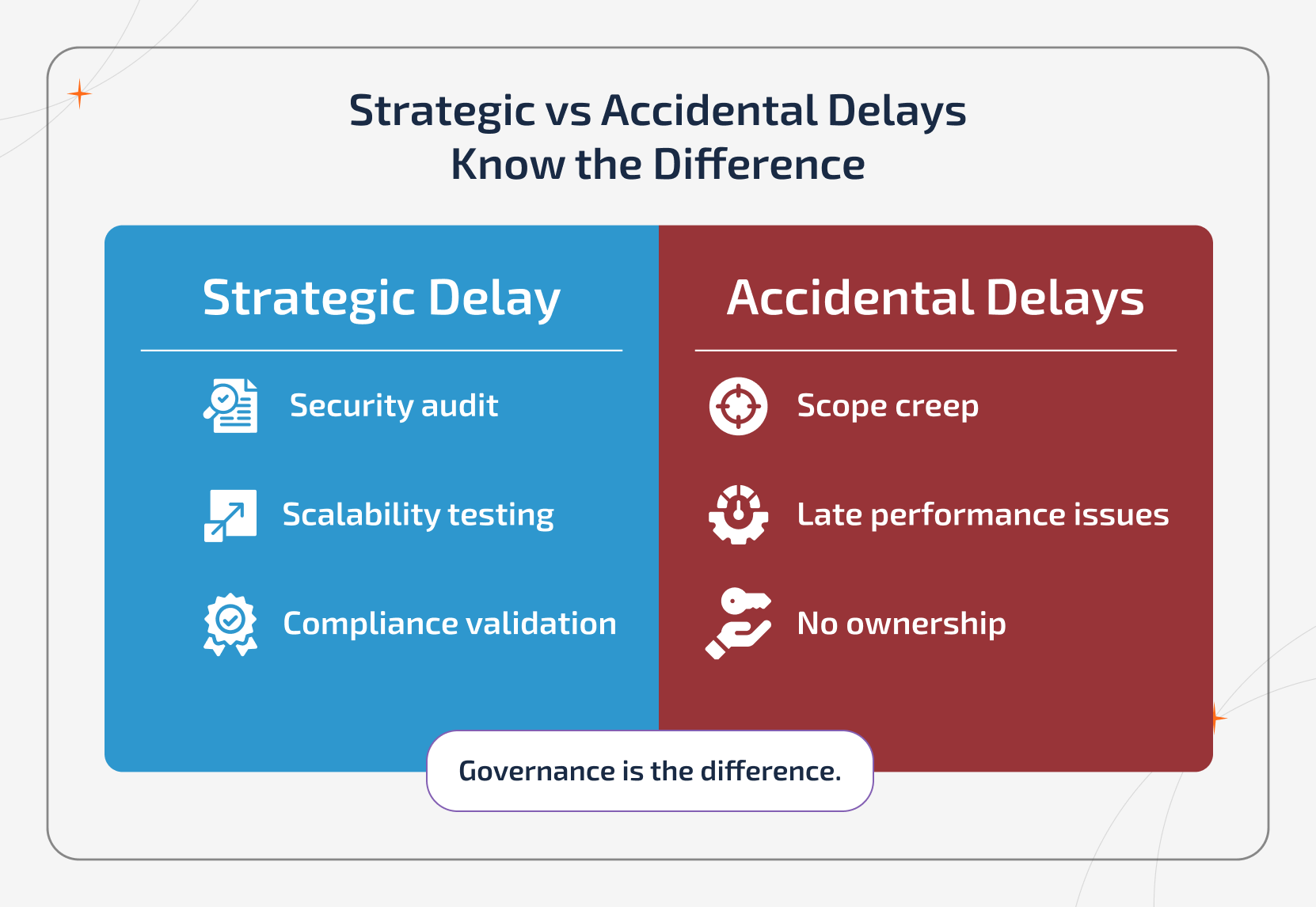
1. Strategic Delays - Deliberate & Controlled
A strategic delay happens when a team consciously chooses to pause the launch to reduce the long-term risk. Some examples include:
- Extending a security audit
- Completing regulatory or compliance validation
- Running deeper scalability or load testing
- Hardening infrastructure before peak traffic
- Addressing a high-impact architectural weakness
All the above delays are planned, transparent, and backed by data. They help protect the user trust, brand reputation, store ratings, long-term scalability, and enterprise credibility. A strategic delay costs a few weeks, and it prevents months of recovery later.
2. Accidental Delays (Reactive & Uncontrolled)
An accidental delay happens when gaps are found late and force an unplanned pause. Some of the common causes include:
- Poor discovery and unclear requirements
- Endless revision cycles
- Performance problems were found near submission
- Weak architectural decisions that don't scale
- No clear launch ownership
These delays are not intentionally made; rather, they occur because the risks were not identified early. This delay removes confidence rather than protecting the business.
The Difference:
The real difference between strategic and accidental delays is governance.
Strategic delays are proactive and data-driven, while accidental delays are reactive and expose user pressure. Both the delays actually strengthen the product, while they may look like extending the timelines.
How Performance Debt Turns Into Launch Delays
Most often, it isn't the timeline problem that causes the mobile app launch delays. They begin as performance debt.
Teams start to move fast during development and focus on features and functionality. Performance optimization gets postponed often with the assumption that it can be handled later. Now, the final QA begins, and that's when the speed-delay loop happens.
This is especially critical for products built by an AI app development company, where real-time inference, model latency, and API responsiveness impact the start-up time, UX, and retention.
Common technical causes include:
- No CDN integration for content-heavy apps
- Large images not optimized (WebP / AVIF)
- Synchronous API calls are blocking the UI
- Missing lazy loading
- Memory leaks under extended use
- Unindexed database queries
The above issues may not appear during light testing. But under real-world conditions, they lead to slow start-up times, crashes, UI freezes, and latency spikes. When this is found close to the submission, timelines slip. Regression cycles will restart. Release candidates get rebuilt.
Now, performance debt turns into timeline debt. The solution is simple: optimize early. Implement caching, asynchronous loading, asset compression, and infrastructure hardening during development.
This shall not be done during the final sprint. It is because when the performance is fixed later, the more expensive the delay becomes.
How to Prevent Mobile App Launch Delays in the Future
Avoiding launch delays is all about building repeatable systems. To prevent the delays from recurring:
Adopt release trains with a predictable cadence
- Automate builds & smoke tests
- Use feature flags for high-risk features
- Define clear acceptance criteria before development begins
- Set SLAs for code reviews and approvals
- Conduct structured sprint reviews
- Monitor performance continuously, and not just before launch
The above practices help reduce the last-minute surprises and stabilize delivery.
How Sparkout Helps Recover a Mobile App Launch Delayed Project
At Sparkout, we help restore the launch confidently. When the mobile app launch is delayed, the real issue is the alignment and rarely the speed. We ensure strategy engineering and release governance to stabilize the product before it goes live.
Our structured recovery approach includes:
- Comprehensive launch delay audit covering product, technical, QA, & release gaps
- MVP scope realignment to remove the instability
- CI/CD pipeline stabilization & build optimization
- App Store & Google Play submission support
- Performance tuning & load validation
- Architecture review for scalability & resilience
- Staged rollout strategy to minimize go-live risk
- Post-launch monitoring & quick hotfix protocol
We focus on the root causes and not surface-level fixes. It is because speeding up a broken system only compounds risk. We help you ship with stability, scalability, compliance, and operational clarity.
We not just speed up launches but also ensure they are production-ready, scalable, and defensible.
Winding Up
A delayed mobile app launch is a feedback and it signals that something in the system requires attention. It can be anything between process misalignment, architectural debt, unstable scope, or weak governance.
When the found delays are handled currently, then it becomes a reset point. It offers the chance to stabilize the foundation, validate performance, strengthen the release discipline and align teams before scaling. So, businesses can launch with confidence and scale without regret. So, a mobile app launch delay is a structured recovery opportunity and is not a crisis to deal with.