


If you're reading this, you've probably been searching long and wide for the best mobile application testing tools for your project. Maybe you're a founder about to build the next big app for millions of users. Or maybe you've already proceeded with app development and want to make sure that you can launch it without worrying about bugs.
If this describes who you are, then you've come to the right place. In this blog, you'll learn everything you need to know about the latest tools professionals use to test their mobile apps, what automated testing is, and what to look for when selecting an automated testing tool. So, let's dive in and see the best automated mobile app testing tools and frameworks in 2026.
What is Mobile Automation Testing and Why Should You Care?
Mobile app automation testing is a method where you use automated mobile app testing tools and scripts to check the quality of your apps. This includes the functionality and usability of your app, along with the performance.
The reason test automation is important is that your app has to work on multiple devices under different real-world conditions. Manual testing is an option, and you should still do it even if your tests are automated. However, it is practically impossible for you to manually test for all cases that may arise during real-world use of your apps. Additionally, automated mobile app testing tools provide useful features to reduce the time you take for testing, which results in you being able to launch your apps faster.
Another hurdle in app testing is that different people use different devices. It's very difficult to tune your app for multiple devices manually, especially if you have a small team or don't have a dedicated quality assurance and testing service. Test automation solves this by giving you access to tools and features that can run simultaneous tests on multiple devices, saving you time and money.
Mobile App Testing Tools vs Frameworks: What's the Difference?
It's understandable if this is confusing you a little bit. You'll see the terms mobile application testing tools and mobile application testing frameworks being thrown around interchangeably. So, let's simplify things.
You can say that tools are software or programs you can use to automate your mobile app testing process. However, frameworks are like rules. Typically, a tool or software will have a user interface that you can use to complete your tasks. Frameworks are rules that you can import into a code editor or into the tools that you use to accomplish tasks.
In our context, a test automation tool is what you would use when you want to carry out a specific kind of task or automate tests for a specific kind of app. Mobile application testing tools are great for this because they have built-in tools to help you accomplish your tasks.
Now, you would use a framework when you need more flexibility. Frameworks do not have graphical user interfaces and work using code. In short, you would need coding knowledge to run test automations.
Best Automated Mobile App Testing Tools in 2026 to Uplift Your Workflow
When it comes to the best mobile app testing tools, you have a lot of options to choose from. You're not necessarily at a disadvantage if you have one over the other. However, knowing about these tools in detail will help you optimize your testing process and development plans.
1. TestGrid

If your priority is to quickly automate the testing process across multiple devices, then TestGrid is for you. TestGrid gives you a lot of flexibility too, because you can do both manual and automated testing.
Additionally, TestGrid gives you AI-powered scriptless testing. This gives TestGrid a powerful advantage over web app development and other mobile application testing tools. Further, it allows you to test your apps thoroughly, even if you have a very small team.
Key Features:
- You can test your mobile apps on hundreds of real devices for Android and iOS.
- If you want more flexibility, you can integrate TestGrind with custom scripts or code.
- The built-in AI Auto Heal feature reduces maintenance by automatically identifying defects and fixing them.
- You can create custom dashboards to visualize your test results and work on improving your app's performance.
- Integrate it easily with popular CI/CD tools to automate the testing process further.
- Making it a standout pick among mobile application testing tools.
- If your needs are really specific, you can also reserve a device for exclusive access.
Pros:
✅ Helps in reducing device lab management for QA teams.
✅ Suitable for distributed teams working remotely.
✅ Since the testing environments are cloud-hosted, the setup requires minimal infrastructure.
Cons:
❌ Advanced customization might require technical expertise.
❌ Full dependence on cloud environments will lead to network-related delays.
Best Suitable For: Companies that really want to simplify mobile QA operations without maintaining any physical testing infrastructure.
Not Ideal For: Teams who prefer complete local control over their testing environment.
2. ACCELQ

If you're running a AI app development company and looking for a suitable tool, then ACCELQ might just be for you. It's a great choice among mobile application testing tools because ACCELQ is an AI-powered codeless test automation tool. This tool suits enterprises because you can use its capabilities for mobile and web app testing, APIs, databases, and packaged apps.
Key Features:
- You can automate your testing process throughout your project's lifecycle. From gathering requirements to deployment of your app.
- ACCELQ rapidly increases your testing process by applying AI and ML algorithms. It's intelligent enough to understand and adapt to changes in your applications, which reduces maintenance and increases test coverage.
- It also supports popular CI/Cd tools and testing frameworks for ease of use.
- You can collaborate easily with your team members because ACCELQ provides a centralized platform where you can design tests, execute, and report.
Pros:
✅ Provides detailed analytics for tracking efficiency.
✅ Robust governance and traceability features for enterprise-level QA processes.
Cons:
❌ Higher licensing cost when compared to many open-source alternatives.
Best Suitable For: Larger organizations that require structured QA workflows and strong management capabilities.
Not Ideal For: Small teams and startups that actually need low-cost automation tools.
3. Ranorex

Ranorex is a very powerful candidate among mobile app testing tools that can handle automations for mobile apps, web apps, and desktop apps. It supports a great range of coding languages and is easy to use and approach, even if you are non-technical.
Key Features:
Ranorex gives you a very intuitive object recognition engine that can identify the elements in your UI even if they have been changed or are not visible.
It also gives you the ability to integrate with popular tools such as Jira, Jenkins, and TestRail, which makes it very easy to automate your entire testing process.
Pros:
✅ Offers stable performance for long regression testing cycles.
✅ Provides detailed reporting and debugging insights during the execution.
✅ Strong documentation and onboarding resources for new users.
Cons:
❌ The licensing costs might become expensive when the team expands.
❌ Flexibility is limited when compared to custom frameworks.
Best Suitable For: Organizations that need a reliable commercial testing solution with strong reporting capabilities.
Not Ideal For: Developers who prefer highly customizable automation frameworks.
4. Kobiton

If you're looking for mobile-first testing platforms, then Kobiton should be on your list. Much like many other mobile application testing tools, Kobiton gives you features to automate your testing process, such as visual testing, scriptless automation, and performance testing.
Key Features:
- Kobiton is a great tool that gives you access to hundreds of testing devices on the cloud.
- It also gives you support for popularly used frameworks for testing, such as Selenium, Appium, Espresso, and XCUI.
- Kobiton is a comprehensive tool for testing because it gives you performance evaluation features in addition to functional testing tools. These features can detect spikes in CPU usage, battery draining, and latency.
- Kobiton also gives you support for mobile continuous testing, such as integration with CI/CD tools and self-healing test scripts.
Pros:
✅ Removes the need for maintaining an in-house device lab.
✅ Provides scalable testing environments for growing teams.
✅ Assists in speeding up release cycles by enabling quick remote testing tools.
Cons:
❌ The costs can increase depending on the number of devices and sessions used.
Best Suitable For: Teams that need scalable mobile application testing environments without investing in physical hardware.
Not Ideal For: Organizations with strict compliance rules that actually require internal testing setups.
5. TestComplete Mobile

If you're looking for mobile application testing tools for simple tasks such as automating UI actions, then TestComplete Mobile is for you. You can automate your UI actions on real mobile devices or emulators with scriptless record and replay easily.
Key Features:
- You can use a library that contains prede ned keywords and create tests that you can update and maintain easily.
- You can get comprehensive coverage by running tests in parallel on multiple devices and operating systems.
- You can even do test automation by recording your test steps as you interact with your app and playing them back.
Pros:
✅ Most suitable for long-term regression testing strategies.
✅ It provides strong debugging and log analysis capabilities.
✅ Quick adoption for teams who are transitioning from manual testing to automation.
Cons:
❌ Complex projects might require deeper scripting knowledge.
❌ The licensing and maintenance costs might increase over time.
Best Suitable For: QA teams that are looking forward to introducing automation into their testing workflows.
Not Ideal For: Highly technical teams that prefer full code-based automation frameworks.
6. Eggplant

Eggplant is another big name among mobile application testing tools for graphical user interfaces. Eggplant has image-based testing, and you can use it with multiple platforms and technologies. The great thing about Eggplant is that you can create a single script and use it to automate.
Key Features:
- You can use Eggplant's image-based testing to test GUIs by recording actions. You don't have to code with Eggplant as it generates test scripts for you.
- Eggplant is really useful if you want to automate complex tests, such as those involving multiple windows, tabs, or interacting with your database.
- It is easier to use than other mobile application testing tools because it uses an English-like scripting language called SenseTalk.
- That's not all, it also has an AI-powered automation feature that lets you automate very complex tests.
Pros:
✅ Supports testing across a wide range of operating environments.
✅ Works well with apps that require constant UI changes.
Cons:
❌ The performance might slow down while handling huge visual test suites, leading to app development delays.
❌ Image-based automation may require constant updates when the UI design changes.
Best Suitable For: Projects that prioritize validating user interface behaviour from a visual perspective.
Not Ideal For: Apps that require extremely fast test execution for CI pipelines.
Best Mobile Application Framework to Choose in 2026
Similar to testing tools, selecting the right mobile app testing framework depends on your project goals and the platforms you need to support. Also, understanding their strengths will help you choose a framework that improves testing efficiency and overall application quality.
1. Appium

If you're aiming at open-source development, Appium is a good pick for you. You can automate testing for multiple types of applications, such as native apps, hybrid apps, and web apps for business. This is in the top list because it supports both Android and iOS.
Key Features:
- Appium is a cross-platform tool, which means that you only have to write tests once and test them on multiple platforms.
- You can easily automate testing for hybrid applications that have native app and web app elements.
- You can test multiple tests at the same time using parallel testing. This is a great quality to look for when selecting mobile application testing tools.
- Being an open-source tool, you won't have any dif culty nding documentation or help from the large community.
Pros:
✅ Instead of learning new languages, this framework allows teams to rescue existing programming skills.
✅ It is supported by a large ecosystem of plugins and integrations.
✅ This is highly flexible and customizable for different testing strategies.
Cons:
❌ It requires a proper test architecture to maintain long-term stability.
❌ Debugging complex test failures can be challenging sometimes.
Best Suitable For: Development teams that needs flexible automation framework adaptable to different projects.
Not Ideal For: Teams who look for a fully visual or no-code automated solution.
2. Espresso

If you're about to build a native Android application, then Espresso is one of the most reliable mobile application testing tools. Provided by Google, this automated tool is designed specifically for UI testing of Android applications. This makes things fast and stable when compared to many third-party frameworks.
As Espresso is tightly integrated with the Android development environment, developers can easily write and run tests without any heavy setup.
Key Features:
- The test cases of Espresso can be crafted with either Java or Kotlin.
- This tool ensures that the tests are stable by waiting for the UI events to complete before the execution in next action.
- It integrates seamlessly with Android Studio. So, developers can run tests directly from their development environment.
- As it synchronizes automatically with the background operations, this tool provides fast and reliable UI testing.
Pros:
✅ It provides quick feedback during the entire development cycle.
✅ It is designed specifically for Android applications, ensuring strong reliability.
✅ Works well for validating UI behaviour during frequent code updates.
Cons:
❌ It is mostly used by developers rather than dedicated QA teams.
❌ The documentation is limited compared to broader cross-platform frameworks.
Best Suitable For: Android app development teams who really want tight integration between testing and coding workflows.
Not Ideal For: Specific projects which required testing across multiple mobile platforms.
3. XCUITest

If your core focus is iOS application testing, XCUITesting is one of the most powerful and flexible application testing tools offered by Apple. Alongside this tool, the app will be built directly into the iOS development ecosystem and is widely used for automating UI tests on iPads and iPhones.
As it's native to the iOS ecosystem, it delivers high performance and accurate results when testing mobile applications.
Key Features:
- Developers can write automated test scripts using Swift or Objective-C applications.
- It supports UI testing, functional testing, and performance testing for iOS applications.
- XCUITest allows testing on both simulators and real Apple devices to make sure better app reliability.
- This tool allows testing on both simulators and real Apple devices to ensure better reliability.
Pros:
✅ Works reliably with Apple's ecosystem.
✅ It provides deep access to the internal behaviour of iOS applications during testing.
✅ Well-suited for long-term maintenance of iOS testing pipelines.
Cons:
❌ Always required macOS environments for development and execution.
❌ The community support is quite smaller compared to cross-platform tools.
Best Suitable For: iOS-focused teams that really want a native testing framework maintained within Apple's ecosystem.
Not Ideal For: Certain organizations that develop applications for multiple platforms.
4. Selendroid

Selendroid is a great open-source tool for test automation if you're an Android nerd. You can do automated testing for both hybrid apps and native apps easily. It also allows you to do test automation on web-based apps on mobile.
Key Features:
- A great feature with Selendroid is the hot plugging of hardware devices. You can connect or disconnect your devices without restarting the app or the device, making it a strong contender among mobile application testing tools.
- It's a great tool even if you're less experienced because it has a built-in inspector that simplifies test case development. This inspector app provides you with a visual interface when you test the UI elements of your mobile application.
- You will be able to test your apps on various Android devices, which will include physical devices and emulators.
Pros:
✅ It is very useful for validating legacy Android applications.
✅ Allows quick test execution for basic Android testing scenarios.
✅ Being a lightweight framework, Selendroid is much easier to deploy in small testing setups.
Cons:
❌ Might not support the latest Android platform capabilities.
❌ Limited updates and community activity when compared to modern frameworks.
Best Suitable For: Testing older Android applications that require lightweight automation tools.
Not Ideal For: Modern Android applications that fully rely on newer platform APIs.
5. EarlGrey

Speaking of automation tools, EarlGrey is another powerful iOS testing framework developed by none other than Google. This is designed specifically to provide highly synchronized UI testing, which ensures that the testing actions occur only when the app is completely ready.
While comparing with other mobile application testing tools, EarlGrey focuses mainly on test stability and accuracy when interacting with iOS UI elements.
Key Features:
- This tool provides highly detailed error reporting, which helps developers to identify issues quickly in their applications.
- Alongside this framework, developers can write tests using Swift or Objective-C, which makes it flexible for iOS teams.
- EarlyGrey synchronizes with the UI, animations, and network calls automatically before executing test actions.
Pros:
✅ Well-suited for validating complex UI interactions.
✅ Designed specifically to deliver highly consistent test results.
✅ Provides robust debugging insights when UI failure occurs.
Cons:
❌ The adoption is small compared to mainstream frameworks.
❌ Requires a deeper understanding of the iOS testing tools environment.
Best Suitable For: IOS projects that actually require validation of UI interactions.
Not Ideal For: Teams that look for widely adopted cross-platform testing solutions.
6. Calabash

Calabash is unique among mobile application testing tools because it is a Behaviour Driven Development framework, or BDD for short. You can use natural language to interact with applications, allowing you to write tests that are concise and easy to understand.
Key Features:
- Calabash gives you something called test coverage analysis, where you can see if your tests cover your application's code properly.
- You get plenty of mobile-specific features with Calabash, like interacting with mobile devices, simulating gestures, and verifying elements on the screen.
- Calabash also allows you to test your apps on physical devices and gives you a better idea of how your app will perform in real-world scenarios..
Pros:
✅ More useful for documenting application behaviour during testing.
✅ It encourages collaboration between developers and non-technical stakeholders.
Cons:
❌ Limited ecosystem support for advanced automation workflows.
❌ Slower development activity when compared to modern automation frameworks.
Best Suitable For: Teams that usually prefer behaviour-driven testing approaches.
Not Ideal For: Software projects that require highly advanced automation capabilities.
7. Robotium

Robotium is one of the popular Android automation testing frameworks that allows developers to create powerful automated tests for both hybrid and native Android applications. This is widely known for making UI testing simple and more efficient.
Among the other mobile app testing tools, Robotium stands out because it allows developers to write black-box test cases without the need for deep knowledge of the app's internal code.
Key Features:
- Robotium makes it easy to simulate user actions such as swipes, taps, and navigation flows.
- It can run tests on both real Android devices and emulators, giving teams the flexibility during testing.
- This framework allows developers to write powerful automated UI test cases with minimal coding effort.
Pros:
✅ More useful for quick UI validation during development cycles.
✅ Only requires minimal configuration for basic automation scenarios.
✅ Lightweight framework that is easy to deploy in Android testing environments.
Cons:
❌ In recent years, the community activity has decreased.
❌ Limited support for modern Android architecture patterns.
Best Suitable For: Software developers who need quick UI testing for simple Android applications.
Not Ideal For: Large-scale Android projects that require advanced automation strategies.
8. Nightwatch JS

NightWatch JS is a JavaScript-based testing framework, specifically designed for automated testing of web and hybrid applications. This is particularly useful for teams who prefer working with JavaScript or Node.js environments.
Unlike most of the mobile application testing tools, Nightwatch JS primarily focuses on end-to-end testing and browser-based automation.
Key Features:
- It integrates seamlessly with CI/CD pipelines, which help teams to automate their testing workflows.
- Nightwatch JS supports end-to-end testing for web and hybrid mobile applications.
- It allows developers to write automated tests using JavaScript, making things easy for web development teams.
Pros:
✅ Works well in modern DevOps environments.
✅ It fits naturally into JS-based development workflows.
✅ Supports scalable automation for web-heavy.
Cons:
❌ Optimized primarily for browser automation rather than native applications.
Best Suitable For: Web development teams that need automation tools aligned with the JavaScript stack.
Not Ideal For: Teams who focuses mainly on native mobile application testing.
9. Frank

Frank is special because it's built just for automating tests on iOS and Mac applications. You can use natural language style to write tests because it uses a framework called Cucumber. You also get Symbiote, which is their app inspector that you can use to see detailed information about your running apps.
Key Features:
- It takes very little time to integrate Frank with an iOS application, unlike other mobile application testing tools.
- You can record videos during testing so that you can see how your app behaves during testing.
- You can use Frank with your CI/CD system.
- Last but not least, you can see detailed information about your app by using Frank's app inspector.
Pros:
✅ Helps testers to easily inspect application behaviour during runtime.
✅ Useful for validating app functionality during early-stage development.
✅ Lightweight framework with minimal configuration requirements.
Cons:
❌ Limited compatibility with modern iOS development practices.
❌ App development support and community support have been slowed down in recent years.
Best Suitable For: legacy iOS projects that still rely on older automation frameworks.
Not Ideal For: Limited compatibility with modern iOS development practices.
How to Choose the Best Tools & Framework for Automation Mobile App Testing
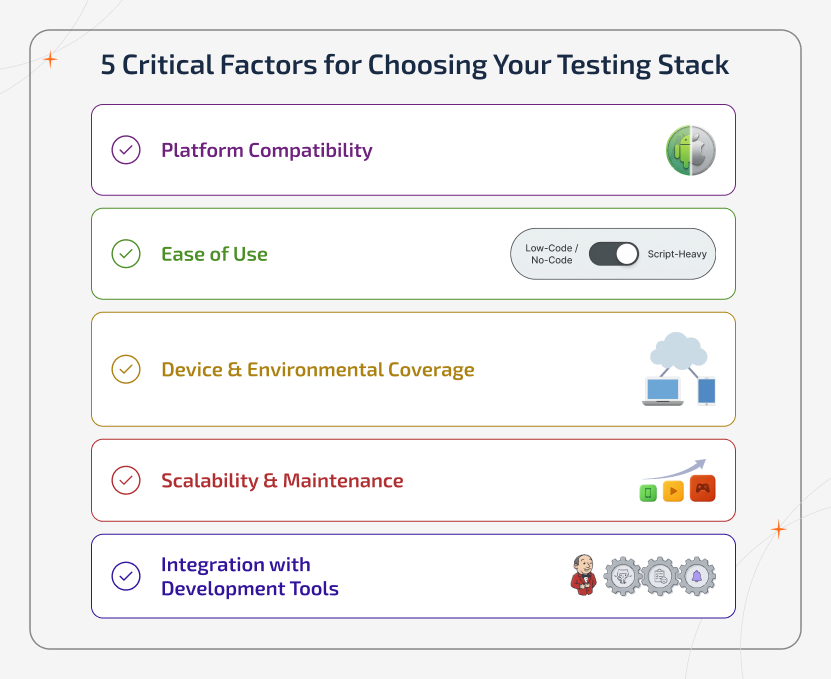
Even though the best mobile app automation tools and frameworks are listed, picking the suitable one can be quite challenging. With so many options available, the best approach is to evaluate the tools and frameworks based on your project needs and long-term scalability. Here are some of the important aspects to consider before selecting one.
Platform Compatibility
The primary thing to check out is whether the tool supports the platform that you're targeting. If the app runs on both Android and iOS, selecting a cross-platform framework like Appium can save time and effort because you can internally run the same tests across multiple platforms.
Ease of Use
As you know, some testing frameworks require intense programming knowledge, while others need only low-code. If your development team includes non-technical testers, then pick the tool that provides natural language testing and visual interfaces. Because it can make the automation much easier to adopt.
Device & Environmental Coverage
Mobile users access applications from various devices, OS, and screen sizes. The tools and framework you're about to choose must allow you to test on real devices and emulators to ensure that the app performs consistently for all users.
Scalability & Maintenance
You need to think futuristic. When your application expands, the testing framework should be able to scale with it. So, look for tools that support parallel testing, reusable test scripts, and reliable maintenance. This ensures that your testing process remains efficient even if the app becomes complex.
Integration with Development Tools
A good testing tool must integrate smoothly with your existing development workflow. Support for CI/CD platforms like Jenkins allows teams to automate testing during each build. This helps in detecting issues much earlier in the development cycle.
Best Practices for Mobile Application Testing
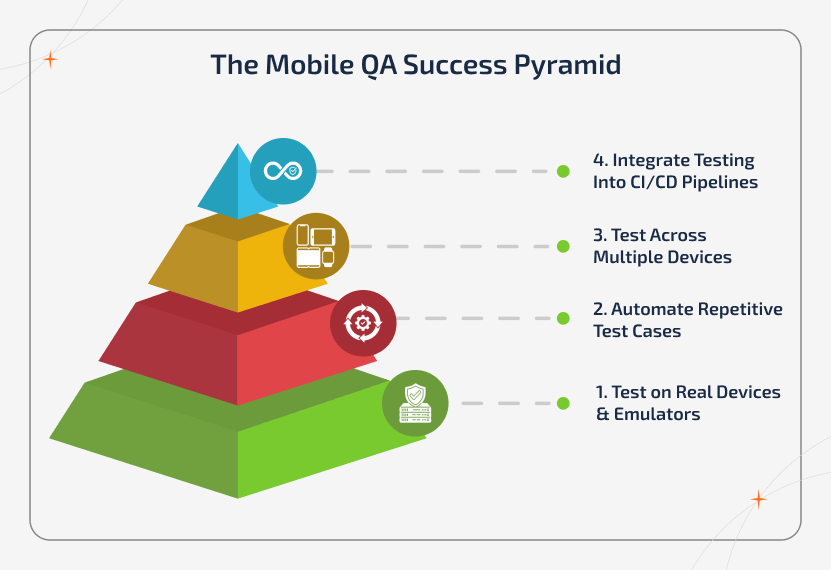
Selecting the right mobile application tools is only the initial step of the process. To ensure the app's performance across devices, teams must follow proven testing practices throughout the development lifecycle.
Test on Real Devices & Emulators
While the emulators and simulators are useful during the early testing stages, they cannot fully replicate the real-world conditions. Only testing it on real devices helps you identify issues related to performance, network conditions, battery usage, and hardware capability.
Automate Repetitive Test Cases
Even though manual testing is important, relying on it thoroughly can slow down your development cycle. Automating repetitive test cases using tools and frameworks like Appium or Espresso can significantly speed things up while maintaining accuracy.
Test Across Multiple Devices
Mobile users operate on different devices, operating systems, and screen sizes. So to ensure a consistent user experience, it is essential to test your mobile application across a wide range of devices running on different platforms like iOS and Android.
Integrate Testing Into CI/CD Pipelines
Integrating testing into CI/CD pipelines will help teams to detect issues at early stages in the development process. By connecting the testing tools with platforms like GitHub Actions and Jenkins, you can automate test execution whenever the new code change.
Keep Test Scripts Maintainable
As the current application evolves, test scripts also need to be updated. Writing modular and reusable test scripts will make maintenance much easier and prevent testing workflows from becoming more complex.
Recommended Picks for Android & iOS Apps
If you've come this far, then you might have realized that there's a lot to choose from when it comes to finding mobile application testing tools for your project. But, if you want to run optimized tests for your applications, you can use tools specifically designed to work with the device or platform you're building for. These tools are good choices:
- Selendroid
- Appium
- TestGrid
When it comes to testing automations on iOS, you have a bit more control because you're only testing for a few devices. However, you may still want to pick a tool that works great with iOS devices. For this, you can consider adding these mobile application testing tools to your workflow:
- Frank
- Kobiton
- ACCELQ
Criteria for Selecting a Mobile App Test Automation Frameworks
We've covered the Top 15 Automated Mobile App Testing Tools in 2026. However, you still might not be sure which app suits your project. Lists and recommendations can take you some distance, but what you really need is a checklist or criteria you can use to make the decision. You should ask yourself a few questions, and the answers to those questions will help you pick the right tool for your project.
So, here are 10 things you should consider before choosing mobile application testing tools.
- What devices and operating systems have I built my mobile app for?
- What kind of application have I built?
- Am I comfortable with coding throughout the process, or do I need a codeless solution?
- Can I use the tool with the CI/CD system I am currently using for my project?
- Can I learn the tool quickly so that I can use it in my project?
- Is there good support from the community and documentation available for the tool?
- Is the tool scalable enough to be used in the future for my project?
- Does the tool provide me with AI and ML tools to make my testing process easier?
- How much does the tool cost, and is it worth it for my project?
- Will I be able to see detailed analytics and properly do reporting?
Winding Up
We hope that this blog was helpful for you in choosing the right test automation tool for your mobile app project. Keep this in your mind: the concept of the best test automation tool does not exist. The automation tool you choose should depend on what kind of app you're building and what makes sense for your project. Only you understand that. However, you now have the right information to make that choice.
If you found this a good read, make sure you share it with someone who needs this information. If you're a founder and don't want to mess with mobile application testing tools or daily code, you can book a call with one of our consultants and get started hands-free.