


In the ever evolving realm of mobile app development, User Interface and User Experience design play a decisive role in an app's success. Creating a visually appealing and intuitive design is no longer optional but essential for delivering meaningful user value. The focus of mobile app development has shifted from merely building functional products to crafting engaging and emotionally satisfying user experiences.
UI and UX design have transformed how users interact with mobile applications, making them more intuitive, engaging, and memorable. As a result, developers increasingly collaborate with experienced designers to ensure applications not only function well but also look and feel distinct. This article explores the importance of UI UX design for mobile apps, their impact on user engagement, and best practices developers should follow to build competitive, user-centric applications.
What is UI/UX Design?
User Experience (UX) design is concerned with how user- friendly, useful, and effective your application design is. This is present in highly interactive, user-friendly applications. UX is influenced by a variety of factors, including usability, credibility, and accessibility.
User Interface (UI) design is concerned with how visually appealing our apps are. It is mostly concerned with graphic design and user interface design. Simply by making our application look beneficial, the UI design approach improves a person's impression of it.
In simple terms, UI shapes how exactly the app should look and respond. Whereas, UX defines how smoothly users move through the app and achieve their goals.
UI vs UX Scope in Mobile App Design
Even though User Interface and User Experience used together, they actually cover different parts of the mobile app design. Here's the scope for UI UX design for mobile apps.
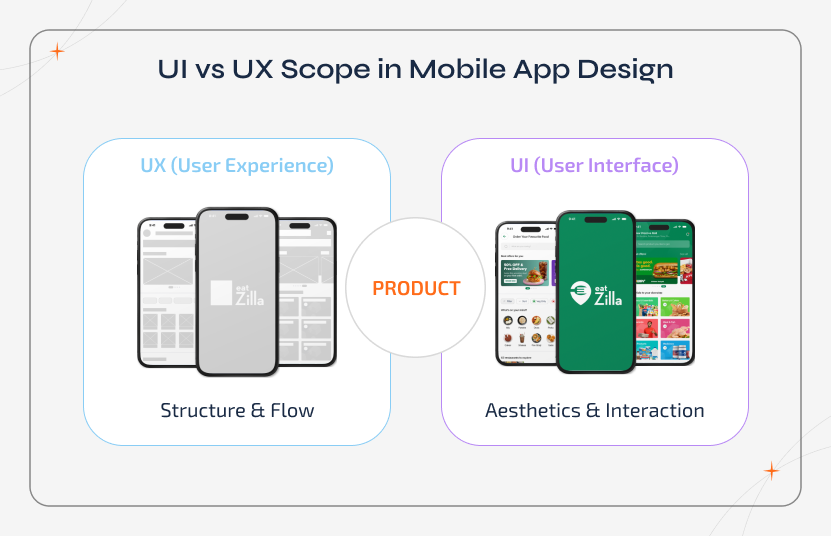
UI in mobile apps covers the following areas:
- Visual hierarchy and screen layouts
- Colours, typography, and brand styling
- Buttons, icons, and interactive elements
- Motion design and micro-animations
- Haptid feedback
- Visual states (hover, active, and disabled)
UX in mobile apps covers the following areas:
- App navigation and screen flow
- User journeys
- In-app and content clarity
- Error handling and empty states
- User feedback
- Ease, speed, and logic of task completion
Treating them as separate but connected scopes helps teams plan and design accurately and avoid costly redesigns during full-scale development.
How Mobile UI/UX Differs from Desktop
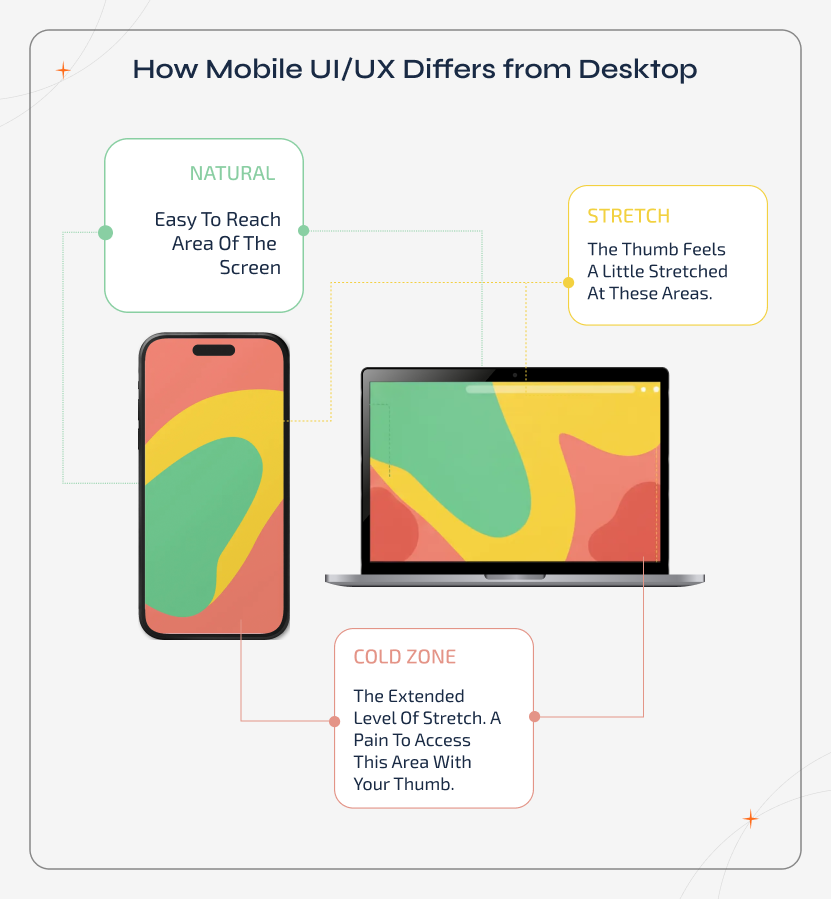
Designing for mobile apps is not about shrinking a desktop interface. Mobile UI UX have unique challenges compared to desktop that directly affect how users see, interact, and complete tasks in your app. Understanding these key differences is the key to crafting exceptional mobile experiences.
| Aspect | Desktop UI UX | Mobile UI UX | Tips for Mobile Designing |
|---|---|---|---|
| Input Method | Mouse and keyboard | Touch | Make the buttons bigger and avoid hover-only interactions |
| Gestures | Hover and clicks | Swipe, pull-to-refresh, and long-press | Ensure to use discoverable gestures and reinforce with visual cues |
| Screen Orientation | Fixed (mostly) | Portrait and landscape | Maintain visual consistency so that the layouts can adapt fluently |
| One-hand Use | Rere concern | Common | Ensure to place the primary actions within thumb reach |
| Screen Size | Large and has plenty of space | Small and has limited space | Prioritize key content and simplify the interface |
| Environment | Stable and focused | On-the-go and distractions | Use high contrast and readable fonts |
| Multitasking | Less frequent | Frequent app switching | Make the interface recoverable and clear |
| Icons & Symbols | Can rely on text | Should be clear and consistent | Use recognizable icons and reinforce with labels when needed |
The Significance of UI/UX Design for Mobile Apps in the Development Process
The following are the reasons why UI/UX is vital in the Mobile application development process:
Seamless User Experience
When interacting with the application, an
effective UI UX design for mobile apps will ensure that users are not frustrated by slow- loading
windows or unclear layouts.
Customers must believe that the app helps them when they interact with it, whether it delivers a service such as food delivery or entertainment. If they are unsure whether the app will be quick enough for their needs or if they are unable to figure out how to use it, they will delete it within a few days.
A well-designed user interface will also contribute to the app's usability. Your app will be better organized, with a clean layout that is intended to keep users engaged. You can conclude already conclude why UX design for mobile developers is crucial.
Building Customer Trust
If the application development requires users to
entrust you with personal information, the user experience design becomes even more critical.
Customers are inclined to trust an application that appears professional and has smooth and perfect
user interaction.
Consider this:
if we are using a banking
application that frequently crashes, we will be less likely to share our personal information, such
as bank account information, with it. With bad mobile interface design and development, it would
appear unprofessional. This is why following the best practices for UX UI design and development for
mobile apps is crucial.
Greater Exposure
Excellent user interaction and a fantastic application
design are two ways to maximize our application's visibility. This will attract more users and raise
your profile through UI UX app development.
Attract Users
A good UI/UX for mobile apps attract users and keeps them
on the app for as long as possible. Because the elegance of what they see will psychologically
impress them more. When users visit your application, they should be immediately hooked so that they
return for more.
A good application has a longer usage period, which may be achieved through the UI UX design of mobile apps. As a result, good design is always a valuable asset for an application.
Long-term Time & Cost Savings
Ensure that by working with an
understanding of the mobile app's best UI/UX practices from the start, there will be less need for
app maintenance and updates. Furthermore, as those two things are
avoided, the issues faced following the application's debut will be reduced.
Building a Brand
Investing in a productive UI/UX design increases
consumer satisfaction, which results in happy consumers. People are drawn to brands that bring them
joy. They will be eager to adopt features that can be improved and invest resources in improving
your application.
As a customer develops positive associations with your company and brand, your company's credibility will grow. The major result of this is an increase in the value of your company and brand identity.
Enhanced Traffic
An excellent UI UX design for mobile apps continually
keeps users engaged. Nothing can stop them from researching the predetermined target and converting
users into valuable consumers if your website is magnificently created and the client experience is
astounding.
As a result, it is the responsibility of the UI/UX developers to ensure that your site or application has the best UI/UX possible.
A Structured Process for Mobile UI UX Excellence
Creating an exceptional mobile application experience requires a structured UI UX process. By following clear steps, you can ensure intuitive navigation and visually consistent screens that meet real user needs.
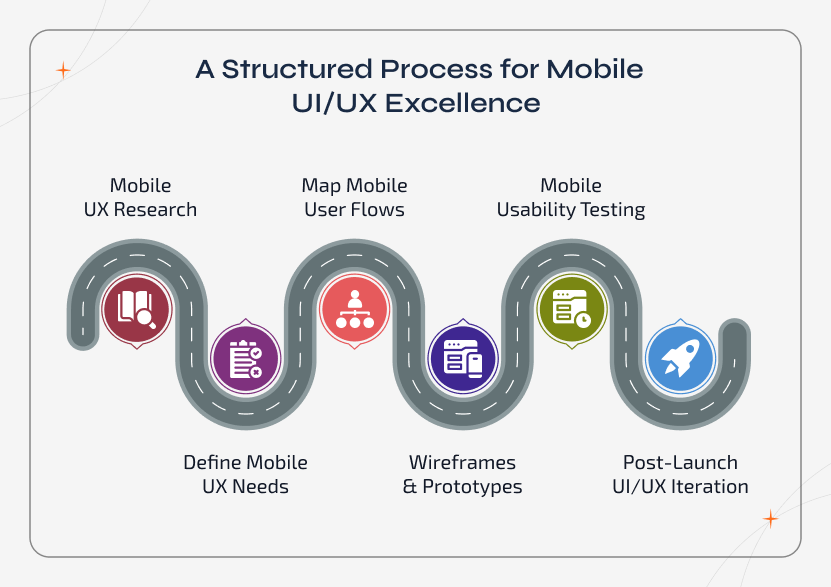
Step 1: Mobile UX Research
Initially, use surveys, interviews, and
competitor app reviews and have a clear understanding on user goals, pain points, and behaviour on
mobile devices. Do focus on screen size limitations, gestures, and context-specific interactions.
Step 2: Define Mobile UX Needs
Develop personas and statements
highlighting the mobile-specific needs, such as one-hand use, short sessions, and common task flows.
This clarifies which features and interactions are very important.
Step 3: Map Mobile User Flows
Ensure to organize navigation paths, so
users can complete their tasks quickly. So plan for logical progression, thumb reach zones, and
easy-to-digest content on small screens.
Step 4: Wireframes & Prototypes
Kick things off with simple wireframes to
map out the app's layout. Following that, build clickable prototypes so you can actually test how
everything feels. Make sure that interactions like swipe, tap, and pull-to-refresh feel intuitive.
Step 5: Mobile Usability Testing
Further, observe the real users who are
performing tasks on actual devices. Inspect the targets, icon clarity, and gesture discoverability
to pinpoint the potential flaws.
Step 6: Post-Launch UI/UX Iteration
Ensure to
collect analytics and session replay insights. Continuously refine the layouts, interactions, and
feedback mechanisms to improve retention and the overall mobile app experience.
Best Practices for Designing High-Quality Mobile UI/UX
Here's the practical breakdown of UI UX design for mobile apps that shape smooth and intuitive mobile app experiences. The following mobile design best practices help you reduce friction and improve user satisfaction.
Make Use of Conventional Aspects
Users will save time by using familiar
elements in the mobile user interface design. They can learn the app quickly and without getting
confused. Elements such as buttons, icons, colours, and symbols should be designed similarly to how
they are in most apps. The faster users learn how to use the app, the more likely they are to like
it.
Maintain Consistency
It is critical that the design be consistent across
all of the windows. The consistency in UI/UX app design reflects the high level of effort invested
in crafting the mobile app. This uniformity extends beyond just icons and buttons; it encompasses
maintaining consistency in colours and patterns across all media and elements.
Select the Best UI & UX Designer
Working with experts is highly suggested
if you are focusing on the mobile app user interface design and experience. You may also outsource
app development for your app to a reputable app development company to ensure that the UI UX design
for mobile apps is flawless. The UI/UX designers must comprehend all aspects of end-to-end user
interaction and incorporate them into the app.
Make it as Engaging as Possible
It is a fact that an interactive app is
superior to a non-interactive one. This allows consumers to interact with the app and establishes a
relationship between them. Users can travel via different windows when using interactive apps.
Don't Slow Down Performance
The mobile app's speed is just as vital as
its design. Startups frequently make this error, believing that the app's design is all that is
required to attract users. However, the mobile app's functionality is equally crucial. The mobile UI
design must be fast and have a solid mobile application.
Keep it Simple
There is no need to overdo things if a feature can be
implemented simply. Users will appreciate the app's general simplicity as well as its ease of use.
Complicated designs render app users confused or enraged, neither of which we want. It has also been
found that apps with basic designs have more users than those with complex designs.
Maintain a Narrow Focus
Often, the UI/UX development
process focuses on so many elements at once that the overall user experience suffers. If there is
too much going on the screen, the user will be unable to focus on the app's content. Another
approach to quickly losing users is to overcrowd the screen with stuff.
The Essential Components of Effective UI/UX Design for Mobile Apps
Consider the following critical components to make the most of UI/UX design in mobile app development:
Consistency
- Ensure that the UI UX design for mobile apps, including fonts, colours, and button styles, is consistent throughout.
- Consistency allows users to explore and interact with the app more easily, resulting in a more satisfying experience.
Intuitive Navigation
- Create an app with simple navigation that allows users to quickly locate what they're looking for.
- To make it user-friendly, employ established mobile app design principles and clear labels.
Adaptability & Responsiveness
- Create an app that performs well on a variety of devices and screen sizes.
- Ascertain that your app is usable and accessible to people with disabilities or limited technological skills.
Interaction & Feedback
- When users engage with the app, provide explicit feedback, such as visual cues or audio.
- This makes the experience more immersive and helps consumers grasp the consequences of their choices.
User Evaluation
- Conduct regular user testing to get useful feedback and insights regarding the usability and app design.
- Make the required adjustments and enhancements based on this feedback to improve the overall user experience.
A Proven UI UX Framework for Crafting Exceptional Mobile App Experiences
By using a structured framework, businesses can ensure that UI UX design for mobile apps decision are intentional rather than subjective. For mobile applications, merging the recognized UX model with clear UI principles creates an experience that feels both functional and polished.

UX Framework: Peter Morville's UX Honeycomb
This specific framework
defines six core qualities that shape a strong user experience in mobile applications:
- Useful: The specific app addresses a real user need and delivers a clear value.
- Usable: Interactions, navigation, and gestures are intuitive and efficient.
- Desirable: The user experience feels engaging through time, motion, and visual appeal.
- Findable: Features, actions, and information are easy to locate within the specific application.
- Accessible: The application supports various abilities, screen sizes, and usage conditions.
- Credible: The mobile design consistency and feedback build user trust.
Core UI Quality Framework for Mobile Apps
Unlike UX, the UI quality is
judged by visual clarity, consistency, and interaction feedback. A robust UI framework ensures that
the mobile app interface supports usability while maintaining visual appeal across devices.
- Clarity: The interface elements are very easy to recognize and understand quickly.
- Consistency: Icons, colours, and typography follow a unified system.
- Hierarchy: Visual weight guides users to important content and primary actions.
- Responsiveness: Layouts adapt smoothly across the screen sizes and orientations.
- Feedback: Visual, motion, and haptic responses confirm user actions.
- Aesthetic Integrity: Visual design aligns with brand identity without sacrificing usability.
Moreover, for a clear and user-friendly UI, use 44*44 px tap targets, proper spacing to prevent mis-taps, context-aware keyboards, high contrast for outdoor readability, and micro-interactions that give clear feedback.
Platform-Specific UI UX Design for Mobile Apps Considerations
Designing mobile applications requires respecting platform-specific patterns. Considering iOS and Android guidelines helps maintain familiarity while deciding where customization adds value without disturbing the usability.
iOS Design Consideration
Apple's Human Interface Guidelines encourage
simplicity, clarity, and system-native behaviours. By following the default pattern, gesture and
control, you can control the learning effort and ensure consistency with other iOS applications.
Android Design Consideration
With Material Design guidelines for Android
it emphasizes structure, hierarchy, and meaningful motion. Using the layout principles, spacing
logic, and feedback patterns helps Android apps feel more responsive and visually consistent across
devices.
Using mobile app design guidelines as a foundation and customizing only where it actually adds real value, you can carry out meaningful UI UX mobile app design that feels intuitive rather than unfamiliar.
Real-Time Examples That Demonstrate Why Mobile App Design Matters
Mobile app design directly influences how easily users carry out tasks and whether they continue using the app or not. By looking at the following real-time examples, you can have a clear idea of how exactly the UI UX design and development for mobile apps impact usability and user behaviour.
Navigation Example
A food delivery app places Home, Search, Profile, and
Cart icons in the bottom tab. So that users can access them frequently, while they can navigate to
Settings and other operations inside a secondary menu.
Onboarding Example
After installing and setting up a fitness app, users
can start tracking workouts immediately and ask only for age and weight after the first session.
This reduces drop-offs and makes the onboarding feel lighter.
Forms & Checkout Example
A mobile checkout screen auto-fills address
details and shows errors instantly when a card number is invalid. This removes the optional fields
to speed up the completion.
Error State Example
If any payment fails, the app
explains the exact reason (Network Issue or Incorrect PIN) and offers actions like "Retry" or
"Change Payment Method" instead of a generic error message that often pops up on mobile.
The Future of UI/UX Design for Mobile App Development
The role of UI/UX design in mobile app development will expand as technology advances. Here are a few trends that you should be monitoring:
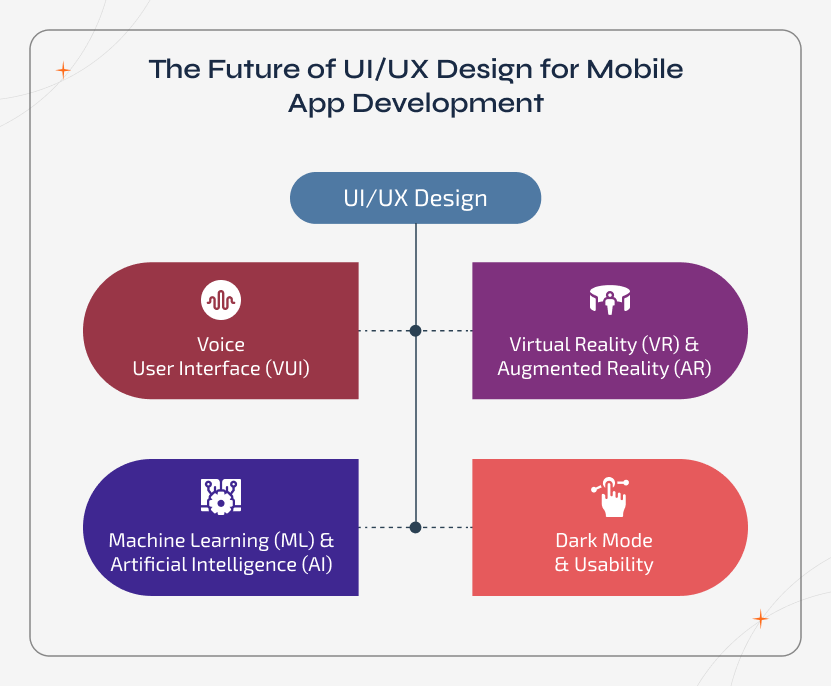
Voice User Interface (VUI)
With the rise of voice-activated devices,
mobile apps will need to include voice user interfaces to provide a smoother and hands-free
experience. To support voice interactions, designers will need to rethink established UI/UX design
ideas.
Virtual Reality (VR) & Augmented Reality (AR)
As AR and VR technologies
become more common, UI UX design of mobile apps will need to evolve in order to provide consumers
with immersive experiences. A mobile UX Designer will need to think about things like spatial
awareness, depth perception, and gesture controls.
Machine Learning (ML) & Artificial Intelligence (AI)
AI and ML integration in mobile app development will result in more
personalized and adaptive user experiences. To generate designs that can adapt to particular user
preferences and behaviours, UI/UX designers will need to engage with data scientists and engineers.
Dark Mode & Usability
The popularity of dark mode,
as well as the growing emphasis on accessibility, will continue to influence
UI/UX design trends. To accommodate a larger range of users, designers will need to consider
colour contrast, font sizing, and other accessibility features.
Wrapping Up
We may conclude from the above points how crucial a strong UI/UX design is for the development of an effective mobile application. The value of the software is increased by incorporating a strong user experience design with an attractive UI design for mobile apps and graphics. This factor significantly influences their choice of our app over competing options.
Are you considering enlisting the services of a skilled UI/UX development company? If yes, then connect with us for mobile app development and user experience design.
Build Better Mobile UI UX Experiences Today
Create intuitive mobile app designs with Sparkout that users find easy and natural to use.